

› UKTH forums › 🛜 Wireless Routers & Modems › ASUS & Wireless › ASUS – DSL-AC88U / DSL-AC3100 Firmwares (beta's) etc. Looks like a new Beta Release for the DSL-AC88U is available, this version has Telnet enabled and improved 2.4GHz wifi (I believe). DSL-AC88U_v9.10.06_build581_debug.w.zip https://www.asuswebstorage.com/navigate/s/604D61534F2541D1B3CE1CC031A697E4Y UK Sentinel In a completely...
- This topic has 1,435 replies, 105 voices, and was last updated 1 year, 9 months ago by
 UK Sentinel.

- AuthorPosts
- January 16, 2019 at 6:59 pm #1994
Does anyone else have problem with port forwarding and FTP service ? When i activate FTP service from ASUS port forwarding tab, i can have access to my files but after some short period of time it denies access from the remote smartphone… i have tried the opposite to open 21 port from Synology NAS through upnp and it gives me access for sometime and it denies access later… when i had DSL -AC68 i had service properly, that’s why i suspect DSL-AC88U.
Which Firmware are you currently running?
In a completely sane world, madness is the only freedom (J.G.Ballard).
You need to login in order to vote
January 16, 2019 at 9:15 pm #2000January 16, 2019 at 9:33 pm #2001I’m running firmware version: v1.10.06 build591
Perfect. apart from your remote smartphone, have you tried another device, and is result the same, I am sure you are correct, issue with Router, but worth checking with another device if pos?
I can then check with ASUS to see I they are aware of same issues?
Is AiProtection ON or OFF?
In a completely sane world, madness is the only freedom (J.G.Ballard).
You need to login in order to vote
January 16, 2019 at 9:51 pm #2002Hi
I’d not set up Port Forwarding on the DSL-AC88U to my Sunology for fear of it breaking
I tried after seeing the last thread and it didn’t seem to be working, so tried a reboot.You’ve guessed it, now no devices on my LAN1 & 4 ports apart from my PC on LAN3 are getting an IP ADD again, this is despite me now only having 3x static IP ADD’s configured. All WiFi devices are still connected.
So the port forward doesn’t work anyway as the Synology now has no network connectivityThe logs are wrapped after a reboot with devices rejoining, so I have no idea what is causing this
I am unsure if the debug FW could help me diagnose issues
I am regretting buying this router as the software it utter nonsense
You need to login in order to vote
January 16, 2019 at 10:01 pm #2003I have tried remotely from a desktop pc and a laptop, with the same result… it doesn’t respond. From my smartphone says connection refused (not failed).
When i press apply to the port forwarding rules it give me access for some time and then it denies again… also when i reboot AC88U it works fine for some time.
Firewall is disabled and AiProtection too.
I tried also from Synology NAS to open ports through upnp (and disable Asus native FTP service as they say to avoid conflict) by custom port rule and i have the same result, they have also a compability list that NAS cooporate with but AC88U isn’t… they support automatic rules since AC68U, i send them a report which router i use so to support it on a future firmware.You need to login in order to vote
January 17, 2019 at 12:04 pm #2005@geodia – I have spoken with ASUS and they wish to understand which client you was using on your Mobile / Desktop etc.
Also, if pos, I will PM you as ASUS would like a copy of your backup.cfg for refence and I will PM you to get file to pass to ASUS.
In a completely sane world, madness is the only freedom (J.G.Ballard).
You need to login in order to vote
January 17, 2019 at 3:37 pm #2006I’m using X-Plore for Android to Access my FTP service through smartphone, from laptop and Desktop i use only Firefox (built-in support) to download from FTP service and not any specific FTP client program.
The same programs and exactly the same things i was using and before with the AC68U, with no problems!!!
Yes of course, i don’t have any problem but which settings do you want to use ??
By trying to use Native FTP service from the router to open 21 port or by trying through upnp from Synology NAS ?? (I have send them also before 3 days a feedback inside AC88U but they didn’t answer me).You need to login in order to vote
January 17, 2019 at 3:55 pm #2008I’m using X-Plore for Android to Access my FTP service through smartphone, from laptop and Desktop i use only Firefox (built-in support) to download from FTP service and not any specific FTP client program. The same programs and exactly the same things i was using and before with the AC68U, with no problems!!! Yes of course, i don’t have any problem but which settings do you want to use ?? By trying to use Native FTP service from the router to open 21 port or by trying through upnp from Synology NAS ?? (I have send them also before 3 days a feedback inside AC88U but they didn’t answer me).
The Native FTP service via the router would be ideal, I have sent you a PM/Email today? just perform a backup of the router via Administration – Restore/Save/Upload Setting
Ta ;-)
In a completely sane world, madness is the only freedom (J.G.Ballard).
You need to login in order to vote
January 18, 2019 at 8:03 am #2009Hi all guys, just bought and updated to the latest firmware 591 debug the ADSL-AC88U.
I have some doubts.
Is normal not it shown in the System Log when you log in to the webui and all of AiProtection’s actions ?
I need to be able to access the webui remotely, since I will only connect with a static IP address, to increase security I want to use the function “Allow only specified IP” but only accepts IP addresses of my LAN 192.168.1.XXX.You need to login in order to vote
January 18, 2019 at 9:03 am #2010For the AiProtection, this is not normally shown in the System Log, I have also double checked with my RT-AC86U, all my AiProtection activities, which are Time Stamped, are not shown in my System Log, I assume there is a filter set, not to show this sort of information, I have my DSL-AC88U also running 591 (debug) and this is the same.
Under Administration – System is the option for Remote Access Config, If WAN Access is Enabled on my RT-AC86U, I can enter BT Public Address OK, but if I do the same with the DSL-AC88U, then it does not accept those IP’s, it only like local IP Address, so I believe you have found a bug at least for the debug version,. ideally need somebody running non Debug version to verify if same limitation is evident.?
Edit: I have just flashed my DSL-AC88U with 591 (non debug) firmware and still I cannot apply a non 192.168.1.xx IP address, so bug it is looking like ?
In a completely sane world, madness is the only freedom (J.G.Ballard).
You need to login in order to vote
January 18, 2019 at 8:44 pm #2011Hi all,
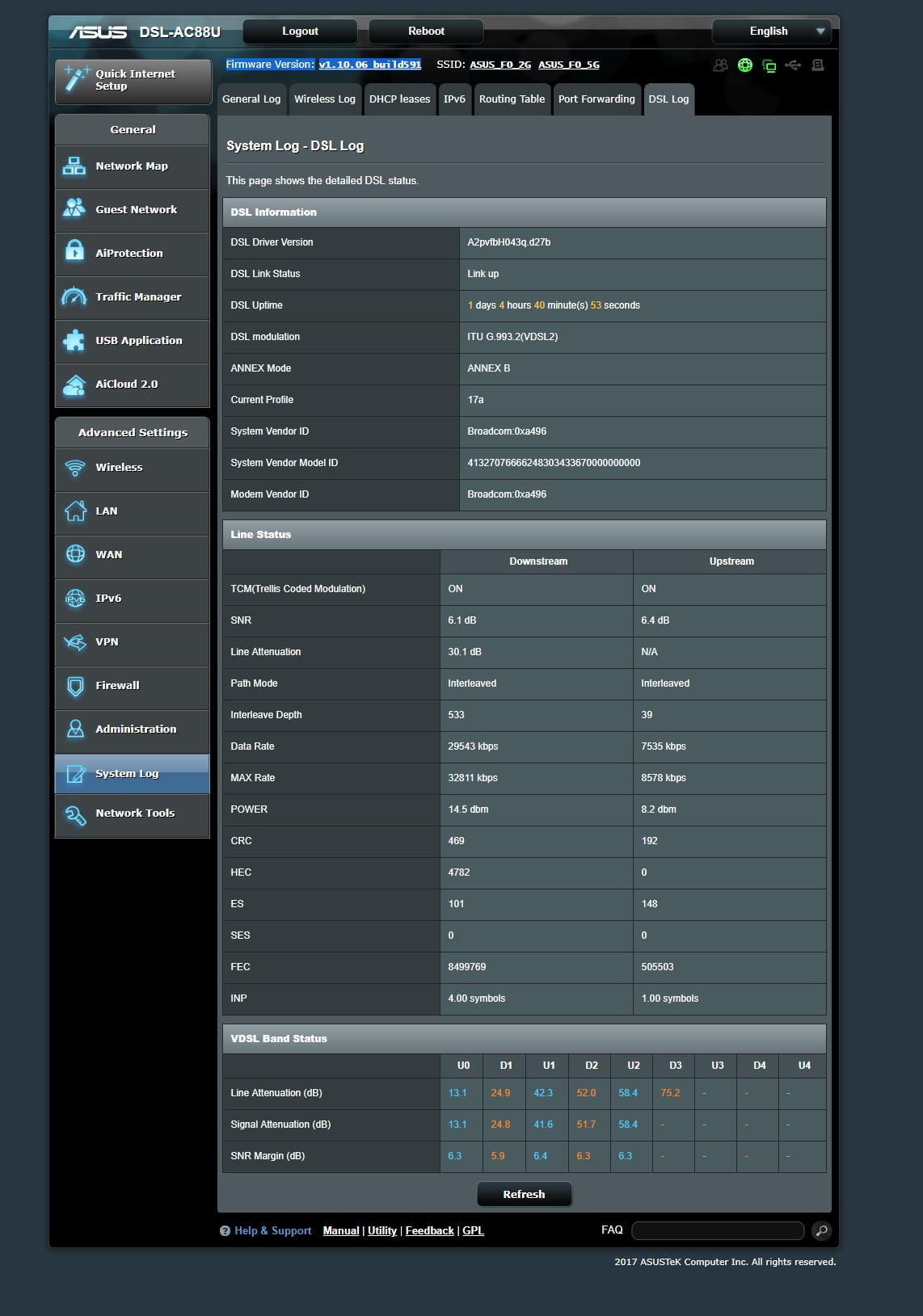
I have problem with my ASUS DSL AC88U my Line Attenuation is 30.1 db and my Data Rate
29543 kbps and SNR 6.0 db on my old DLINK 2888A my Line Attenuation was 16 db and my speed was 59 Mbps and max speed is 75Mbps and SNR 15.9db and if i reconnect DLINK i got this high speed again and if i use ASUS DSL AC88U it get slow after 2 or 3 days but DLINK keep the speed high is this firmware issue or ??thanks
You need to login in order to vote
January 18, 2019 at 8:48 pm #2012I would strongly advise against exposing any router login page directly to the WAN. It’s just crying out to get hacked. Instead enable a secure open vpn service and connect to the router via that which will then allow management without exposing it to being hacked. Remember this is a consumer grade device, I doubt its Web interface is free from vulnerabilities.
You need to login in order to vote
January 18, 2019 at 9:41 pm #2015Hi all, I have problem with my ASUS DSL AC88U my Line Attenuation is 30.1 db and my Data Rate 29543 kbps and SNR 6.0 db on my old DLINK 2888A my Line Attenuation was 16 db and my speed was 59 Mbps and max speed is 75Mbps and SNR 15.9db and if i reconnect DLINK i got this high speed again and if i use ASUS DSL AC88U it get slow after 2 or 3 days but DLINK keep the speed high is this firmware issue or ?? thanks
Which firmware are you currently running, this does not sound normal, if possible, try to get a screen dump of System Log / DSL Log page so we can all have a look?
In a completely sane world, madness is the only freedom (J.G.Ballard).
You need to login in order to vote
January 18, 2019 at 10:06 pm #2016Which firmware are you currently running, this does not sound normal, if possible, try to get a screen dump of System Log / DSL Log page so we can all have a look?
Firmware Version:v1.10.06 build591
Attachments:
You need to login in order to vote
January 18, 2019 at 10:16 pm #2018You are totally correct, you speed is half what is should be, can we have a copy of your DSL Settings page as I am sure there is an option not set correctly (I hope) ?
I am unsure, do you have G.INP in your part of the world?
In a completely sane world, madness is the only freedom (J.G.Ballard).
You need to login in order to vote
- AuthorPosts


- You must be logged in to reply to this topic.