

› UKTH forums › 🛜 Wireless Routers & Modems › ASUS & Wireless › ASUS – DSL-AC88U / DSL-AC3100 Firmwares (beta's) etc. Looks like a new Beta Release for the DSL-AC88U is available, this version has Telnet enabled and improved 2.4GHz wifi (I believe). DSL-AC88U_v9.10.06_build581_debug.w.zip https://www.asuswebstorage.com/navigate/s/604D61534F2541D1B3CE1CC031A697E4Y UK Sentinel In a completely...
- This topic has 1,438 replies, 106 voices, and was last updated 4 months, 1 week ago by
 alt.james.

-
AuthorPosts
-
August 24, 2019 at 12:05 pm #3923
;-) ;-) ;-)
just what I said or expected.
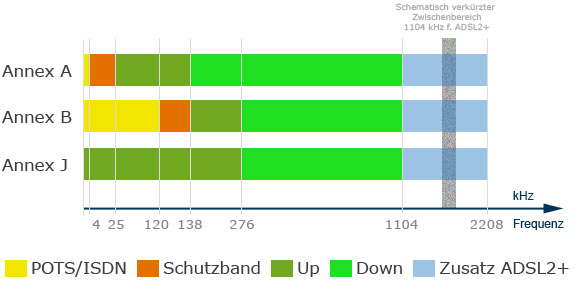
You should see about 1Mb/s more speed using Annex_A, but thats marginal on >40Mb lines and probably not able to observe.
Annex_J uses even POTS spectrum for DSL, here a nice pic.
You need to login in order to vote
August 24, 2019 at 12:10 pm #3925Yes, my line to slow to notice 1Mb difference but just confirming Annex A and B work the same for UK with Fritz!Box (as you said) ;-)
In a completely sane world, madness is the only freedom (J.G.Ballard).
You need to login in order to vote
August 24, 2019 at 12:14 pm #3928PPOE connection in my ASUS DSL AC-88U is set to auto, so settings are taken from network. Also it doesn’t really matter on FTTC as long as profile is set correctly (17A on mine) which define bandwidth.
Think which is really interesting is that when you type in this command in telnet : bcm_xdslctl profile –show
you will get nice output what may be in use by DLM. In my case SRA was “Off” on interleave even that in DSL settings in router was on, on fast patch is “On”
/ # bcm_xdslctl profile –show
Modulations:
G.Dmt Enabled
G.lite Enabled
T1.413 Enabled
ADSL2 Enabled
AnnexL Enabled
ADSL2+ Enabled
AnnexM Enabled
VDSL2 Enabled
Gfast Disabled
VDSL2 profiles:
8a Enabled
8b Enabled
8c Enabled
8d Enabled
12a Enabled
12b Enabled
17a Enabled
30a Disabled
US0 Enabled
Phone line pair:
Inner pair
Capability:
bitswap On
sra On
trellis On
sesdrop Off
CoMinMgn Off
24k On
phyReXmt(Us/Ds) Off/On
Ginp(Us/Ds) On/On
TpsTc AvPvAa
monitorTone: On
dynamicD: On
dynamicF: Off
SOS: On
Training Margin(Q4 in dB): -1(DEFAULT)
PHY TYPE CFG:
PHY switch Enabled
Bootup PHY Non GfastMaybe little clue what else is “on” :P
You need to login in order to vote
August 24, 2019 at 12:23 pm #3932Fastpatch is Actually FastPath if I understand you correctly.
Having Telnet access is so so useful for this type of work and good to see G.fast is still disabled by default as they had problems in the early releases due to the switch clicking ;-)
In a completely sane world, madness is the only freedom (J.G.Ballard).
You need to login in order to vote
August 24, 2019 at 12:28 pm #3933G.Fast will be disabled as there is no G.Fast POD on my cabinet so there is no surprise here…
you will get nice output what may be in use by DLM. In my case SRA was “Off” on interleave even that in DSL settings in router was on, on fast patch is “On” (SRA)
You need to login in order to vote
August 24, 2019 at 12:49 pm #3934I am sure for Auto Negotiate, G.fast was turned off, so would be good to get this confirmed by others .
Fast Path it is – but call it what you like, I seem to ;-)
Edit: – Firmware Version 1.10.06_Build585 – Exclude G.fast capability in Auto-Sync mode for DSL modulation and removed some driver bits, for ADSL2+ compatibility.
But whether this means for G.fast being disabled, I will have to check next time my DSL-AC88U is back online as G.fast is enabled in my area
In a completely sane world, madness is the only freedom (J.G.Ballard).
You need to login in order to vote
August 24, 2019 at 7:38 pm #3945SRA is not fast patch, what I said that it was disabled when line was on interleave (should be on to help get line better stability) and then was turned on while line go on fast patch. SRA is kind of stability with dynamic line adjustment. I was suprised that it was on ECI cabinet because I read not much things is available on ECI, definitely SRA works on Huawei cabinets on all stages.
You need to login in order to vote
August 29, 2019 at 1:44 am #4045Hi, I have had the dsl ac88u for a while and it has been quite problematic, does anyone have the latest beta firmware? Thanks.
You need to login in order to vote
August 29, 2019 at 8:18 am #4046Hi, I have had the dsl ac88u for a while and it has been quite problematic, does anyone have the latest beta firmware? Thanks.
Alas, nothing new as a far as I recall after DSL-AC88U_v1.10.06_build591 – some users have found that going back to firmware 503 has proven more palatable.
If this does not work, let us know what your issues are as there are some work arounds for various (current) issues.
In a completely sane world, madness is the only freedom (J.G.Ballard).
You need to login in order to vote
August 30, 2019 at 3:14 pm #4077Well I am using build 591 and my wireless seems to drop constantly, that is not my main issue though because I am using TP-Link extenders with wifi disabled, my main concern is how slow it is when using the OpenVPN client (VyprVPN) I am only getting 17mb down and 1.65mb up, it also seems like the VPN connection drops randomly too.
Without VPN:
With VPN (Router):With VPN (Desktop application): Thanks.
You need to login in order to vote
August 30, 2019 at 3:33 pm #4079for wifi disconnects, try Wireless > Professional and Disable Airtime Fairness for the Wifi Band you have problems with
If problem persists, try Wireless > General > and set Group Key Rotation Interval to zero again for Wifi Band.
Then keep an eye on DSL Log time vs General Log time after you have rebooted router to see if actually DSL is dropping or issue maybe else where?
VPN we can hopefully check after the other issues looked at
In a completely sane world, madness is the only freedom (J.G.Ballard).
You need to login in order to vote
August 30, 2019 at 4:13 pm #4084I added a screenshot of speed through desktop client for comparison, I will try your suggestion for the wifi and post back after a little while thanks.
You need to login in order to vote
August 30, 2019 at 4:38 pm #4085That are standard VPN speeds for 68U, dont think DSL-AC88U is much faster.
You need to login in order to vote
August 30, 2019 at 4:46 pm #4086That are standard VPN speeds for 68U, dont think DSL-AC88U is much faster.
That can’t be right though?
Anyway I have connected a couple of devices to WiFI and will monitor uptime with Airtime Fairness off, if it disconnects I will try rotation on 0 and will report back with how it goes.
Laptop connected – 16:55:00
You need to login in order to vote
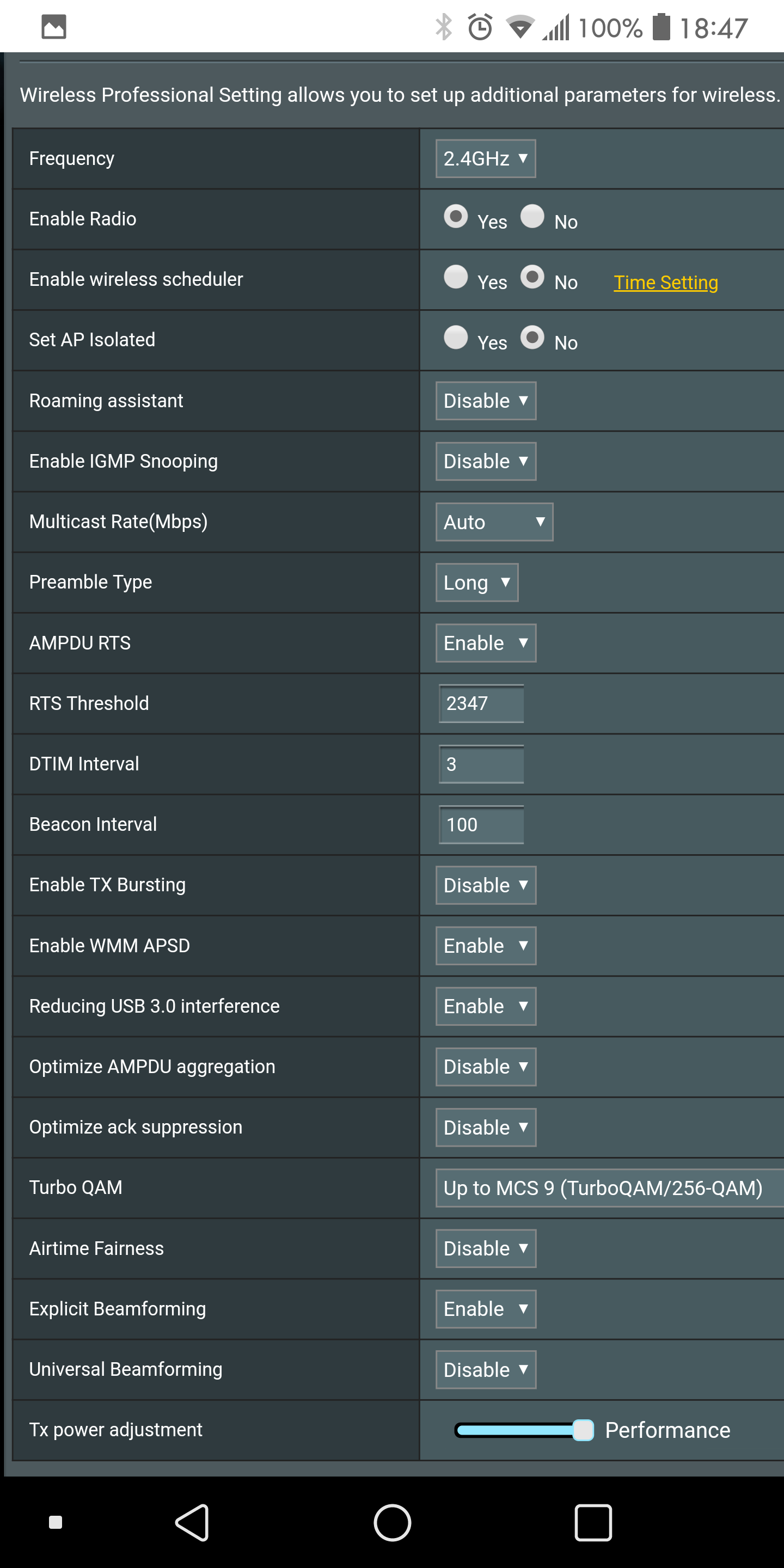
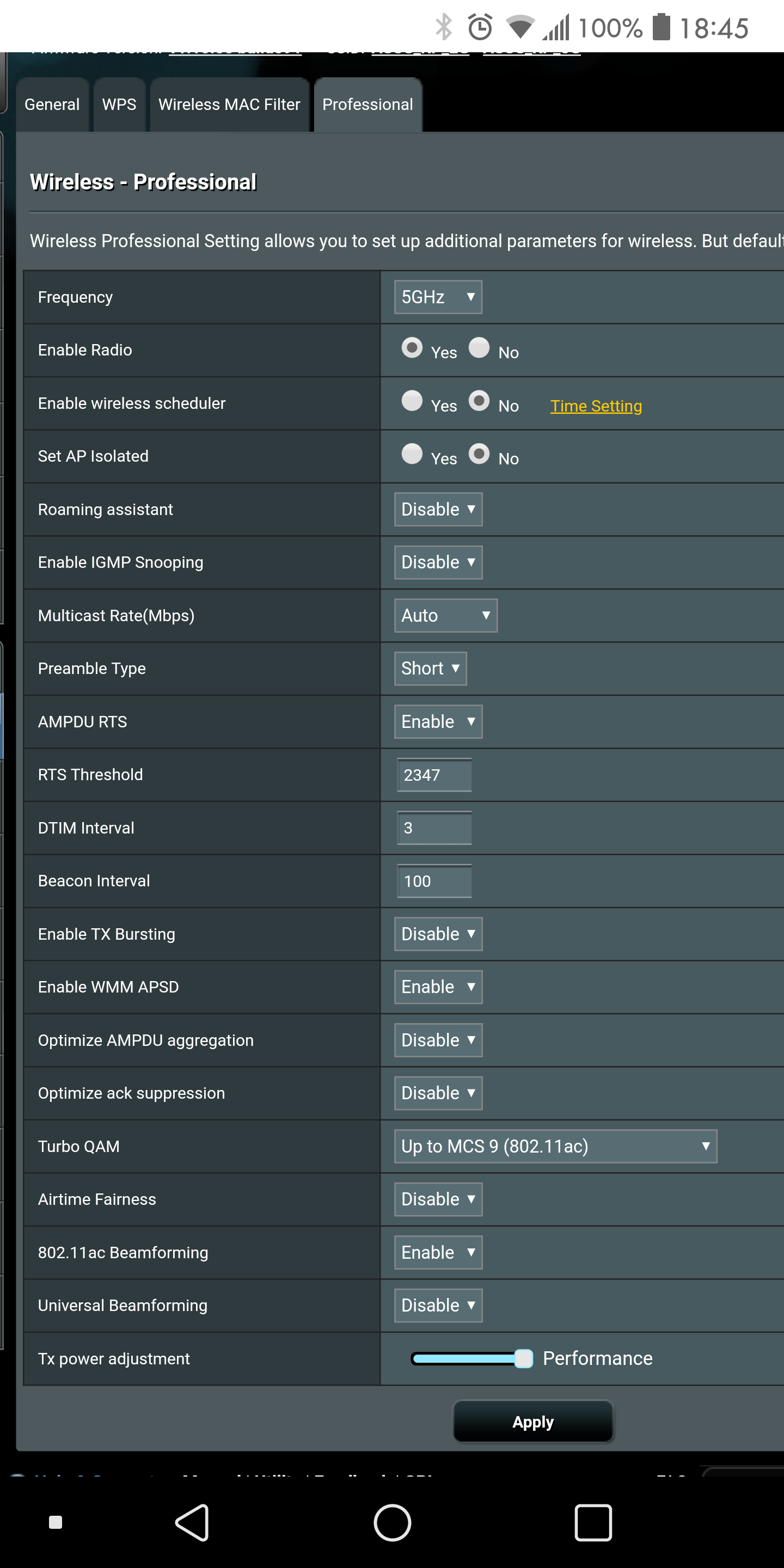
August 30, 2019 at 6:48 pm #4089I set on mine key rotation on 86400, I believe same value is for dhcp in lan settings. Most of great futures in AC-88U in wifi settings need to be disabled as they more cause problems than improvements..
Attached my settings for booth 2.4 and 5Ghz
Forgot to mention, I got roughly 10 devices connected to WiFi and no problems with these settings.
You need to login in order to vote
-
AuthorPosts




 With VPN (Desktop application):

- You must be logged in to reply to this topic.