

› UKTH forums › 🛜 Wireless Routers & Modems › ASUS & Wireless › ASUS – DSL-AC88U / DSL-AC3100 Firmwares (beta's) etc. Looks like a new Beta Release for the DSL-AC88U is available, this version has Telnet enabled and improved 2.4GHz wifi (I believe). DSL-AC88U_v9.10.06_build581_debug.w.zip https://www.asuswebstorage.com/navigate/s/604D61534F2541D1B3CE1CC031A697E4Y UK Sentinel
- This topic has 1,438 replies, 106 voices, and was last updated 6 months, 2 weeks ago by
 alt.james.

- AuthorPosts
- November 17, 2019 at 9:26 pm #5043November 17, 2019 at 9:30 pm #5047
[quote quote=5043]@UK Sentinel: you know my recomendation
[/quote] A pigeon …….. (AVM)Joking aside AVM Fritz!Box are great and very stable, but have limitations (IPTV) etc. DrayTeK is another good brand and UI is a tad unusual, but they are good routers also.
List of DSL Devices with corresponding chipset (not complete) but if you connect to ECI DSLAM/Exchange, then maybe look again at Lantiq (now Intel) as they may synch slightly lower but packet loss can be far less and the SNR is usually tweakable.
https://forum.kitz.co.uk/index.php/topic,14436.0.html
Edit: I forgot to say, maybe you should consider a separate modem and router, that way you can tailor your requirements to suit ?
You need to login in order to vote
November 21, 2019 at 5:27 am #5071November 21, 2019 at 9:55 am #5072Oh no! This means you might actually win!! You’ve got to make it to xmas to equal me, I think New Year should do it
You need to login in order to vote
November 30, 2019 at 7:26 am #5155Good Morning All
i’m still having an issue with WiFi 2.4Ghz
all my devices connected are losing the signal
with 5Ghz no issue
is it possible to have the beta Fw to do a test?
thanks a lot
You need to login in order to vote
November 30, 2019 at 8:34 am #5156[quote quote=5155]Good Morning All i’m still having an issue with WiFi 2.4Ghz all my devices connected are losing the signal with 5Ghz no issue is it possible to have the beta Fw to do a test? thanks a lot[/quote]
PM Sent
You need to login in order to vote
November 30, 2019 at 10:54 am #5157November 30, 2019 at 12:00 pm #5159December 2, 2019 at 4:48 am #5164[quote quote=5155]i’m still having an issue with WiFi 2.4Ghz
all my devices connected are losing the signal[/quote]
Try increasing the Group Key Rotation Interval. I think by default it’s set as hourly, but I find that if you increase this to say 12 or 24 hours it helps with the frequency of disconnection.
You need to login in order to vote
December 2, 2019 at 6:37 pm #5168[quote quote=5159]Telnet is enabled by default[/quote]
I did speed limitation with telnet and I use it like this
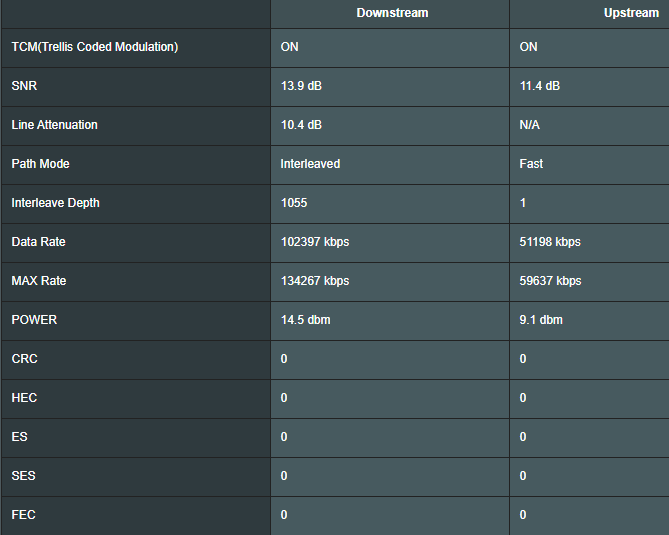
bcm_xdslctl configure –maxDataRate 102400 51200 524280
This setting is cleared when restarted. Is there anything I can do to store telnet settings?
Attachments:
You need to login in order to vote
December 2, 2019 at 6:53 pm #5172What is type of your connection? This looks like G.fast for me, if it is not sure why you put cap? Every time you reset router cap will be removed, so cap need to be applied after every reboot.
Liked by:You need to login in order to vote
December 2, 2019 at 7:15 pm #5173Connection type VDSL 17a
Connection speed is 100/60
To prevent CRC errors, I limit the upload speed to 50 Mbps using telnet. When I enter the code with Telnet, everything works exactly the way I want it, but I don’t know the telnet code to store the settings.You need to login in order to vote
December 2, 2019 at 7:25 pm #5174So I guess this is not in UK :D
Unfortunately you can’t store cap permanently, also if you cap speed to reduce error amount you should avoid to reboot router. Every reset can cause negative action for dlm.
CRC errors are not a problem usually, you can check all other errors and parameters with command: bcm_xdslctl info –stats.
Liked by:You need to login in order to vote
December 2, 2019 at 7:39 pm #5175December 3, 2019 at 12:13 pm #5182 - AuthorPosts



 …….. (AVM)


- You must be logged in to reply to this topic.