

› UKTH forums › 🛜 Wireless Routers & Modems › ASUS & Wireless › ASUS New DSL-AX82U Modem Router Combo – Wifi 6 ASUS New DSL-AX82U Modem Router Combo / Wifi 6 At long last I am now able to (officially) confirm that ASUS are in the process of releasing there latest addition...
- This topic has 711 replies, 37 voices, and was last updated 2 weeks, 1 day ago by
 El3rt1cal.

- AuthorPosts
- April 19, 2022 at 2:57 pm #18719
I am considering now just actually operating via the hardware toggle
Your suggestion has been taken onboard
But yes Asus is correct…….Not at all Convienent !!
Kind of makes a user WiFi schedule pointless
It will be the remembering to operate via the hardware switch !!
Regards
Liked by:You need to login in order to vote
May 20, 2022 at 9:59 pm #19073FW: 3.0.0.4.386_48378
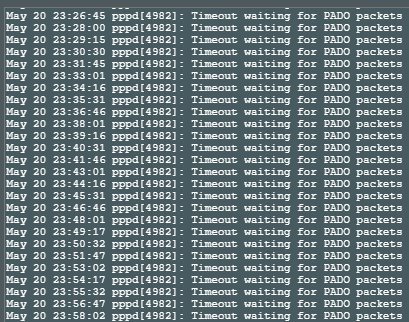
Although there is no problem in its work, I see these logs all the time, there are hundreds.Attachments:
You need to login in order to vote
May 21, 2022 at 7:11 am #19075Did this happen with Version 3.0.0.4.386.45660 ?
In a completely sane world, madness is the only freedom (J.G.Ballard).
You need to login in order to vote
May 21, 2022 at 7:22 am #19076For me, FW: 3.0.0.4.386_48378 broke my internet connection and stopped recognising the connected USB drive. Had to revert back to 45660.
You need to login in order to vote
May 21, 2022 at 7:39 am #19077For me, FW: 3.0.0.4.386_48378 broke my internet connection and stopped recognising the connected USB drive. Had to revert back to 45660.
That’s no good, I was using 48378 on my DSL-AX82U until a couple of weeks ago (ISP is BT) and did not have any issues like this.
Did you try a factory reset, are you using IPv6 etc ?
In a completely sane world, madness is the only freedom (J.G.Ballard).
You need to login in order to vote
May 21, 2022 at 8:14 am #19078<p style=”text-align: left;”>Not using IPv6 but tried everything except a hard reset. Was getting ok download speeds but upload was pretty much non existent, Zen ISP. USB drive kept disconnecting every few seconds.</p>
You need to login in order to vote
May 21, 2022 at 8:24 am #19079I did not try USB connected with my DSL-AX82U, so maybe a firmware bug.
Try hard reset and configure from scratch, not use backup file (.CFG)
In a completely sane world, madness is the only freedom (J.G.Ballard).
You need to login in order to vote
May 21, 2022 at 8:35 am #19080May 21, 2022 at 8:39 am #19081Will try that and report back.
Great
In a completely sane world, madness is the only freedom (J.G.Ballard).
You need to login in order to vote
May 21, 2022 at 8:28 pm #19082Did this happen with Version 3.0.0.4.386.45660 ?
Only in the latest version did this problem catch my attention. We would surely have noticed if it was in earlier versions, we have used the previous fw for a very long time, this did not exist.
You need to login in order to vote
May 21, 2022 at 9:04 pm #19084Did this happen with Version 3.0.0.4.386.45660 ?
Only in the latest version did this problem catch my attention. We would surely have noticed if it was in earlier versions, we have used the previous fw for a very long time, this did not exist.
Understood, I know late last year the DSL-AX82U, did have a PADO and PADS packet timeout PPPoE connection problem, but I had assumed this has now been resolved ?
Would be good to hear if other DSL-AX82U owners are also experiencing this issue with firmware Version 3.0.0.4.386_48378 as I can then have a chat with the ASUS DSL team ?
In a completely sane world, madness is the only freedom (J.G.Ballard).
You need to login in order to vote
May 21, 2022 at 9:28 pm #19085Did this happen with Version 3.0.0.4.386.45660 ?
Only in the latest version did this problem catch my attention. We would surely have noticed if it was in earlier versions, we have used the previous fw for a very long time, this did not exist.
Understood, I know late last year the DSL-AX82U, did have a PADO and PADS packet timeout PPPoE connection problem, but I had assumed this has now been resolved ? Would be good to hear if other DSL-AX82U owners are also experiencing this issue with firmware Version 3.0.0.4.386_48378 as I can then have a chat with the ASUS DSL team ?
The IP retrieval issue with PADO has been fixed and that part works fine, but it is very interesting that these records appear in the system log because there is no problem. I’ll ask other users of this
You need to login in order to vote
May 21, 2022 at 9:50 pm #19086In a completely sane world, madness is the only freedom (J.G.Ballard).
You need to login in order to vote
May 22, 2022 at 12:23 pm #19095Two people returned and said there was no such record. I restarted my modem and I’ll see if it will occur again after a while.
You need to login in order to vote
May 22, 2022 at 12:36 pm #19097Two people returned and said there was no such record. I restarted my modem and I’ll see if it will occur again after a while.
In a completely sane world, madness is the only freedom (J.G.Ballard).
You need to login in order to vote
- AuthorPosts




- You must be logged in to reply to this topic.