

› UKTH forums › 🛜 Wireless Routers & Modems › ASUS & Wireless › ASUS ZenWiFi AX Whole Home Tri-Band Mesh WiFi 6 System Not sure if this is the right place to ask…. I am thinking of upgrading my Google Mesh wifi to the above. Has anyone used this and does it...
- This topic has 1,410 replies, 25 voices, and was last updated 2 months, 4 weeks ago by
 UK Sentinel.

-
AuthorPosts
-
October 6, 2021 at 3:09 pm #15687
still find it fishy that the stable firmware 3.0.0.4.386.42095 is about 72.5 mbytes and the newly released 3.0.0.4.386.45898 is 55.65 mbytes.
Where’s the difference?
will wait a bit, until some volunteers try the new firmware out, and post their feedback
You need to login in order to vote
October 6, 2021 at 3:23 pm #15689Just did the update and the mesh node is back on ‘Weak’ and 2.4GHz.
I’ll trigger a reboot and see what happens.
Sigh!
I really don’t want to do a full reset and configure everything again manually, especially as I am not sure it will do anything.
Edit: Optimise did nothing, but two reboots and it eventually came back saying ‘great’ and 5GHz.
You need to login in order to vote
October 6, 2021 at 5:11 pm #15695Good news your 5GHz back-haul is back in action and glad to see you tried the new firmware 1st ,
In a completely sane world, madness is the only freedom (J.G.Ballard).
You need to login in order to vote
October 6, 2021 at 5:19 pm #15696I took the plunge and updated.
Factory reset using UI and then pin reset. Initial impressions are that setup seemed a little smoother. Usually adding a node via wireless backhaul takes 2 attempts (using the windows UI) – no idea why.
The backhaul channel defaulted to 116/80MHz.
Changed bandwith to 160MHz and all nodes were showing weak 2.4GHz connection for few minutes and then automatically changed to green in UI and 100/160MHz.
Hopefully Microsoft Teams continues to work fine.
You need to login in order to vote
October 6, 2021 at 5:22 pm #15697Your Teams calls will give us a great insight into how well this latest firmware version works (stability), keep us updated
In a completely sane world, madness is the only freedom (J.G.Ballard).
You need to login in order to vote
October 6, 2021 at 5:53 pm #15699One massive observation with my setup/configuration…….
RAM usage seems substantially lower. I have 258MB used 254 Free. It is usually around 210MB free after first complete set up.
Liked by:
You need to login in order to vote
October 6, 2021 at 6:02 pm #15701still find it fishy that the stable firmware 3.0.0.4.386.42095 is about 72.5 mbytes and the newly released 3.0.0.4.386.45898 is 55.65 mbytes.<noscript>
</noscript>Firmware size doesnt tell much or even nothing about whats inside and its quality.
You need to login in order to vote
October 6, 2021 at 8:43 pm #15702How does ‘Auto Firmware Upgrade’ work? Does the router update whenever new firmware becomes available? If so, good thing it is turned off as default.
I haven’t seen this toggle before in ASUS routers.
Attachments:
You need to login in order to vote
October 6, 2021 at 8:50 pm #15704<p style=”text-align: left;”>
How does ‘Auto Firmware Upgrade’ work? Does the router update whenever new firmware becomes available? If so, good thing it is turned off as default. I haven’t seen this toggle before in ASUS routers.
</p>
If you select it, it asks what time you want to perform an automatic update. I agree it’s probably a little risky for ASUS products!
You need to login in order to vote
October 7, 2021 at 11:33 am #15709First day using Microsoft Teams on new firmware 45898. Several meetings already which have been extremely stable so far without major issues.
You need to login in order to vote
October 7, 2021 at 11:34 am #15710First day using Microsoft Teams on new firmware 45898. Several meetings already which have been extremely stable so far without major issues.
All your good work with ASUS paid off
In a completely sane world, madness is the only freedom (J.G.Ballard).
You need to login in order to vote
October 10, 2021 at 10:48 am #15738Everyone – Is the latest firmware 45898 providing a good connection and stable, ?
I ask so I can feed this back to ASUS ?
In a completely sane world, madness is the only freedom (J.G.Ballard).
You need to login in order to vote
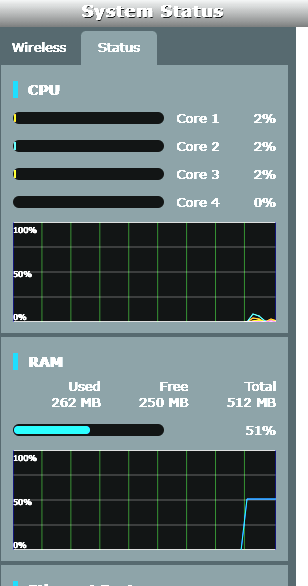
October 10, 2021 at 1:40 pm #15740It has been very stable for me so far. The free RAM of circa 250MB may be a bug or misreporting as I have never seen this much free RAM with previous firmware. I will do a complete reboot and see if that remains 250MB free, if so that is amazing.
You need to login in order to vote
October 10, 2021 at 2:03 pm #15741Did a reboot of the devices, free RAM is reporting as roughly 210MB. This is what it was reported with 43181. Connection remains solid so far, time will tell.
EDIT: This is weird, after 10 minutes now free RAM has increased to 250MB!!!!
Attachments:
You need to login in order to vote
October 10, 2021 at 2:36 pm #15744Still good RAM availability but yes odd the quick change from 210 to 250 Mb
Maybe browser cache ?
In a completely sane world, madness is the only freedom (J.G.Ballard).
You need to login in order to vote
-
AuthorPosts


- You must be logged in to reply to this topic.