

› UKTH forums › 🛜 Wireless Routers & Modems › ASUS & Wireless › ASUS ZenWiFi AX Whole Home Tri-Band Mesh WiFi 6 System
- This topic has 1,416 replies, 25 voices, and was last updated 2 months ago by
 UK Sentinel.

- AuthorPosts
- October 21, 2022 at 5:16 pm #21372
Why are they still pushing “FW_ZENWIFI_XT8_300438821099” out via the router’s firmware upgrade option when they know there are issues with it?
I know and I have spoken with ASUS also, alas beyond my control, thank goodness for ASUSWRT-Merlin (RMerlin) for other such ASUS models
In a completely sane world, madness is the only freedom (J.G.Ballard).
Liked by:You need to login in order to vote
October 22, 2022 at 9:00 am #21383After the latest official firmware issues, I bit the bullet and updated the firmware to the Asuswrt-Merlin 386.07_2-gnuton1 more out of curiosity and so far I’m very impressed.
Liked by:You need to login in order to vote
October 22, 2022 at 9:28 am #21385After the latest official firmware issues, I bit the bullet and updated the firmware to the Asuswrt-Merlin 386.07_2-gnuton1 more out of curiosity and so far I’m very impressed.
I have used it too and it was extremely stable.
Liked by:You need to login in order to vote
October 22, 2022 at 11:13 am #21386Looks like Parental Control is activated on the beta. If there are no lock ups, I will stay on this beta FW.
How’s the test progressing with the new (offline) beta ?
In a completely sane world, madness is the only freedom (J.G.Ballard).
You need to login in order to vote
October 22, 2022 at 2:29 pm #21387How’s the test progressing with the new (offline) beta ?
Still working fine, free RAM is now at 146 MB. Seems to decrease by around 10 MB each day.
You need to login in order to vote
October 22, 2022 at 3:17 pm #21388Still working fine, free RAM is now at 146 MB
In a completely sane world, madness is the only freedom (J.G.Ballard).
You need to login in order to vote
October 23, 2022 at 1:11 pm #21390Ok so this morning the node went “offline” again with the constant blinking blue LED. There was nothing in the logs showing “radar”.
Therefore I started the process of downgrading the firmware on the router and node to 386.49873 and do a factory reset on both.
I did the router first, downgrade, factory reset, then setup. I then unplugged it and moved onto the node. It was quite difficult to connect to the node, as the blue LED kept flashing after startup, even after factory resetting a few times. I eventually was able to connect over ethernet to flash the older firmware, let it reboot and did a factory reset. The blue led flashing came back (on the older firmware!), and seemed to periodically restart itself. I did another factory reset and turned on the primary router. Eventually the node started up connected up to the mesh network itself. I though I would have to trigger this or at least hint that this is how I wanted it to operate, but it just joined the mesh network itself which was a bit strange, no? Hopefully there is no underlying hardware issue with the node.
Anyway both have been running for a few hours. Router and node are still in same locations in the house. I haven’t moved them closer to each other yet. The are still connected via the 5GHZ-2 backhaul. The signal hovers between -62 to -69dBm (Great) and -70 to -72dBm (Good). I was able to achieve 501.87Mbps download and 51.22Mbps upload over wifi while connected to the node (verified I was connected to the node via the app). This is on a Virgin Media 500Mb/50Mb account. Hopefully the issues were only caused by the 388.21099 firmware. I guess time will tell.
You need to login in order to vote
October 23, 2022 at 1:31 pm #21391Load 386.49873 to Nodes and reboot and then load 386.49873 to Primary and reboot. This should work but if you notice any issues, then option 2 will be required. This should not break mesh as you are using ethernet
I notice you don’t mention loading the 386.49873 backup in option 1. Do you feel that is not useful? Thanks for your help.
Thanks for your assistance with this. The “downgrade” in the order you mentioned plus restoring the previously saved configuration for that release seemed to have worked just fine. I’m back on 386.49873 now.
You need to login in order to vote
October 23, 2022 at 1:58 pm #21392Eventually the node started up connected up to the mesh network itself.
Did you use app or browser ?
For your DFS issues, probable best just to disable the DFS option on your ASUS XT8 and see if this then stops any further disconnects etc.
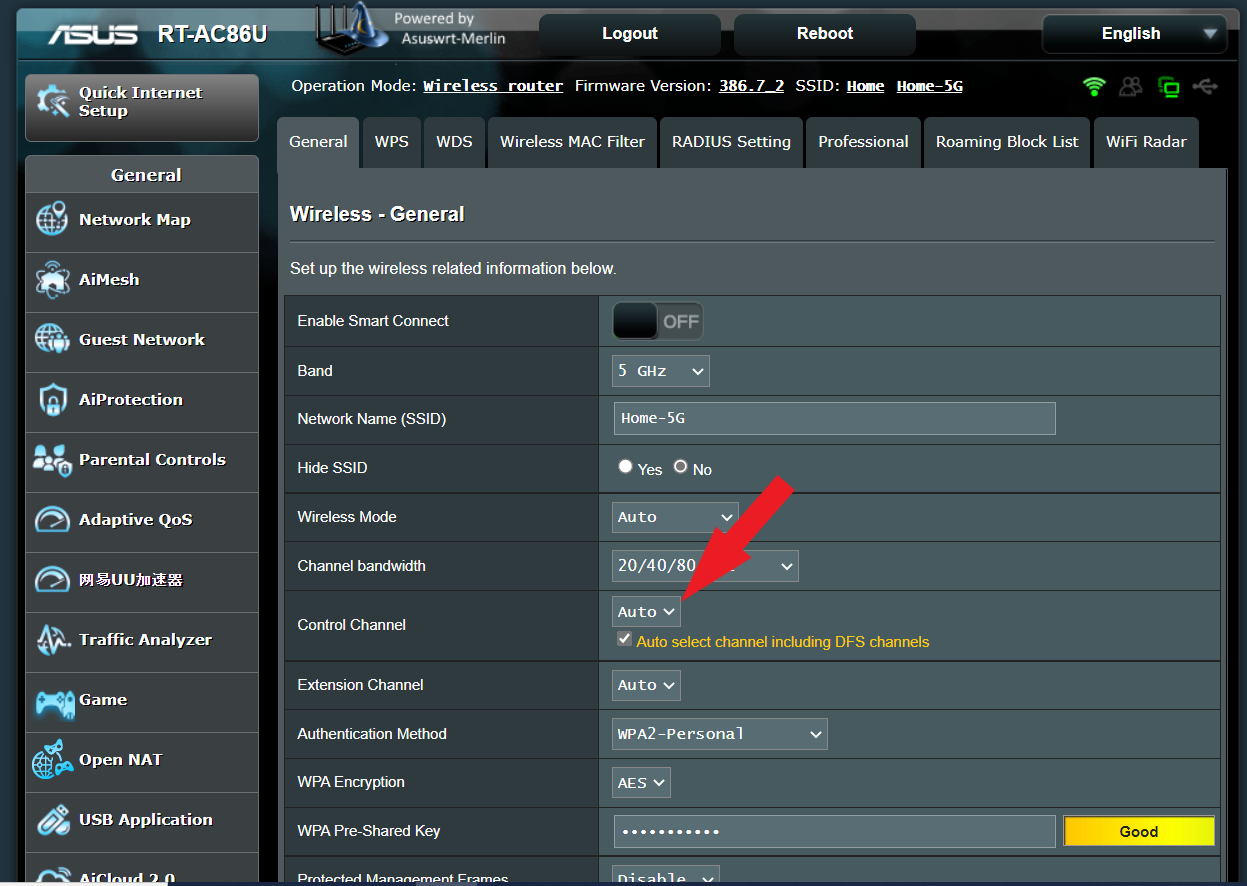
ASUS Router Disable DFS Channel
Advanced Settings > Wireless > General and 5 GHz-2 (backhaul) Channel bandwidth and select 20/40/80 MHz and then there is a tick box ‘Auto select channel including DFS channels’ if you untick this box, you should have no more DFS issues .
Below is my RT-AC86U for ref only:
https://www.asus.com/support/FAQ/1045936/
Attachments:
In a completely sane world, madness is the only freedom (J.G.Ballard).
You need to login in order to vote
October 23, 2022 at 4:46 pm #21396Did you use app or browser ? For your DFS issues, probable best just to disable the DFS option on your ASUS XT8 and see if this then stops any further disconnects
I used the browser this time. I don’t seem to have any DFS issues, at least not yet. But yes, I will try this option should it start acting up again. Still no mention of ‘radar’ in the logs, and stil on 5Ghz-2 backhaul. I will keep an eye on it and post again if there are any updates.
You need to login in order to vote
October 23, 2022 at 6:29 pm #21398I used the browser this time. I don’t seem to have any DFS issues, at least not yet. But yes, I will try this option should it start acting up again. Still no mention of ‘radar’ in the logs, and stil on 5Ghz-2 backhaul. I will keep an eye on it and post again if there are any updates.
Weekend, maybe no flights
In a completely sane world, madness is the only freedom (J.G.Ballard).
You need to login in order to vote
October 23, 2022 at 7:30 pm #21399Weekend, maybe no flights
The regional airport about 5km definately had small planes whizzing around yesterday and today. And Dublin international airport is about 23km away (as the crow flies). The international planes regularly fly overhead and quite low (not sure exactly how low), I guess they are coming in for landing or climbing over our neighbourhood a lot. No mention of ‘radar detected’ in the logs, so not sure if it’s just a case of lucky timing, regarding radar interferences so far, or if they are too high. No fallback to 2.4Ghz backhaul yet though.
You need to login in order to vote
October 23, 2022 at 7:34 pm #21400No mention of ‘radar detected’ in the logs, so not sure if it’s just a case of lucky timing, regarding radar interferences so far, or if they are too high. No fallback to 2.4Ghz backhaul yet though.
Hopefully a few days and we shall know
In a completely sane world, madness is the only freedom (J.G.Ballard).
You need to login in order to vote
October 25, 2022 at 6:04 pm #21405Still working fine, free RAM is now at 146 MB. Seems to decrease by around 10 MB each day.
How’s the beta been over the weekend, positive ?
In a completely sane world, madness is the only freedom (J.G.Ballard).
You need to login in order to vote
October 25, 2022 at 6:30 pm #21407How’s the beta been over the weekend, positive ?
Uptime of 5 days and 8 hours. Free RAM is sitting at 86MB. It’s been running fine for me without any lock ups.
You need to login in order to vote
- AuthorPosts





- You must be logged in to reply to this topic.