

› UKTH forums › 🛜 Wireless Routers & Modems › ASUS & Wireless › Latest Beta Firmwares for DSL-AC51 to DSL-N66U incl. DSL-AC750 Latest DSL ASUSWRT firmware v9.1.2.3_502-g2bdb05b now available. (latest firmware’s are at end of threads) For following ASUS DSL Modem Routers: DSL-AC51 DSL-AC52U DSL-AC55U DSL-AC56U DSL-AC750 DSL-N10-C1 – (extended beta support...
- This topic has 1,129 replies, 77 voices, and was last updated 1 year, 6 months ago by
 UK Sentinel.

- AuthorPosts
- July 27, 2022 at 9:50 am #20320
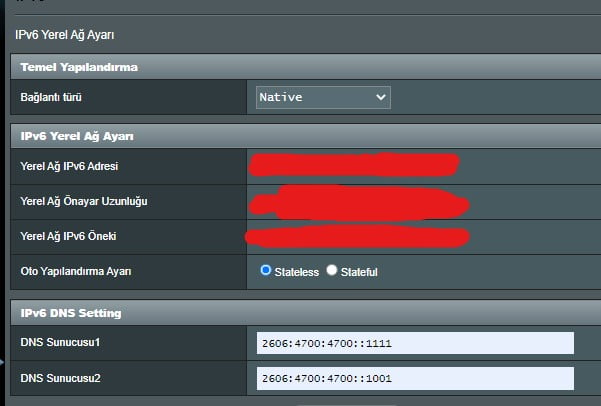
[quote quote=20319]Are you able to post your IPv6 Settings pages etc ?[/quote]
I’ll send it when I get home. Not many settings options anyway. I made the settings recommended by the service provider. Other N16 users also report it not working.
You need to login in order to vote
July 27, 2022 at 10:57 am #20321[quote quote=20320]I’ll send it when I get home. Not many settings options anyway. I made the settings recommended by the service provider. Other N16 users also report it not working.[/quote]
Thanks, I just want to check your settings before I speak with ASUS
BTW – Does the System Log > General log suggest any issues with IPv6 ?
You need to login in order to vote
July 27, 2022 at 11:09 am #20322[quote quote=20321]
Thanks, I just want to check your settings before I speak with ASUS
<noscript></noscript>BTW – Does the System Log > General log suggest any issues with IPv6 ?[/quote]Ok. IPv6 related error in logs when IPv6 was enabled. I don’t remember exactly what it said but I’ll check it out when I get home. And thank you too.
You need to login in order to vote
July 27, 2022 at 11:14 am #20323July 27, 2022 at 9:25 pm #20324[quote quote=20323]
<noscript></noscript>[/quote]Here is.
IPv6 files (DHCPv6) are missing in the log file.
Attachments:
You need to login in order to vote
July 27, 2022 at 9:58 pm #20328[quote quote=20324]IPv6 files (DHCPv6) are missing in the log file.[/quote]
Is that what is detailed in the log file – or are you saying no IPv6 reference can be found in log file ?
You need to login in order to vote
July 27, 2022 at 10:12 pm #20329[quote quote=20328]
Is that what is detailed in the log file – or are you saying no IPv6 reference can be found in log file ?[/quote]
Oops. Sorry. I forgot to mention, yes this is the error written in the log file. :))
Liked by:You need to login in order to vote
July 28, 2022 at 7:58 am #20330Is WAN IP address (IPv6 or IPv4) ?
If IPv6, then change IPv6 DNS Setting to use Googles (for testing)
Note: reboot router after changing settings
2001:4860:4860::8888
2001:4860:4860::8844Attachments:
You need to login in order to vote
July 28, 2022 at 8:56 am #20333[quote quote=20330]Is WAN IP address (IPv6 or IPv4) ? If IPv6, then change IPv6 DNS Setting to use Googles (for testing) Note: reboot router after changing settings 2001:4860:4860::8888 2001:4860:4860::8844
<noscript></noscript>[/quote]I tried IPv6 with Google DNS before but it didn’t work. Why did you ask for my WAN IP addresses? :)
You need to login in order to vote
July 28, 2022 at 9:24 am #20334[quote quote=20333]I tried IPv6 with Google DNS before but it didn’t work. Why did you ask for my WAN IP addresses? :)[/quote]
I did not ask for you actual WAN IP address, just if it was IPv4 or IPv6 ? to see if you had a WAN routing / DHCP issue, maybe DNS etc ?
Try Again Google DNS also and check logs
You need to login in order to vote
July 28, 2022 at 9:42 am #20335[quote quote=20334]
I did not ask for you actual WAN IP address, just if it was IPv4 or IPv6 ? to see if you had a WAN routing / DHCP issue, maybe DNS etc ? Try Again Google DNS also and check logs
<noscript></noscript>[/quote]Oops, sorry. WAN IP only had IPv4 address. I will try the Google DNS addresses in the evening and forward the log records to you.
You need to login in order to vote
July 28, 2022 at 10:14 am #20336[quote quote=20335]WAN IP only had IPv4 address[/quote]
That is interesting, do you know if you have a static / fixed IPv6 address or is it dynamic from the WAN perspective for TurkNet ?
Do not send Logs as no way for me to receive them.
You need to login in order to vote
July 28, 2022 at 10:37 am #20337Maybe try changing IP version from IPv4/IPv6 to IPv6 only and see what happens especially if WAN IP address changes to an IPv6 address ?Alas I am not familiar with Turknet, so a little trial and error
Edit: just plugged in my old DSl-N17U and set-up IPv6 (dual stack) and worked so ignore above.
Does Internet Status: say CONNECTED for Dual Stack ?
You need to login in order to vote
July 29, 2022 at 9:04 am #20342Hello, please put the link of the latest beta version for dsl ac51
You need to login in order to vote
July 29, 2022 at 9:52 am #20343[quote quote=20337]
Maybe try changing IP version from IPv4/IPv6 to IPv6 only and see what happens especially if WAN IP address changes to an IPv6 address ?Alas I am not familiar with Turknet, so a little trial and error<noscript><noscript>
</noscript>Edit: just plugged in my old DSl-N17U and set-up IPv6 (dual stack) and worked so ignore above. Does Internet Status: say CONNECTED for Dual Stack ?[/quote]TurkNet provides
staticdynamic IPv6 addresses to its customers. When IPv6 is enabled, what you say does not appear in the Internet status section.I haven’t tested the method you mentioned above yet. :(
You need to login in order to vote
- AuthorPosts




- You must be logged in to reply to this topic.