Forum Replies Created
-
AuthorPosts
-
I do have one question for the gang here. I’ve always done “dirty” installs – have never done a reset to factory (or whatever the language is in the GUI). Why would it be recommended to do one and can you restore a backup after resetting to avoid manually recreating settings?
Totally agree with @Uk Sentinell. I always factory reset after update and never restore settings. Most times I do this Friday night or Saturrday morning, to keep the family from complaining and shouting.
Liked by:
You need to login in order to vote
@UK Sentiinell, Any ideas if Asus have managed to pinpoint the issues with XT8 on 388 branch?
As mentioned, I am on 386.49873 and will stick with this until they fix the issues with 388. Not ideal as newer FW have latest security patches. But the disconnections were horrible on all 388 FW for me, including Gnuton 388 FW as well. 386.49873 is rock solid.
You need to login in order to vote
I reckon the Rick and Morgan team up is what it will eventually lead to
You need to login in order to vote
Yes all up to date with Madison and Morgan joining up at the end. Weird what they did with Travis.
You need to login in order to vote
Finally fully up to date with Walking Dead and FTWD. Now looking forward to the spin offs. I will eventually also watch World Beyond
You need to login in order to vote
Looks like the FW release dates are back now….
https://www.asus.com/uk/supportonly/asus%20zenwifi%20ax%20(xt8)/helpdesk_bios/
Attachments:
You need to login in order to vote
I had exactly the same issue with the latest 388.22068 fw. What I found was the node in my room was dropping connection mostly in the early morning and evening, and my devices migrated to the node in the other room. My PC failed to reconnect back to the node in my room even after turning the computer on and off, it kept reconnecting to the node in the other room. Only solution was to bind the PC to the node in my room.
I have now reverted back to 386.49873 fw, which has mostly been stable for me. Asus need to sort this messy 388 fw branch.
Liked by:
You need to login in order to vote
Not sure what the question is, is it how to ‘bind’ a device to a specific ‘node’.
If so, using the browser UI, go to the AiMesh section and you can ‘bind’ a device to only connect to a specific node. There is a icon next to each device that looks like a paper clip. You can use that to bind a device so it always connects to that router or node.
You can also go to ‘Professional’ tab under Wireless section and reduce RSSI lowere than the -70 dBm default. That way, when moving around the device will connect to the closest node.
I tend to use the manual binding method for devices that stay in one place i.e TV, desktop PC etc
Liked by:
You need to login in order to vote
That is very good and the right thing for ASUS to do. Baffles me why ASUS made the decision to omit the date in the first place.
Liked by:
You need to login in order to vote
I want to get up to date with FTWD and World Beyond before the new spin offs start
Liked by:
You need to login in order to vote
I finished watching The Walking Dead, now on to Season 2 of Fear the Walking Dead
You need to login in order to vote
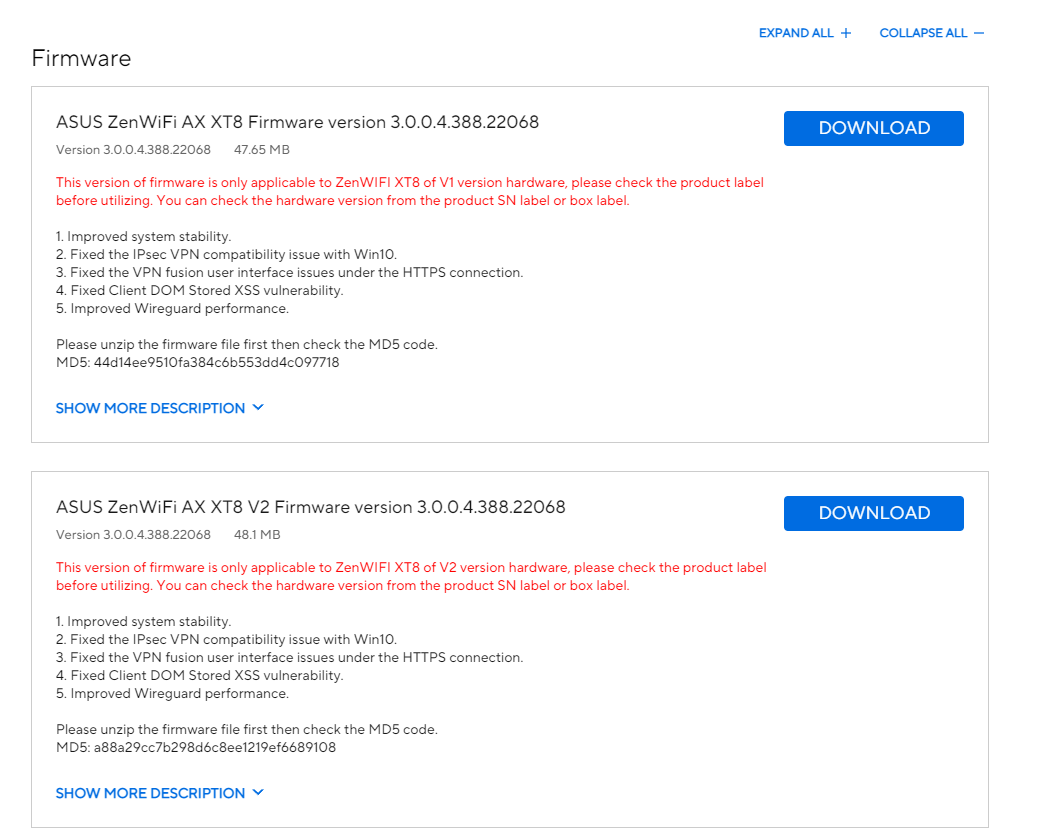
I can see both V1 and V2. Looks like V2 is a slightly bigger size.
Is this going to be the norm going forward that we get 2 seperate versions? Or is this to iron out some issues before merging back again?
Attachments:
Liked by:
You need to login in order to vote
Thanks, it is my desktop PC but not sure exactly what it is trying to do with UPnP/SSDP.
Any ideas if ASUS have found the solution to the memory issues on FW 388?
I may just revert back to 386.49873 which was the last solid FW for me. Downside is losing all the recent security fixes.
Liked by:
You need to login in order to vote
Any ideas what these logs mean:
Dec 13 20:11:19 watchdog: reinit of unit31:0
Dec 13 20:11:43 miniupnpd[2158]: upnp_event_process_notify: connect(192.168.50.17:2869): Connection timed out
Dec 13 20:11:44 miniupnpd[2158]: upnp_event_process_notify: connect(192.168.50.17:2869): Connection timed out
Dec 13 20:11:44 miniupnpd[2158]: upnpevents_processfds: 0x9fc620, remove subscriber uuid:3ddcd1d3-2380-45f5-b069-fc34979be561 after an ERROR cb: http://192.168.50.17:2869/upnp/eventing/cffocgqfpv
Dec 13 20:14:19 watchdog: wl reinit count 10
Also this:
Dec 13 21:08:47 dnsmasq-dhcp[2220]: failed to write /var/lib/misc/dnsmasq.leases: No space left on device (retry in 60s)
Dec 13 21:09:47 dnsmasq-dhcp[2220]: failed to write /var/lib/misc/dnsmasq.leases: No space left on device (retry in 60s)
Go these logs repeatedly yesterday, but did not notice any connection issues.
You need to login in order to vote
I use IPv6 – Google DNS.
Also get the same messages but on the beta 21101. No connection problems till now so will stay on that beta 21101 FW
You need to login in order to vote
-
AuthorPosts