


Forum Replies Created
-
AuthorPosts
-
My setup is also stable for 3 days now. I only use time scheduling under parental control.
For me, the instability on previous 388 fw started after a week. So, too early to say anything.
Liked by:
You need to login in order to vote
You can also check under the logs section I think. There is a tab for wireless. Scroll down to 5GHz-2 and see if it stays something like 100/160 or 100/80.
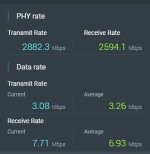
Also check PHY rate.
Attachments:
Liked by:
You need to login in order to vote
Backhaul has connected at channel 100 on 80 MHz.
I will factory reset, then force 160 MHz.
Hope the Asus ‘fix’ wasn’t to default to 80 MHz backhaul when 160 MHz is enabled.
You need to login in order to vote
Apparently someone tested a beta firmware 9.0.0.4_388_22473 where their backhaul kept dropping to 2.4GHz and not recovering.
Hopefully the issues are related.
Weird thing happened on 388.22068, the last time I set it up. I intially set it up after factory reset with 160MHz disabled. All nodes connected to Ch 100/80 MHz.
I then manually changed ‘Wireless Mode’ to AX and re-enabled 160MHz. The main node had PHY rate 1441 on transmit and receive (80MHz). The other 2 nodes for some reason connected PHY rates at 160MHz 2882 transmit and receive. The node in my room was actually giving the same speed on speedtest.net as I would get if the whole network was setup with 160MHz. It stayed stable to 7+ days.
You need to login in order to vote
Always up for a challenge.
Hopefully the ‘Improved AiMesh backhaul stability’ fixes my issue with the setup I have with 3 nodes.
You need to login in order to vote
I have updated from 388.22068 to 388.22525 without factory reset yet. Set wireless backhaul back to 160 MHz as well.
Liked by:
You need to login in order to vote
If anyone is feeling brave:
This version of firmware is only applicable to ZenWIFI XT8 of HW ver: 1.0, please check the product label before utilizing. You can check the hardware version from the product SN label or box label.
1.Fixed CVE-2022-46871
2.Fixed Client DOM Stored XSS.
3.Improved AiMesh backhaul stability.
4.Fixed AiMesh topology UI bugs.
5.Fixed the reboot issue when assigning specific clients in VPN fusion.
6.Fixed the VPN fusion bug when importing the Surfshark WireGuard conf file.
7.Fixed network map bugs.XT8 V1 download link:
XT8 V2 download link:
https://dlcdnets.asus.com/pub/ASUS/wireless/ZenWiFi_XT8/FW_ZENWIFI_XT8_V2_300438822525..zip?model=asus%20zenwifi%20ax%20%EF%BC%88xt8%EF%BC%89
Liked by:
You need to login in order to vote
The flashing blue light on the node I believe means the node is not connecting back to the router, even if the app is suggesting all is well ? Give the node a reboot and see if that enables the white LED to return ? Hopefully @Dodgydrains will see this post and advise also ?
Usually the connection is re-established automatically for me. But a reboot will probably help it along.
Liked by:
You need to login in order to vote
When it flashes blue for me, this is when the node had lost wireless backhaul connection and is trying re-establish the connection.
You need to login in order to vote
The transmit and receive PHY rate on all 3 nodes are around the full 1441.2Mbps on 80MHz. Does fluctuate a bit. On 160MHz it is around double that. It could be that having the daisy chain multiple nodes reduces real world speed?
Via the GUI, max speed I have is 915 down 1,045 up.
Liked by:
You need to login in order to vote
My setup is – ISP Router – XT8 router – XT8 Node 1 – XT8 Node 2 – XT8 Node 3
Wireless speedtest from device connected to Node 1 is basically full speed 750Mbps+. The one in my room is Node 2. From there I get 490Mbps with 160MHz and 340Mbps with 80MHz.
Liked by:
You need to login in order to vote
I will give it a try with 80MHz, in the name of science
. Speedtest has gone down from 490Mbps to 340Mbps. Lets see what happens.Liked by:
You need to login in order to vote
I do not have the option for 20/40/80 MHz on 5GHz-2. Mine is 20/40/80/160 MHz. Am I missing something? This is on 22068
edit. Worked it out. Disabled 160MHz now.
Liked by:
You need to login in order to vote
I am pretty sure that setting 80MHz on the wireless backhaul and WPA2 with fixed channels will ‘resolve’ most of the issues. I am on 386.49873 for nearly 2 weeks with my normal settings and 160MHz backhaul, it has been virtually flawless throughout. It is my go to FW when I encounter issues.
Liked by:
You need to login in order to vote
Thanks UK Sentinel, much appreciated. I am pretty sure ASUS know people have been complaining about this.
Liked by:
You need to login in order to vote
-
AuthorPosts


 . Speedtest has gone down from 490Mbps to 340Mbps. Lets see what happens.