Forum Replies Created
-
AuthorPosts
-
Yes, in essence,
1. Disconnect the Eero completely
Unplug its Ethernet from the ONT.
2. Connect the ASUS to the ONT
- ONT → ASUS WAN port (blue port)
3. Connect your laptop to the ASUS Router
Use Ethernet into any LAN port (yellow ports). (Wi‑Fi also works, but Ethernet is safer during setup.)
4. Open your browser and go to:
192.168.50.1 This works without internet, it’s the router’s local address.
If it doesn’t load, try:
In a completely sane world, madness is the only freedom (J.G.Ballard).
You need to login in order to vote
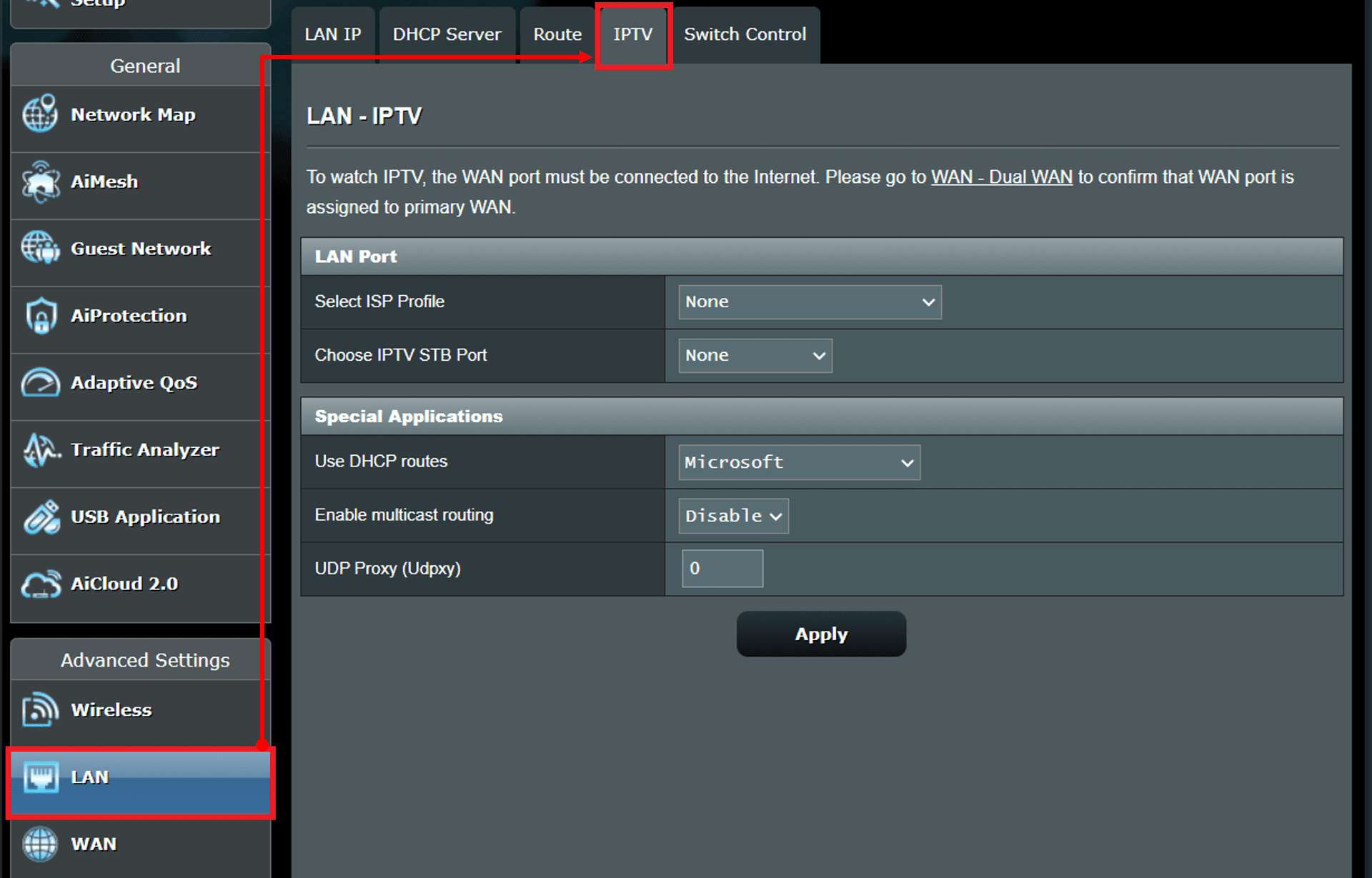
3.0.0.4 firmware as per the video supports IPTV which is where you will add 911.
Giffgaff is not preset on ASUS routers wizard as a preset option unlike Sky and BT, you have to in essence bypass the setup wizard and enter the VLAN ID via IPTV manually.
Personally I would just run through the ASUS setup Wizard via computer browser (not app) and configure it with your SSID’s etc, and configure it for say BT, which uses no VLAN’s for Full Fibre connections , after you have configured the router, quickly go to the LAN page > IPTV and add 911
I.e.
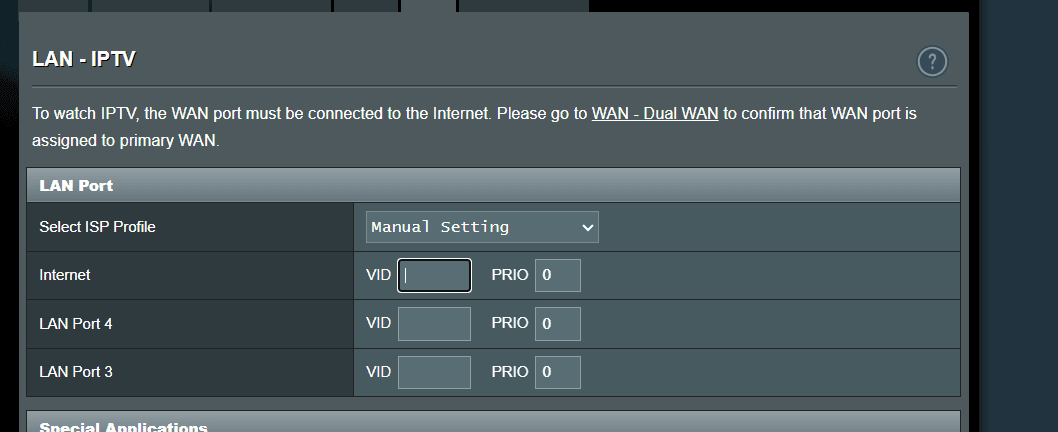
- Add; LAN → IPTV → Internet VLAN ID → 911
- Apply
- Change; WAN → Automatic IP (DHCP) (was set to PPPOE after BT setup)
- Apply
- Reboot router

ISP Network WAN Type VLAN Required? Notes BT FTTP Openreach PPPoE ❌ No ONT strips VLANs; router receives untagged PPPoE Giffgaff FTTP CityFibre Automatic IP (DHCP) ✅ Yes (911) No PPPoE, no Option 61, no credentials In a completely sane world, madness is the only freedom (J.G.Ballard).
You need to login in order to vote
This video shows the ASUS TUF AX4200 and go to 14:25 minuites and you can see the LAN page options.
If you cannot see these on your router and your are running the latest ASUS firmware for this router, a factory reset is advisable.
In a completely sane world, madness is the only freedom (J.G.Ballard).
You need to login in order to vote
Strange as the ASUS specs details IPTV is supported, does your Advanced Settings / LAN page look like anything like this ?
Attachments:
In a completely sane world, madness is the only freedom (J.G.Ballard).
You need to login in order to vote
Sounds like your router is set to Access Point mode, not Router mode.
Need to change it back to Router mode,
Administration > Operation Mode > Wireless Router Mode, click apply and reboot.
In a completely sane world, madness is the only freedom (J.G.Ballard).
You need to login in order to vote
Apologies, I meant LAN → IPTV settings
Attachments:
In a completely sane world, madness is the only freedom (J.G.Ballard).
You need to login in order to vote
Welcome, Your ASUS TUF‑AX4200 will work fine as a full replacement for the Eero 6+ if you set VLAN ID 911 on the WAN.
Giffgaff broadband runs on the same platform as Virgin Media O2 wholesale FTTP services and typically requires VLAN ID 911 on the WAN connection and WAN Connection Type is set to Automatic IP (DHCP)
Not sure on you specific router model, but generally ASUS routers have the following option;
check:
LAN → IPTV settings
Look for:
- ISP Profile = Manual
- Internet VLAN ID = 911
-
This reply was modified 3 months ago by UK Sentinel. Reason: WAN reference changed to LAN
In a completely sane world, madness is the only freedom (J.G.Ballard).
You need to login in order to vote
June 6, 2026 at 7:06 am in reply to: US FCC Blocks Approval of New Foreign‑Made Wi‑Fi Routers Interesting news! The U.S. Federal Communications Commission has introduced a significant policy shift that will affect the future of consumer networking hardware. The agency has halted the approval of new... #42771Interestingly, FCC backs down on router update ban after security concerns
The FCC has backed away from rules that would have prevented some routers from receiving firmware and security updates after March 2027. Following concerns that the move could leave millions of devices vulnerable to cyberattacks, the FCC has extended a waiver allowing updates to continue until at least January 2029.
In a completely sane world, madness is the only freedom (J.G.Ballard).
You need to login in order to vote
We’ve got a Shark PowerDetect Clean & AutoEmpty Cordless Pet Vacuum Cleaner. It sits on its base like a standard cordless vacuum, but the self‑emptying feature makes it so much easier to live with. The attachments let us switch between a compact handheld setup and a full‑size cleaner, so it handles pretty much any job around the house. Honestly, the automatic emptying is the part we appreciate most as it takes one of the most tedious chores off our plate.
Maybe an expensive option, but long term could be a worthwhile investment.
In a completely sane world, madness is the only freedom (J.G.Ballard).
You need to login in order to vote
I did some research at the time and in essence, My Shark robot vacuum cleaner does not have a Sleep Mode, but does have a Low Power mode and probable more a case of the Wi‑Fi subsystem going into a suspended state.
Not happened since and but I do tend to power off the Shark vacuum nowadays when on holidays etc.
In a completely sane world, madness is the only freedom (J.G.Ballard).
You need to login in order to vote
. Grisu Said:Don’t see any difference in my setup, but it was fine and fast before as well, so dont know what I should look for.
If it is even faster now I don’t realize it (old man).
At least there is no disadvantage for me.Forum seems to be snappier now (really fast), but don’t think there is any relationship to this Windows update.
Not too old I’m sure
Yes, I disabled Cloudflare’s configs the other day as this was causing me lots of issues, so hopefully forum stays a little snappier.
In a completely sane world, madness is the only freedom (J.G.Ballard).
You need to login in order to vote
. dodgydrains Said:I am running this motherboard.
https://uk.msi.com/Motherboard/MAG-X870E-TOMAHAWK-MAX-WIFI-PZ/support
Built the PC myself as a project with my son couple of months ago. I had 32GB ddr5 RAM and a few gen5 ssd’s that I purchased before the AI apocalypse hit us.
Very nice rig and probable worth a small fortune nowadays
In a completely sane world, madness is the only freedom (J.G.Ballard).
You need to login in order to vote
The KB5089573 update is designed for x64 (AMD64) and ARM64 systems so looks like good news for yourself.
Given your using the AMD Ryzen 7 9800X3D which is high end CPU, the improvements maybe less noticeable.
What MB you running with that setup ?
In a completely sane world, madness is the only freedom (J.G.Ballard).
You need to login in order to vote
About 5 GB or so, lets us know if you see any improvements in say App launching seems quicker, Quicker search result population and General desktop responsiveness improvements
In a completely sane world, madness is the only freedom (J.G.Ballard).
You need to login in order to vote
Yes, it does sound interesting in that the boost works in very short bursts (roughly 1–3 seconds) to improve responsiveness rather than sustained performance.
Are you going to try it with KB5089573 which is already available now as an optional “Preview” update for Windows 11 24H2 and 25H2 – otherwise I think KB5089573 will be deployed sometime in June
In a completely sane world, madness is the only freedom (J.G.Ballard).
You need to login in order to vote
-
AuthorPosts