

› UKTH forums › 🛜 Wireless Routers & Modems › ASUS & Wireless › ASUS – DSL-AC88U / DSL-AC3100 Firmwares (beta's) etc. Looks like a new Beta Release for the DSL-AC88U is available, this version has Telnet enabled and improved 2.4GHz wifi (I believe). DSL-AC88U_v9.10.06_build581_debug.w.zip https://www.asuswebstorage.com/navigate/s/604D61534F2541D1B3CE1CC031A697E4Y UK Sentinel
- This topic has 1,438 replies, 106 voices, and was last updated 6 months, 2 weeks ago by
 alt.james.

- AuthorPosts
- November 16, 2018 at 12:58 pm #1501
it will not be , so you ran the ‘fc enable’ type commands, do not type any others as it is sensitive ?
You need to login in order to vote
November 16, 2018 at 1:08 pm #1502Yeah those commands with the flush too.
For the time being im re using the BT Hub and disconnected the 88u with the debug firmware on as i didn’t know if i should leave it on there or flash back to the previous firmware?
You need to login in order to vote
November 16, 2018 at 3:09 pm #1503[quote quote=1502]Yeah those commands with the flush too. For the time being im re using the BT Hub and disconnected the 88u with the debug firmware on as i didn’t know if i should leave it on there or flash back to the previous firmware?[/quote]
Spoke with ASUS and best to flash back if you plan to use DSL-AC88U over the weekend as the Engineer has buggered off for weekend (they are 6 hour or so ahead of us) likewise, I have kindly suggested to ASUS they need to, when dealing with customers, to advise on a Beginning, Middle and End. ‘muppets they are’ ;-)
You need to login in order to vote
November 17, 2018 at 12:20 am #1508I think the entire ASUS company need to work on their customer relations, being vague will only annoy the end user who is helping them find/fix faults etc
Anyway ive flashed back to 503, as ive never really had any issues with that firmware to be honest. At present its been downloading my entire Steam/Origin games of 400GB+ at full speed of 310-320Mbps, even with Ai Protection on and working. Going to leave 503 on until the next stable firmware if there is any and let my line have a rest, otherwise ISP will probably execute DLM, and we all know that is a pain for it to sort itself out ;)
You need to login in order to vote
November 17, 2018 at 11:52 am #1510What do people think regarding replacing with an RT-AC88U with merlin firmware?
You need to login in order to vote
November 17, 2018 at 11:58 am #1512[quote quote=1510]What do people think regarding replacing with an RT-AC88U with merlin firmware?[/quote]
Actually, there is a cheaper, faster and “smaller” beast, which is the RT-AC86U, dual processors @1.8GHz vs 1.4GHz or 1.0GHz, better antennas and also Merlin support.
Im my experience DSL routers will always have some issue and will never be supported by Merlin which adds the true value to the Asus hardware, hence my personal opinion to split DSL + WiFi, see a longer post I made before describing my personal process and learning.
Here is the list of Asus routers to check their RAM, CPUs and Merlin support:
https://en.wikipedia.org/wiki/List_of_Asus_routersEdit 1: Older post https://uktechhub.com/forums/topic/asus-dsl-ac88u-firmwares-betas-etc/page/19/#post-1494
Edit 2: The key is to disable the ISP WiFi, any other functionality and set it to bridge mode if possible so that the Firewall, Security and NATing is done all at the Asus router which with the aid of AiProtection + Merlin it should be fast enough which has been proven by my old RT-AC56U and RT-AC3200
You need to login in order to vote
November 17, 2018 at 12:41 pm #1513[quote quote=1510]What do people think regarding replacing with an RT-AC88U with merlin firmware?[/quote]
The RT-AC88U is an 8 port router, so a big unit, if you do not need the 8 ports, then the RT-AC88U is relatively expensive compared to @Oxygen8 recommendation and slightly lower spec CPU and wifi chipsets etc
Regarding RMerlin, not hesitation, highly recommended, just ensure modem used is suitable also, especially if you DSLAM/Exchange is Infineon
You need to login in order to vote
November 17, 2018 at 12:53 pm #1514[quote quote=1513]Regarding RMerlin, not hesitation, highly recommended, just ensure modem used is suitable also, especially if you DSLAM/Exchange is Infineon[/quote]
Merlin doesn’t support DSL routers, he has explicitly said so on SNB forums, so; if he goes for a non-DSL router he should pick one that supports Merlin, here is the list of supported devices, warning; don’t confuse the names with DSL routers, they are all non-DSL:
https://github.com/RMerl/asuswrt-merlin/wiki/Supported-DevicesYou need to login in order to vote
November 17, 2018 at 12:56 pm #1515@@oxygen8 – I meant the modem that is used alongside the RT Router ;)
You need to login in order to vote
November 17, 2018 at 12:58 pm #1516Regarding the routers don’t trust the numbers, meaning, RT-AC3200 is not better than RT-AC2900 (AC86U), the funny thing about the RT-AC86U is that it is only surpassed in power by the GT-AC5300 (doesn’t support Merlin) and the RT-AX88U (which Merlin will support very soon)
But the RT-NX88U is twice the price of RT-AC86U, the difference is quad core @1.8GHz vs dual core and 1GB RAM vs 512KB
You need to login in order to vote
November 18, 2018 at 2:14 am #1522Hi guys
Having some issues with
Random no internet on my wifi
But only on one connection at a time and mostly on the 5g but some random on the 2.4 as well
Some recommendations guys
You need to login in order to vote
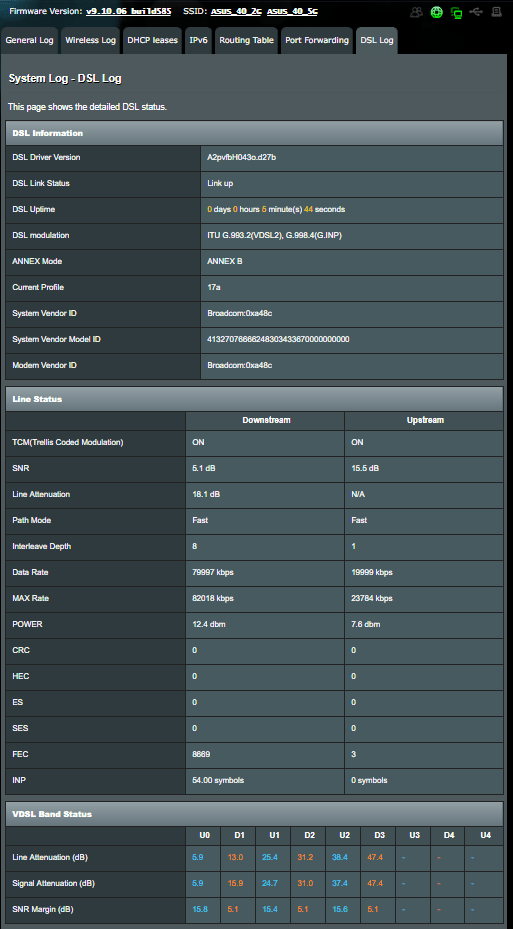
November 18, 2018 at 7:29 am #1523There is something wrong with the official build585 and beta build586. I had a full DLM reset on 07/11/18. With those 2 builds DLM refused to reduce my SNR from 6dB to 5dB.
I then decided to revert to beta build585 late last night on 17/11/2018 (just to experiment). Within 6 hours DLM kicked in and reduced SNR to 5dB. Stats attached.
The only difference I noticed was upstream SNR is higher on beta585 than the other 2 firmware.
Attachments:
You need to login in order to vote
November 18, 2018 at 9:19 am #1527[quote quote=1522]Hi guys Having some issues with Random no internet on my wifi But only on one connection at a time and mostly on the 5g but some random on the 2.4 as well Some recommendations guys[/quote]
Did you Disable Airtime Fairness for both 2.4 and 5GHz.?
There used to be a problem with Group Key Rotation Interval for wifi encryption, if you set it to 0 (zero), this fixed (workaround WPA (2) multicast / broadcast issue, another way of testing is switch to WEP wifi encryption for testing and see if issue remain, give router a reboot though.
What Firmware version are you running and is it a particular device that is being problematic?
You need to login in order to vote
November 18, 2018 at 9:31 am #1528[quote quote=1523]There is something wrong with the official build585 and beta build586. I had a full DLM reset on 07/11/18. With those 2 builds DLM refused to reduce my SNR from 6dB to 5dB. I then decided to revert to beta build585 late last night on 17/11/2018 (just to experiment). Within 6 hours DLM kicked in and reduced SNR to 5dB. Stats attached. The only difference I noticed was upstream SNR is higher on beta585 than the other 2 firmware.[/quote]
This is interesting as I also noticed my SNR value was higher than norm, around 10, but I assumed it was due to a lot of testing I was doing at the time, ASUS DSL-AC88U Firmware version 1.10.06-Build585 did have a driver update ad whether the value are being reported incorrectly is another option?
Hopefully others can say also if they have noticed similar reading
You need to login in order to vote
November 18, 2018 at 11:55 am #1529[quote quote=1528]This is interesting as I also noticed my SNR value was higher than norm, around 10, but I assumed it was due to a lot of testing I was doing at the time, ASUS DSL-AC88U Firmware version 1.10.06-Build585 did have a driver update ad whether the value are being reported incorrectly is another option? Hopefully others can say also if they have noticed similar reading[/quote]
I thought the upstream SNR had gone from 15dB to 7dB due to the cold weather. But it was actually due to firmware change. With beta585 (and the HG633) the upstream SNR is 15dB but with official 585 and beta586 it is reported as 7dB.
Could that have stopped DLM from reducing downstream SNR target? All other line stats were virtually identical with the different firmware.
You need to login in order to vote
- AuthorPosts



- You must be logged in to reply to this topic.