

› UKTH forums › 🛜 Wireless Routers & Modems › ASUS & Wireless › ASUS – DSL-AC88U / DSL-AC3100 Firmwares (beta's) etc. Looks like a new Beta Release for the DSL-AC88U is available, this version has Telnet enabled and improved 2.4GHz wifi (I believe). DSL-AC88U_v9.10.06_build581_debug.w.zip https://www.asuswebstorage.com/navigate/s/604D61534F2541D1B3CE1CC031A697E4Y UK Sentinel
- This topic has 1,438 replies, 106 voices, and was last updated 6 months, 2 weeks ago by
 alt.james.

- AuthorPosts
- November 22, 2018 at 10:07 pm #1594
@dodgydrains – they are busy, I will drop them an email in the morning and chase them ;)
You need to login in order to vote
November 23, 2018 at 6:13 am #1595[quote quote=1586]I have the same issue, gave feedback to Asus both when the beta and the official version 585 was released. They have elected not to respond.[/quote]
Thanks for confirming it’s not just me.
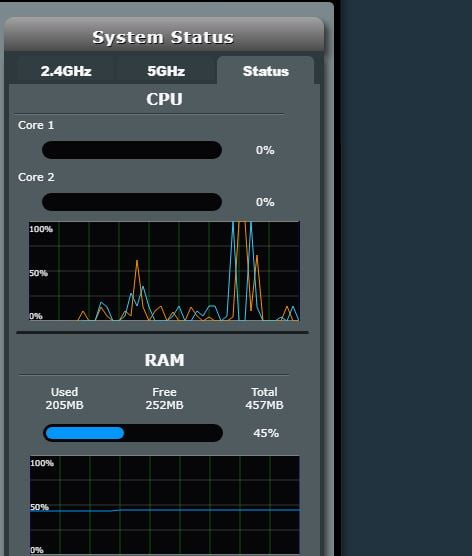
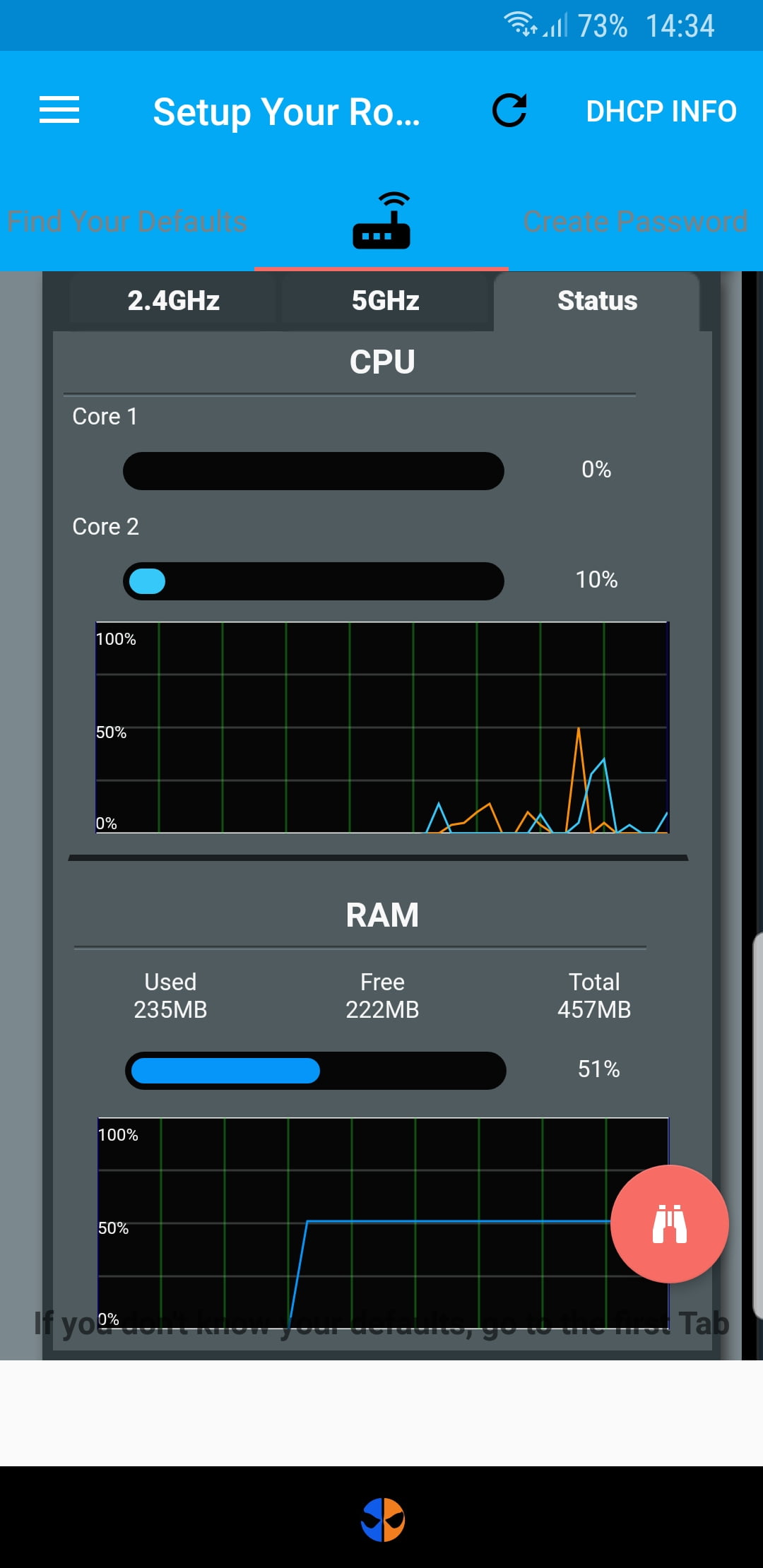
[quote quote=1588]Day 5 on 385 here and flushing back to 210mb with no AI. I was on 194 when I first flashed it. Also getting lots of cpu spikes to 100% even when the router is presumably not doing anything much. I’m not expecting to stop checking the ASUS GUI anytime soon[/quote]
I too notice the spikes. I’m assuming it’s running some kind of background process to manage the memory, as I sometimes see the memory usage drop by 1MB, only to rise again later.
[quote quote=1593]I am on beta585 and don’t have any RAM usage problem. I do no use AI as everyone seems to find it buggy. Sitting on 180MB used for 3 days now.[/quote]
Very interesting/impressive. Since yesterday’s update I’m at 266MB used, so it’s definitely still leaking around 6MB/day. On the 502 firmware, I was able to get 60 days uptime (only rebooted to flash 585) and even then the memory used was only around 240MB.
Can anyone else on beta 585 confirm there is no slow memory leak? I can’t really be bothered reflashing unless it’s worth it.
You need to login in order to vote
November 23, 2018 at 8:57 am #1596If you are using AiProtection I would use beta585, if you are not using AiProtection, then no point flashing, and wait a few months until AiProtection issues resolved
You need to login in order to vote
November 23, 2018 at 10:25 am #1597Well mine is sitting at 208mb now. I’ve never seen if at 180! Not even right after flashing and before connecting to vdsl. I’ve never turned on AiProtection because I don’t trust it not to cause problems.
Previously I had the 585 beta which seemed to be OK right up until a month in – from what I could tell 30 days almost exactly – when it rebooted and then continued to reboot every couple of hours. I’m now waiting to see if the same things happens in 24 days’ time.
I’ve had three ASUS routers and never quite grasped that it’s the integrated dsl that causes the problems. I might put this one on ebay, get an rt ac86u and use talktalk’s free huawei in bridge mode. My only concern with that is that it’s another socket and another device on all the time.
You need to login in order to vote
November 23, 2018 at 3:58 pm #1602<p style=”text-align: left;”>Where in the menu can you find the cpu usage and ram utilisation</p>
You need to login in order to vote
November 23, 2018 at 4:28 pm #1603November 23, 2018 at 6:54 pm #1605November 23, 2018 at 9:31 pm #1606November 24, 2018 at 3:35 pm #1609November 24, 2018 at 6:03 pm #1611[quote quote=1609]This is how mine look[/quote]
IS that with or without AiProtection On?
You need to login in order to vote
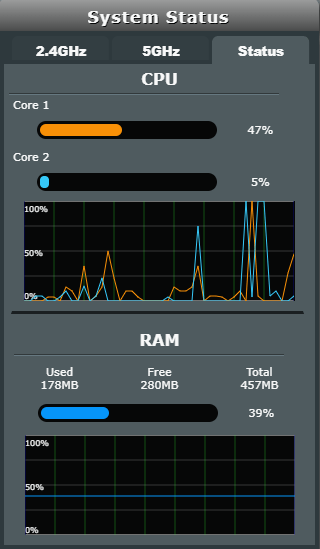
November 24, 2018 at 6:55 pm #1612As an example, my RAM usage stats look like this with AiProtection off.
I always flash firmware twice with a factory reset each time. I do get spikes in CPU usage.
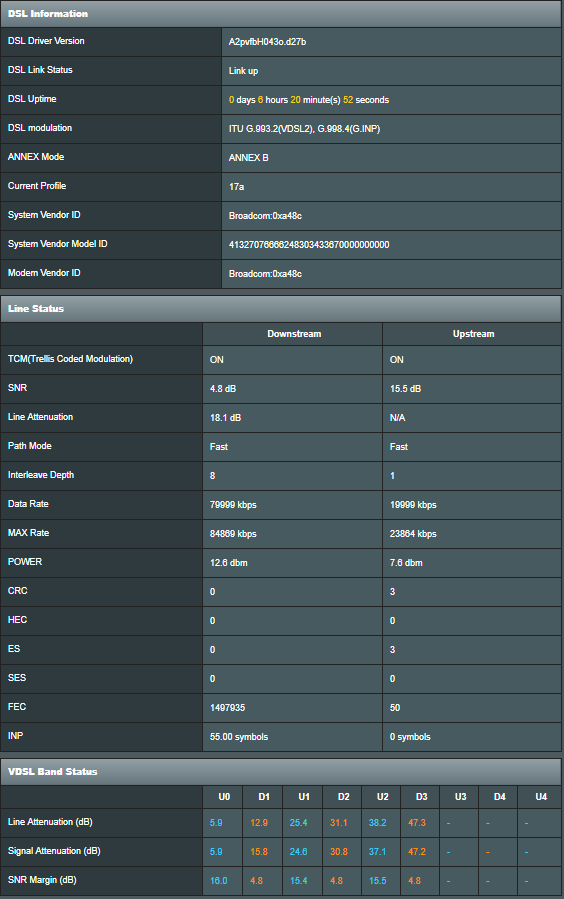
Today swapped the ISP provided ADSL cable to a CAT6 one. After over 6 hours connection no CRC or ES errors downstream. Hoping it stays like this.
Attachments:
You need to login in order to vote
November 24, 2018 at 8:14 pm #1615When you swapped your ISP cable, was you previously getting CRC errors,?
I have always thought that some ISP cables are better than others?
You need to login in order to vote
November 24, 2018 at 8:26 pm #1616[quote quote=1615]When you swapped your ISP cable, was you previously getting CRC errors,? I have always thought that some ISP cables are better than others?[/quote]
I was getting some CRC and ES errors but not enough to cause DLM to react. The CAT6 is much thicker cable and is twisted to reduce interference. It can only be better than the ISP provided ADSL cable.
You need to login in order to vote
November 24, 2018 at 8:47 pm #1617Interesting, ? I use the ADSL Nation Pro+ low loss twisted-pair cable to cat 5e standard, combined with shielding from Tandy, and never had any issues.
Cat6 is a very thick gauge wire and could for DSL reduce signal quality over a long length from mater socket to modem. but sounds like it is working well for you?
You need to login in order to vote
November 24, 2018 at 9:04 pm #1618[quote quote=1617]Cat6 is a very thick gauge wire and could for DSL reduce signal quality over a long length from mater socket to modem. but sounds like it is working well for you?[/quote]
The wire is only 1.5M long, which is slightly longer than I need. Hopefully it doesn’t cause any issues with my line. Speed test has actually shown a slight increase from a best of 73.5MB to 74.5MB. Not much of an improvement, but wasn’t expecting anyway as my Sync was already at maximum.
You need to login in order to vote
- AuthorPosts


- You must be logged in to reply to this topic.