

› UKTH forums › 🛜 Wireless Routers & Modems › ASUS & Wireless › ASUS New DSL-AX82U Modem Router Combo – Wifi 6 ASUS New DSL-AX82U Modem Router Combo / Wifi 6 At long last I am now able to (officially) confirm that ASUS are in the process of releasing there latest addition...
- This topic has 711 replies, 37 voices, and was last updated 2 weeks, 2 days ago by
 El3rt1cal.

- AuthorPosts
- December 30, 2022 at 9:27 pm #22124
i created a topic
ASUS DSL-AX82U IPv6 Issue – UKTechHub.com
Liked by:You need to login in order to vote
December 30, 2022 at 9:30 pm #22126i created a topic
In a completely sane world, madness is the only freedom (J.G.Ballard).
You need to login in order to vote
December 31, 2022 at 10:00 am #22134There are those who say that HDD hibernation does not work, can you check it?
You need to login in order to vote
January 6, 2023 at 7:03 pm #22306Hello everyone
I currently have a BT FTTC connection and it seems like this router would serve me well. I have some questions:
1: It seems like there is always some bugs in the CAKE implementation for whatever Asus router I am considering. Is this one ok now? Seemed to be some issues last year or so.
2: My plan right now is FTTC to the DSL-AX82U directly and then once BT FTTP comes available, just unplug the DSL modem cable and go from the ONT directly into the WAN port on the DSL-AX82U. The problem is as you all likely know BT uses PPPoE. I can only see something about PPPoE Relay on the specs page which I think from my limite dunderstanding is vastly different to just normal PPPoE support.
Now I know that the router has to have PPPoE support via DSL as how else would I login e.g. bthomehub@btbroadband.com stuff but not sure about the WAN port.
Thank you
You need to login in order to vote
January 6, 2023 at 8:00 pm #22308Welcome, for the DSL-AX82U, ASUS stock firmware does not support CAKE QoS, but it is supported in an ASUSWRT-Merlin fork provided by @GNUton for the DSL-AX82U.
My DSL-AX82U is plugged in currently using its WAN port and connected to a DrayTeK 130 modem and is working well using PPPoE, so very simular to using a FTTH/P ONT.
I use BT (VDSL) so a copy of my settings from my DSL-AX82U Internet Connection that will work for yourself when you switch to BT full fibre.
Hope that helps ?
Attachments:
In a completely sane world, madness is the only freedom (J.G.Ballard).
Liked by:You need to login in order to vote
January 6, 2023 at 8:57 pm #22311Thank you for the reply. Not that I should be intruding on your setup but can I ask why you have the Draytek in the pipeline? Is the modem on the 82U not as high sync speed or something?
You need to login in order to vote
January 6, 2023 at 9:09 pm #22312I was testing my DSL-AX82U the other day for forum member @BlackBird as they was having issues with IPv6 and needed some settings verified using the WAN port and have not changed it back as yet.
The DSL-AX82U broadband modem chipset is broadcom and works well, so no problems with that and fully supports G.inp, so a nice little synch rate increase if you are connected to a Huawei cab
In a completely sane world, madness is the only freedom (J.G.Ballard).
You need to login in order to vote
January 6, 2023 at 9:51 pm #22313Can anyone fully confirm that the router does have PPPoE support on WAN? I know you said it does but that was using a modem infront. The reason I bring this up is I nearly got stung with just thinking every router supported PPPoE directly.
Case in point: The eero 2nd gen routers. These only work when you have a modem infront to handle the PPPoE. If you connect the eero 2nd gen directly to the ONT for FTTP, you won’t actually get internet as it doesn’t directly support PPPoE.
You need to login in order to vote
January 6, 2023 at 10:15 pm #22314@BlackBird Issue with IPv6 was when he was using his DSL-AX82U WAN port with his FTTH connection ONT. hopefully he we see this thread and comment also.
Edit: I did forget to mention are you also planning to use Digital ?
In a completely sane world, madness is the only freedom (J.G.Ballard).
You need to login in order to vote
January 7, 2023 at 1:01 pm #22320Can anyone fully confirm that the router does have PPPoE support on WAN? I know you said it does but that was using a modem infront. The reason I bring this up is I nearly got stung with just thinking every router supported PPPoE directly. Case in point: The eero 2nd gen routers. These only work when you have a modem infront to handle the PPPoE. If you connect the eero 2nd gen directly to the ONT for FTTP, you won’t actually get internet as it doesn’t directly support PPPoE.
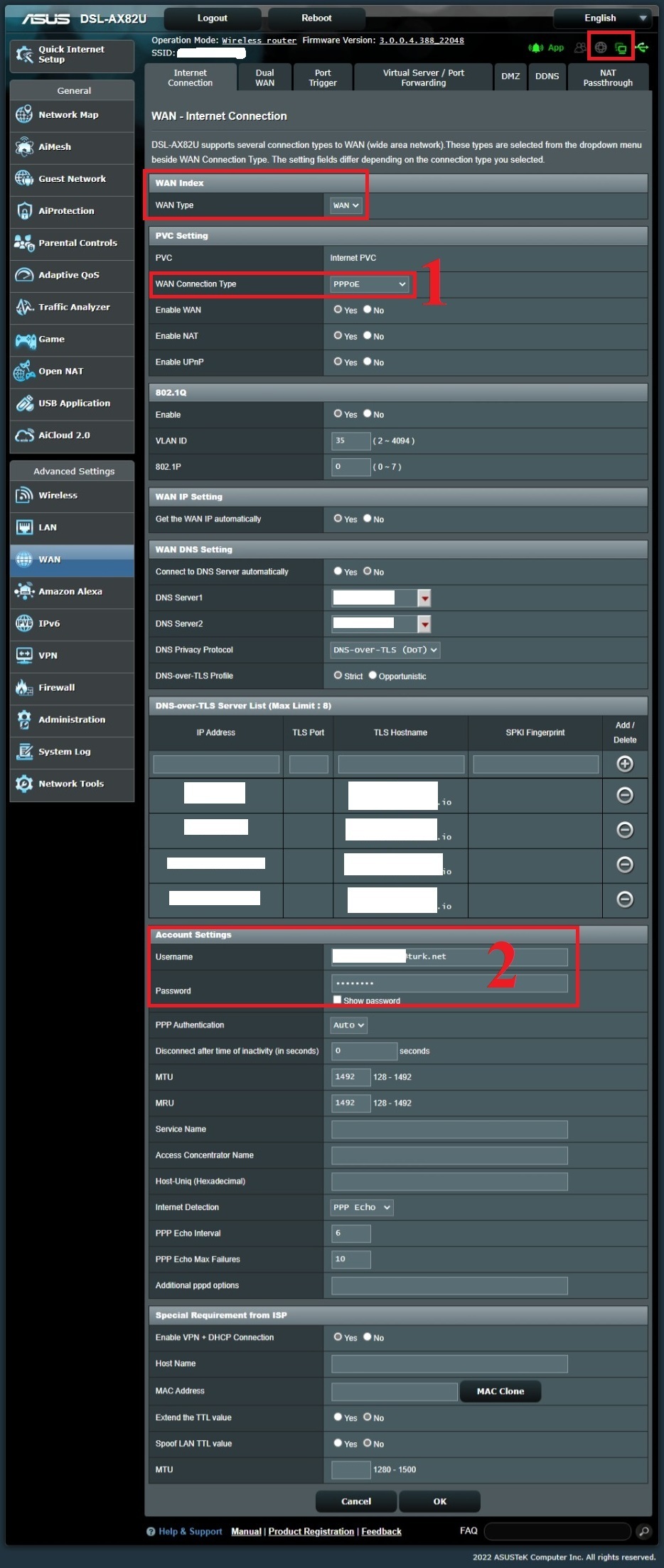
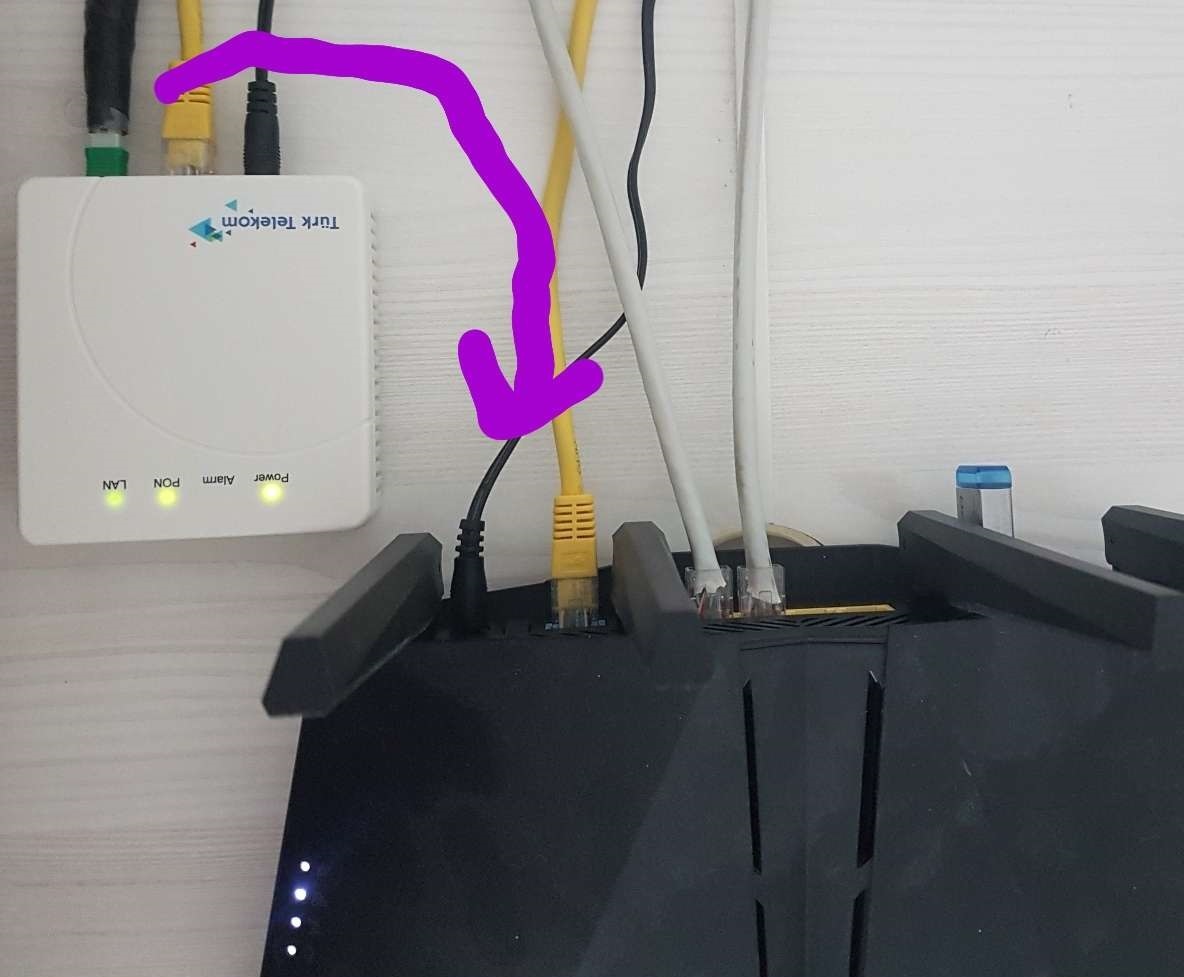
Yes I’m using it with PPPoE directly from the PON device output, but you need to make the 1st WAN setting WAN port WAN because this is a modem and the 1st WAN setting is selected as DSL by default. You can also use the WAN PPPoE setting in the same way as DSL.
I have attached a few screenshots for you, just pay attention to the ones with the red frame.
Note: I am in a different country, so the Internet (VLAN 35), IPTV (VLAN 55), and VoIP (VLAN 46) are provided through different VLAN IDs, so you may see that I have entered VLAN 35 for Internet service, but please ignore this as this option should be disabled in your country.”
Attachments:
Liked by:You need to login in order to vote
January 7, 2023 at 1:24 pm #22328Note: I am in a different country, so the Internet (VLAN 35), IPTV (VLAN 55), and VoIP (VLAN 46) are provided through different VLAN IDs, so you may see that I have entered VLAN 35 for Internet service, but please ignore this as this option should be disabled in your country.
That is great news and thank you @BlackBird , as you say, UK we do not need to enter any VLAN ID’s as this is handled by ONT.
In a completely sane world, madness is the only freedom (J.G.Ballard).
You need to login in order to vote
January 7, 2023 at 2:02 pm #22329Thank you @uk-sentinel and a small piece of information I would like to add is that I have been using PPPoE over FTTH for 7 months, and there have been no problems so far. The Asus WRT interface has all the necessary settings for PPPoE. Before the team came to set up the transition from VDSL to FTTH, I had already made the same VDSL (WAN) setting as WAN (WAN). When the fiber connection was made, it was sufficient to just connect the ONT’s LAN port to the Asus WAN port, and my Internet access continued uninterrupted.
Liked by:You need to login in order to vote
January 7, 2023 at 2:07 pm #22330In a completely sane world, madness is the only freedom (J.G.Ballard).
You need to login in order to vote
January 7, 2023 at 2:56 pm #22331I’d just like to say thank you very much to both of you. It’s been refreshing signing up to a forum and getting great and detailed responses (especially even taking the time to attach actual camera photo).
Sentinel, I would like your take on my situation. I don’t feel right creating a new thread and since it’s technically still pertinent to the DSL-AX82U, I hope you don’t mind if I ask here.
So my family have somehow been able to get along ok in a 3 story house with something as simple as a Billion 8800NL (in the center of the whole property). Sure it had complete dead spots at the far corners and outside reception was just not a thing but it worked. However, the wireless on it just simply died recently. It would not broadcast an SSID anymore. I managed to get a replacement 8800NL from Ebay for £15 and that was fine. The issue is my brother got some Blink outdoor wireless cameras for the property and as you can guess, it’s having trouble to connect. Now the cameras directly screwed above the doors work good enough (1-2 bar connection) but the one we were thinking of placing approx 10 foot on an adjacent wall to look over the complete driveway is not working well if at all.
It seemed time to look at a new router or better yet, a mesh system to completely cover the house. With only having a 40/10 BT line, it doesn’t really matter the speeds of the satellite nodes. They just have to be able to extend the signal enough to allow the cameras to connect reliably. I have a gaming PC but this will always be wired into the main router. Everything else on the wireless doesn’t need super fast pings or speed.
For years I always thought that ping spikes while downloading or others using internet was just because the CPU on the router sucked. I now know after alot of research recently it’s likely bufferbloat so I thought I may aswell try and solve that problem at the same time (for the wired in gaming PC anyway). I know I needed a router with SQM features (preferably cake or fq_codel).
The options I came up with was Eero, TP-Link Deco and ofcourse ASUS. I also thought to myself that since I’m on FTTC now but FTTP is apparently coming soon, I should get one that will be directly compatible with both. How I saw the products:
Eero: This is such a mixed bag. From all my reading the 2nd gen product seems to be the best because it has cake compared to what I read is a very flawed implementation of fq_codel on the newer 6 models (something about offload engines and very technical stuff). However, as I stated above about PPPoE the 2nd gen eero with cake does not support PPPoE directly. It always has to have a modem infront. The 6 models do support PPPoE directly but then I have an SQM method that barely works and with how expensive it is, not ideal. The thing is I can’t just bridge the 2nd gen as then you lose access to SQM feature…. ahhhhh!!!!!!
TP-Link Deco: This should on paper be a pretty good solution but… something tells me it won’t be. They sell DSL versions of the products (X20-DSL and X73-DSL). The plan there is FTTC directly into the unit and then when FTTP comes, just use one of the 4 ethernet ports on the router (all 4 support PPPoE WAN). The only downside (besides being tied to a smartphone app like Eero) is they have some form of a QoS feature but it’s never going to be anywhere close to cake which is super “plug n play” on Eero. I can’t even find anyone with a Deco product willing to run bufferbloat tests for me to see if their QoS even does anything.
The other thing putting me off TP-Link is privacy issues: https://www.reddit.com/r/hardware/comments/tbthjj/psa_newer_tplink_routers_send_all_your_web/
They said they “fixed” this in firmware updates but none of those DSL units I am looking at had firmware updates.
Asus: The DSL-AX82U seems perfect as a standalone router. It will do the FTTC modem route and serve me well on the move to FTTP. The problem I see myself having is that’s only for one router. I know that all routers have to adhere to transmission power regulations or whatever so I can’t magically think that it will be better than the Billion I have for range (cameras only work on 2.4 Ghz). Since I will need merlin firmware to enable cake, my instincts tell me that I will likely have some issues if I try to add other Asus access points via AiMesh. It’s likely not been tested that much. Plus if I go the multiple Asus router route, it can get somewhat expensive. Even if I go for the non DSL modem equivalent (the TUF-AX5400) that’s still £132. 3 of them and you’re looking at basically £400. With the TP-Link and Eero I can get 3 packs all for under £300 that are unlikely to have as many firmware bugs since it’s official release stuff.
Now I know after reading all this you are likely just gonna say stuff like “just wire access points” but nobody in the house has experience with drilling or laying cables and my family already thinks it’s weird that we now will require 2 devices for internet (gonna use the 8800NL in modem bridge mode for the router/mesh system). Laying cables would just be a no no.
Thanks for any suggestions on that wall of text.
You need to login in order to vote
January 7, 2023 at 3:37 pm #22332I’d just like to say thank you very much to both of you. It’s been refreshing signing up to a forum and getting great and detailed responses (especially even taking the time to attach actual camera photo).
No problem and glad to help we are, can I just confirm, what type of gaming do you do, PC, Xbox and do you use also products like iPhones, Android etc.
As I am not aware of the wiring in you home and where the BT master socket is located etc, then as you already use a 8800NL, which seems to work, almost, then maybe considering a single (more powerful) unit which will improve wifi coveridge and is also suitable for Gaming, Cake QoS and can be Wifi Meshed if initial wifi coveridge is not suitable .
Given those parameters, I was initially drawn to the ROG Rapture GT-AC5300 or ROG Rapture GT-AXE16000.
They are both supported by ASUSWRT-Merlin so Cake QoS will be available, wifi will be better due to the fact that Billion 8800NL only supporting Wireless N standards and has no external antennas etc.
Alas the above routers have no inbuilt modem, so the Billion 8800NL could be bridged.
The real question is how long you plan to keep your FTTC connection and if/when you move to FTTH, what speeds you are considering and available budget etc ?
The ROG Rapture GT-AC5300 is well suited for line speeds upto around 300 – 500 Mbps (ish) but unsure if the GT-AC5300 has reached its EoL (End of Life) for Firmware support.
The DSL-AX82U is also a good choice if you use the @GNUton fork (ASUSWRT-Merlin) firmware , but will suffer if you move to FTTH and use QoS (if needed at all) at 900Mbps etc. and hence looking at the ROG Rapture GT-AXE16000.
(Note; all speed assumptions and suitability are approximate)
In a completely sane world, madness is the only freedom (J.G.Ballard).
You need to login in order to vote
- AuthorPosts




- You must be logged in to reply to this topic.