

› UKTH forums › 🛜 Wireless Routers & Modems › ASUS & Wireless › ASUS ZenWiFi AX Whole Home Tri-Band Mesh WiFi 6 System Not sure if this is the right place to ask…. I am thinking of upgrading my Google Mesh wifi to the above. Has anyone used this and does it...
- This topic has 1,416 replies, 25 voices, and was last updated 1 month, 3 weeks ago by
 UK Sentinel.

- AuthorPosts
- August 6, 2022 at 7:06 am #20482
Strong possibility it is RADAR (DFS) related, a lot more going on in UK airspace due to the war in Ukraine.
In the logs (Primary / Node) look for “time elapsed” value next to the DFS state, it will tell you when the last DFS channel monitoring occurred.
Maybe AiMesh node is located upstairs / by window etc. and this is the trigger ?
In a completely sane world, madness is the only freedom (J.G.Ballard).
You need to login in order to vote
August 7, 2022 at 12:46 pm #20490I have noticed on another forum that people are reporting that the wireless backhaul is falling back to the 2.4GHz band. I can’t test it as I only have the one router but worth a mention.
Liked by:You need to login in order to vote
August 7, 2022 at 1:44 pm #20491I have noticed on another forum that people are reporting that the wireless backhaul is falling back to the 2.4GHz band. I can’t test it as I only have the one router but worth a mention.
In a completely sane world, madness is the only freedom (J.G.Ballard).
You need to login in order to vote
August 7, 2022 at 10:40 pm #20492I have moved from Gnuton’s Merlin to official FW. Mesh connected to channel 100 and 160MHz. I will monitor if that changes or experience any issues.
Liked by:You need to login in order to vote
August 8, 2022 at 6:55 am #20493I have moved from Gnuton’s Merlin to official FW. Mesh connected to channel 100 and 160MHz. I will monitor if that changes or experience any issues.
That is kind of you, it will be interesting if you also experience the wireless backhual falling back
In a completely sane world, madness is the only freedom (J.G.Ballard).
You need to login in order to vote
August 8, 2022 at 8:14 am #20494Strong possibility it is RADAR (DFS) related, a lot more going on in UK airspace due to the war in Ukraine. In the logs (Primary / Node) look for “time elapsed” value next to the DFS state, it will tell you when the last DFS channel monitoring occurred. Maybe AiMesh node is located upstairs / by window etc. and this is the trigger ?
I’ve forced 160MHz and will see what happens since the new firmware.
Update: It does nothing. As in a Wi-Fi scanner shows no signal at all. And the mesh node cannot connect, or connects at 2.4GHz.
The wireless log shows what channel it is supposed to be on – but it simply doesn’t appear. The SSID is hidden, but a scanner can still see it – and doesn’t.
No mention of Radar detection.
I’ll try unhiding the SSID and see if I can toggle this or anything else that might fix the issue.
Update: Nope!
Wireless log:
SSID: “TyrellCorporation_5G-2”
noise: -85 dBm Channel: 128/160
BSSID: F0:2F:74:8D:C3:88 Capability: ESS RRM
Supported Rates: [ 6(b) 9 12(b) 18 24(b) 36 48 54 ]
HE Capable:
Chanspec: 5GHz channel 114 160MHz (0xef72)
Primary channel: 128
HT Capabilities: 40Mhz SGI20 SGI40
Supported HT MCS : 0-31
Supported VHT MCS:
NSS1 Tx: 0-11 Rx: 0-11
NSS2 Tx: 0-11 Rx: 0-11
NSS3 Tx: 0-11 Rx: 0-11
NSS4 Tx: 0-11 Rx: 0-11
Supported HE MCS:
80 Mhz:
NSS1 Tx: 0-11 Rx: 0-11
NSS2 Tx: 0-11 Rx: 0-11
NSS3 Tx: 0-11 Rx: 0-11
NSS4 Tx: 0-11 Rx: 0-11
160 Mhz:
NSS1 Tx: 0-11 Rx: 0-11
NSS2 Tx: 0-11 Rx: 0-11
NSS3 Tx: 0-11 Rx: 0-11
NSS4 Tx: 0-11 Rx: 0-11Interference Level: Acceptable
Mode : AP OnlyDFS status: state PRE-ISM Channel Availability Check(CAC) time elapsed 49650ms radar channel cleared by DFS none
Channel Information
—————————————-
Channel 100 A Band, RADAR Sensitive
Channel 104 A Band, RADAR Sensitive
Channel 108 A Band, RADAR Sensitive
Channel 112 A Band, RADAR Sensitive
Channel 116 A Band, RADAR Sensitive, Passive
Channel 120 A Band, RADAR Sensitive, Passive
Channel 124 A Band, RADAR Sensitive, Passive
Channel 128 A Band, RADAR Sensitive, Passive
Channel 132 A Band, RADAR Sensitive, Passive
Channel 136 A Band, RADAR Sensitive, Passive
Channel 140 A Band, RADAR Sensitive, PassiveLiked by:You need to login in order to vote
August 8, 2022 at 8:56 am #20497Don’t know what has happened, but I cannot connect at 5GHz-2 at all anymore, not at 160, 80 or even 20/40/80.
Update: Did a full power off, and waited, and rebooted and it’s back now at 80MHz. So, I think it’s safe to say I won’t be trying 160MHz again for a while.
You need to login in order to vote
August 8, 2022 at 9:37 am #20500Interference Level: Acceptable
Mode : AP OnlyDFS status: state IDLE time elapsed 0ms radar channel cleared by DFS none
Channel Information
—————————————-
Channel 36 A Band
Channel 40 A Band
Channel 44 A Band
Channel 48 A Band
Channel 52 A Band, RADAR Sensitive, Passive
Channel 56 A Band, RADAR Sensitive, Passive
Channel 60 A Band, RADAR Sensitive, Passive
Channel 64 A Band, RADAR Sensitive, PassiveStations List
—————————————-
idx MAC Associated Authorized RSSI PHY PSM SGI STBC MUBF NSS BW Tx rate Rx rate Connect Time
AA:45:C4:F8:E3:8A Yes Yes -69dBm ac Yes Yes Yes Yes 1 80M 325M 6M 00:08:12
44:E4:EE:77:DA:5A Yes Yes -40dBm n No Yes No No 1 40M 150M 135M 34:40:54SSID: “Home-Mesh 5G-2”
noise: -87 dBm Channel: 100/160
BSSID: FC:34:97:9B:0B:08 Capability: ESS RRM
Supported Rates: [ 6(b) 9 12 18 24(b) 36 48 54 ]
HE Capable:
Chanspec: 5GHz channel 114 160MHz (0xe872)
Primary channel: 100
HT Capabilities: 40Mhz SGI20 SGI40
Supported HT MCS : 0-31
Supported VHT MCS:
NSS1 Tx: 0-11 Rx: 0-11
NSS2 Tx: 0-11 Rx: 0-11
NSS3 Tx: 0-11 Rx: 0-11
NSS4 Tx: 0-11 Rx: 0-11
Supported HE MCS:
80 Mhz:
NSS1 Tx: 0-11 Rx: 0-11
NSS2 Tx: 0-11 Rx: 0-11
NSS3 Tx: 0-11 Rx: 0-11
NSS4 Tx: 0-11 Rx: 0-11
160 Mhz:
NSS1 Tx: 0-11 Rx: 0-11
NSS2 Tx: 0-11 Rx: 0-11
NSS3 Tx: 0-11 Rx: 0-11
NSS4 Tx: 0-11 Rx: 0-11Interference Level: Acceptable
Mode : AP OnlyDFS status: state In-Service Monitoring(ISM) time elapsed 24432900ms radar channel cleared by DFS channel 100/160 (0xE872)
Channel Information
—————————————-
Channel 100 A Band, RADAR Sensitive
Channel 104 A Band, RADAR Sensitive
Channel 108 A Band, RADAR Sensitive
Channel 112 A Band, RADAR Sensitive
Channel 116 A Band, RADAR Sensitive
Channel 120 A Band, RADAR Sensitive
Channel 124 A Band, RADAR Sensitive
Channel 128 A Band, RADAR Sensitive
Channel 132 A Band, RADAR Sensitive, Passive
Channel 136 A Band, RADAR Sensitive, Passive
Channel 140 A Band, RADAR Sensitive, PassiveIn terms of my wireless backhaul, under the AiMesh tab, it initially showed the mesh connecting at 2.4GHz ‘uplink-type’. After 5-10 minutes all the nodes changed to 5GHz with connection quality ‘Great’ and various ‘PHY rate’.
Node 1: Transmit rate 2882.3 Mbps, Receive rate 2882.3 Mbps
Node 2: Transmit rate 2041.7 Mbps, Receive rate 2450 Mbps
Node 3: Transmit rate 1945.6 Mbps, Receive rate 2041.7 Mbps
It has remained at Channel: 100/160 for 1 day 11 hours. I am living near central London, if that helps.
Liked by:You need to login in order to vote
August 8, 2022 at 10:00 am #20503Just checked again, and it’s now at 160MHz. Must have taken a while to ‘shift up’.
- Stations List
—————————————-
idx MAC Associated Authorized RSSI PHY PSM SGI STBC MUBF NSS BW Tx rate Rx rate Connect Time
F0:2F:74:8D:C3:F8 Yes Yes -48dBm ax No Yes Yes Yes 4 160M 2632.5M 1361.1M 00:50:42
(Looking at the connect time, it seems it switched about 15 minutes after I posted)
Will now have to see how long it remains like this, or if it drops to 80, or indeed drops to 2.4GHz.
(I am 10.25 miles from Luton Airport, as the crow flies)
You need to login in order to vote
August 8, 2022 at 10:38 am #20506Radar dedection takes some time (after hit at least an hour) to use this channel again and must be finished before the router may use it.
So it is senseless to have a look after restart.If you use ch. 36-64 it should be much faster, but with less power.
Liked by:You need to login in order to vote
August 8, 2022 at 11:36 am #20509Just checked again, and it’s now at 160MHz. Must have taken a while to ‘shift up’
Interesting, delayed start does seem to be the key before AiMesh etc. switches to 160MHz,
Would be good to see how long 160 MHz lasts and if you get a chance, can you check logs to see how long (time) before 160MHz channel was activated from start, as @DodgyDrains took around 5-10 minutes
In a completely sane world, madness is the only freedom (J.G.Ballard).
You need to login in order to vote
August 8, 2022 at 7:18 pm #20513After 1 day 21 hours the XT8 wireless backhaul is still remain on Channel: 100/160.
I will return to Gnuton’s Merlin who has a new stable FW which was released yesterday.
You need to login in order to vote
August 8, 2022 at 7:48 pm #20514After 1 day 21 hours the XT8 wireless backhaul is still remain on Channel: 100/160
Stability is good news
In a completely sane world, madness is the only freedom (J.G.Ballard).
You need to login in order to vote
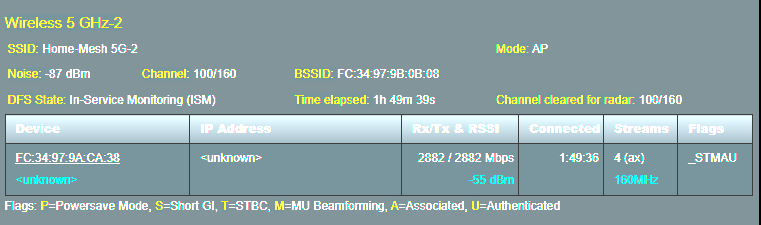
August 8, 2022 at 9:38 pm #20518I am on Gnuton’s Merlin stable 386.07_2 for 2 hours.
10 minutes after dirty update over official FW 49873 the backhaul automatically connected to channel: 100/160.
Attachments:
You need to login in order to vote
August 9, 2022 at 4:02 am #2052010 minutes after dirty update over official FW 49873 the backhaul automatically connected to channel: 100/160.
So 10 minutes seems to be the nominal time period before AiMesh (wireless) backhaul changes to its optimal configuration. (I am sure both ASUSWRT-Merlin and ASUSWRT will use the same parameters)
Good to know and feel free to create a dedicated thread for @GNUtons ASUS ZenWifi fork if you feel this will be a good talking point for others also
In a completely sane world, madness is the only freedom (J.G.Ballard).
You need to login in order to vote
- Stations List
- AuthorPosts




- You must be logged in to reply to this topic.