


Forum Replies Created
-
AuthorPosts
-
So sorry for the mix up. Yes, it’s Asus zenwifi AX XT8. Oh ok, so instead of selecting 20,40,80mhz. I just choose 80mhz only? Also unclick auto channel dfs? thanks a lot! Will try these! More power to you! Great help!
It really also depends on your location and RADAR detection in your area. For me, on 22525 I just set it to 160MHz and it hasn’t had any major issues in 32-33 days uptime. In previous 388.xxxxx FW the wireless backhaul lost connection after 5-7 days for me.
Liked by:
You need to login in order to vote
I had this type of chat with ASUS back in Sept 2022. ASUS will lump UK and EU together with this regulatory requirement and at the time, only US has approved the use of UNII-4 channels. Alas still no idea when UNII-4 will be approved UK/EU but can touch base with ASUS to see if they have any more upto date news ? ———— 5.9G UNII4 is currently only available for US regulations. XT8, XT9, XT12 and GT6 will also support this.
I think it could solve a lot of the 160MHz backhaul issues if/when implemented.
Liked by:
You need to login in order to vote
Any ideas if and when UNII-4 will be passed and deployed in the UK for Wi-Fi band?
UK seems to always be too slow when it comes to tech innovation.
You need to login in order to vote
For me it has now been 25 days on 160MHz with no major issues with the latest 22525 FW, other than having to set 160MHz manually.
Liked by:
You need to login in order to vote
Looks like the 5GHz-2 are the same spec on XT8 and XT9. Only difference is impoved 5GHZ-1 spec.
You need to login in order to vote
My family member has 2 XT9’s in their house and wants to add an additional XT8 to the mesh network. Are there any downside/issues to doing this?
You need to login in order to vote
Possibly select manual control channel. This is what I ended up doing
Liked by:
You need to login in order to vote
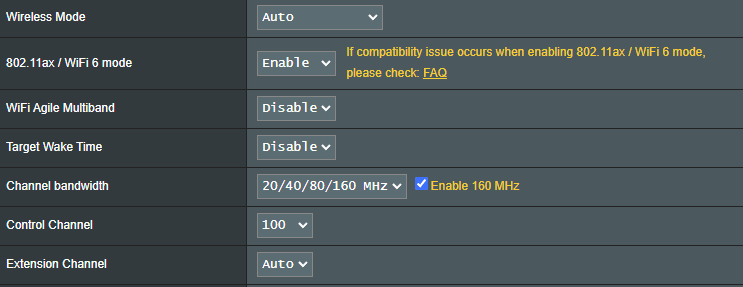
It looks like the only way for me to get full bandwidth (160MHz) on the 5GHz-2 backhaul is to either set channel bandwidth 160MHz, or manually select a control channel.
This behaviour is different to any previous FW I have used or tested.
Liked by:
You need to login in order to vote
@dodgydrains But setting a manual channel of 120 & then 100 it did sustain a 160 bandwidth
I might try this
I have tried this and confirm the same. Setting control channel to Auto, it always connects at 80MHz regardless which channel it automatically connects at. Manually selecting control channel to 100 it connects at 160MHz.
Liked by:
You need to login in order to vote
3.0.0.4.388_22525 went down this evening (PST) at 7 days and a few minutes of up time.
I could still connect to the gui via IP address, from ethernet connected computer, and there was nothing unusual in the logs (forgot to look at free ram
. According to Network Map page, WAN was up, and while WiFi was visible and mesh was connected, wireless devices dropped and couldn’t reconnect. Up until this happened, everything had been working normally, and after router/node manual reboot, all devices are back online.I take it you have wireless backhaul? Might be worth checking if the backhaul had gone down next time it happens. I haven’t noticed your specific behaviour before.
Liked by:
You need to login in order to vote
@dodgydrains On 5GHz-2, 20/40/80/160 enabled & channel set to auto, (always defaulted to 100) & bandwidth always 80MHz)
I had noticed this too
@dodgydrains But setting a manual channel of 120 & then 100 it did sustain a 160 bandwidth
I might try this
You need to login in order to vote
Interesting, I assume as you have manually set 160MHz on 5GHZ-2 wireless backhaul, then if any issues with DFS, no chance of dropping to lower channels. Or did you disable the include DFS channels option to remove this possibility ?
Just manually set it to 160MHz, so only issue will be that it will never revert to 80MHz
Attachments:
You need to login in order to vote
It’s been 7 days now with no issues that I have seen with my setup.
Only thing different I had to do, was manually set 160MHz on 5GHZ-2 wireless backhaul. Otherwise setting it to 20/40/80/160 it settled at 80MHz and remained there.
You need to login in order to vote
I do factory reset via GUI by also ticking ‘Initialize all the settings and clear all the data’.
I then do a hard factory reset on each:
https://www.asus.com/support/FAQ/1046973/#:~:text=1.,and%20turn%20the%20router%20on.
I then setup the whole mesh network from scratch. You can use the app or the GUI which prompts you to set new username and password during the setup.
May be overkill, but works for me.
You need to login in order to vote
Are all your devices showing on your list with 3.0.0.4.388_22525. I’m getting devices not showing, both wireless and wired, even though they are operating properly and I’m also getting devices dropping off the list and reappearing moments later, but they too are all operating normally?
Not something that I have noticed. I did do a full factory reset in the evening after the intial dirty flash update.
You need to login in order to vote
-
AuthorPosts





 . According to Network Map page, WAN was up, and while WiFi was visible and mesh was connected, wireless devices dropped and couldn’t reconnect. Up until this happened, everything had been working normally, and after router/node manual reboot, all devices are back online.