Forum Replies Created
-
AuthorPosts
-
No problems so far on my setup since updating FW. Only thing I did notice is slightly higher RAM usage – 209 MB free to 199 MB after setting up fresh with all my settings manually inputted. Now down to 188 MB free.
Free RAM down to 123 MB, this is quite weird. I did a hard factory reset again 3 days ago and gradually free RAM has gone down to now being at 123 MB.
Anyone else experiencing this? I have never experienced this with other FW versions.
Liked by:
You need to login in order to vote
No problems so far on my setup since updating FW.
Only thing I did notice is slightly higher RAM usage – 209 MB free to 199 MB after setting up fresh with all my settings manually inputted. Now down to 188 MB free.
Liked by:
You need to login in order to vote
ASUS ZenWiFi AX (XT8) Firmware version 3.0.0.4.388.21099
A lot of changes, they have added WireGuard VPN support, so lots of positives also. Feeling brave are you
Already updated last night, hard factory reset twice just in case.
Liked by:
You need to login in order to vote
Version 3.0.0.4.388.21099
ASUS ZenWiFi AX (XT8) Firmware version 3.0.0.4.388.21099
Try more on ASUSWRT 2022 with new features at https://asus.click/ASUSWRT2022
1. Supported WireGuard VPN server and client.
2. Supported VPN fusion. It can easily achieve VPN connection to network devices like Smart TV, Game consoles and without installing the VPN client software.
3. Supported new devices connection notification.
4. Supported connection diagnostic on the ASUS router app.
5. Supported Instant Guard 2.0 which helps easily invite family or friends to join the VPN connection.
6. Upgraded parental control and added reward, new scheduler for flexible setting
7. Fixed USB icon issue in port status.
8. Fixed HTTP response splitting vulnerability. Thanks to Efstratios Chatzoglou, University of the Aegean.
9. Fixed status page HTML vulnerability. Thanks to David Ward.
10. Fixed CVE-2018-1160. Thanks to Steven Sroba.
11. Fixed cfg_server security issue.Please unzip the firmware file first then check the MD5 code.
MD5: d87704f3d53898f19961b6085c621193https://dlcdnets.asus.com/pub/ASUS/wireless/ZenWiFi_XT8/FW_ZENWIFI_XT8_300438821099.zip
Looks like quite a few changes. Recipe for disaster?
You need to login in order to vote
One positive will possibly be for people who have radar issues with DFS channels
Liked by:
You need to login in order to vote
Check from post #91
Looks like it is region specific to US and the firmware will only enable based on region.
I tried finding more info and if UK will support this. No idea what UNII-4 bands are.
Will be interesting to see what Asus say.
You need to login in order to vote
Apparently FW 49873 added support for new UNII-4 band on the XT8.
From what I have read it is something to do with 5GHz-2 antenna which adds additional bands.
Any ideas what this is? Which bands these are and how to select them?
You need to login in order to vote
I am on Gnuton’s Merlin stable 386.07_2 for 2 hours.
10 minutes after dirty update over official FW 49873 the backhaul automatically connected to channel: 100/160.
Attachments:
You need to login in order to vote
After 1 day 21 hours the XT8 wireless backhaul is still remain on Channel: 100/160.
I will return to Gnuton’s Merlin who has a new stable FW which was released yesterday.
You need to login in order to vote
Interference Level: Acceptable
Mode : AP OnlyDFS status: state IDLE time elapsed 0ms radar channel cleared by DFS none
Channel Information
—————————————-
Channel 36 A Band
Channel 40 A Band
Channel 44 A Band
Channel 48 A Band
Channel 52 A Band, RADAR Sensitive, Passive
Channel 56 A Band, RADAR Sensitive, Passive
Channel 60 A Band, RADAR Sensitive, Passive
Channel 64 A Band, RADAR Sensitive, PassiveStations List
—————————————-
idx MAC Associated Authorized RSSI PHY PSM SGI STBC MUBF NSS BW Tx rate Rx rate Connect Time
AA:45:C4:F8:E3:8A Yes Yes -69dBm ac Yes Yes Yes Yes 1 80M 325M 6M 00:08:12
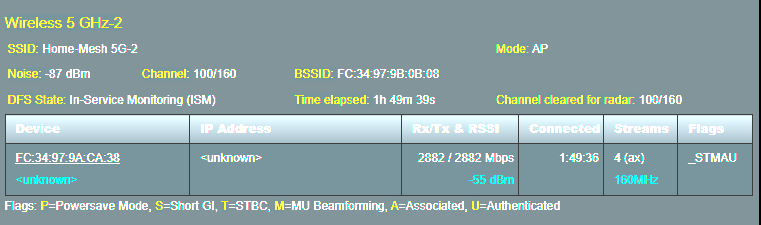
44:E4:EE:77:DA:5A Yes Yes -40dBm n No Yes No No 1 40M 150M 135M 34:40:54SSID: “Home-Mesh 5G-2”
noise: -87 dBm Channel: 100/160
BSSID: FC:34:97:9B:0B:08 Capability: ESS RRM
Supported Rates: [ 6(b) 9 12 18 24(b) 36 48 54 ]
HE Capable:
Chanspec: 5GHz channel 114 160MHz (0xe872)
Primary channel: 100
HT Capabilities: 40Mhz SGI20 SGI40
Supported HT MCS : 0-31
Supported VHT MCS:
NSS1 Tx: 0-11 Rx: 0-11
NSS2 Tx: 0-11 Rx: 0-11
NSS3 Tx: 0-11 Rx: 0-11
NSS4 Tx: 0-11 Rx: 0-11
Supported HE MCS:
80 Mhz:
NSS1 Tx: 0-11 Rx: 0-11
NSS2 Tx: 0-11 Rx: 0-11
NSS3 Tx: 0-11 Rx: 0-11
NSS4 Tx: 0-11 Rx: 0-11
160 Mhz:
NSS1 Tx: 0-11 Rx: 0-11
NSS2 Tx: 0-11 Rx: 0-11
NSS3 Tx: 0-11 Rx: 0-11
NSS4 Tx: 0-11 Rx: 0-11Interference Level: Acceptable
Mode : AP OnlyDFS status: state In-Service Monitoring(ISM) time elapsed 24432900ms radar channel cleared by DFS channel 100/160 (0xE872)
Channel Information
—————————————-
Channel 100 A Band, RADAR Sensitive
Channel 104 A Band, RADAR Sensitive
Channel 108 A Band, RADAR Sensitive
Channel 112 A Band, RADAR Sensitive
Channel 116 A Band, RADAR Sensitive
Channel 120 A Band, RADAR Sensitive
Channel 124 A Band, RADAR Sensitive
Channel 128 A Band, RADAR Sensitive
Channel 132 A Band, RADAR Sensitive, Passive
Channel 136 A Band, RADAR Sensitive, Passive
Channel 140 A Band, RADAR Sensitive, PassiveIn terms of my wireless backhaul, under the AiMesh tab, it initially showed the mesh connecting at 2.4GHz ‘uplink-type’. After 5-10 minutes all the nodes changed to 5GHz with connection quality ‘Great’ and various ‘PHY rate’.
Node 1: Transmit rate 2882.3 Mbps, Receive rate 2882.3 Mbps
Node 2: Transmit rate 2041.7 Mbps, Receive rate 2450 Mbps
Node 3: Transmit rate 1945.6 Mbps, Receive rate 2041.7 Mbps
It has remained at Channel: 100/160 for 1 day 11 hours. I am living near central London, if that helps.
Liked by:
You need to login in order to vote
I have moved from Gnuton’s Merlin to official FW. Mesh connected to channel 100 and 160MHz. I will monitor if that changes or experience any issues.
Liked by:
You need to login in order to vote
I will also wait till Wi-Fi 7 ZenWifi is released as my current units work really well now. Asus FW on the XT8 have worked amazingly for me since Jan/Feb 22 releases.
Not sure why your mesh does not connect to 160MHz. I just set channel bandwidth to 160MHz and it it finds and connects to channel 100. Haven’t noticed it change at all for a long time. Might be worth you trying a factory reset over the weekend?
You need to login in order to vote
Indeed, 2 out of 2 positive feedbacks, sounds like ASUS are still working there magic with there latest firmware offering for the ASUS ZenWiFi AX (XT8)
Asus seem to have upped their game with the new FW releases on the XT8. Refreshing to see after all the previous issues. Well done to you all that sent their logs with their Teams issues.
Liked by:
You need to login in order to vote
I’ve updated and will see how it goes, or more likely my wife will!
Will be great to see how you get on with the latest FW.
I have been using Gnuton’s Merlin builds for the past month or so. Currently on build 386.07_2.
https://github.com/gnuton/asuswrt-merlin.ng/releases
You need to login in order to vote
-
AuthorPosts