Forum Replies Created
-
AuthorPosts
-
I am feeling your pain. I am convinced that 43181 is borked. Did you also experience this issue with 42095?
You need to login in order to vote
You have to ask Merlin for support of other than mainstream-models or do his work on your own for this router like Gnuton did for some DSL-types (Merlin based). But he ever said that he will not support other models than those which can be found on his page.
I asked the question and the response was:
‘I can`t speculate about future model support, sorry.’
You need to login in order to vote
Not sure if this has been asked before, any ideas how to find out if asuswrt merlin will be possible on these ZenWiFi devices?
You need to login in order to vote
I went back to 42095 and all has been good with Microsoft Teams this week. Sent more logs to Asus on Monday, hopefully they can find what is causing this annoying and deal breaking issue.
You need to login in order to vote
It is a typo and will be fixed by tomorrow.
Asus RD are analysing my issue now.
You need to login in order to vote
Looks like the latest firmware was removed and re-uploaded yesterday with 3.0.0.4.384.81351 in the description? Is this likely an error on the website?
Attachments:
You need to login in order to vote
Thanks, just got contacted by ASUS and provided some details of the device I am using that has the Teams problem.
Quick question, looks like my employer uses Zscaler for secure connection. Any ideas what that is?
You need to login in order to vote
Testing is the only way to prove the new Firmware and settings work with your Teams calls next week

Same problem on 43181 with Teams as before, looks like firmware related? I’ll go back to 42095
You need to login in order to vote
Sure I will let you know how Teams test goes next week.
Any ideas what this means?
Channel Information
—————————————-
Channel 100 A Band, RADAR Sensitive
Channel 104 A Band, RADAR Sensitive
Channel 108 A Band, RADAR Sensitive
Channel 112 A Band, RADAR Sensitive
Channel 116 A Band, RADAR Sensitive
Channel 120 A Band, RADAR Sensitive
Channel 124 A Band, RADAR Sensitive
Channel 128 A Band, RADAR Sensitive
Channel 132 A Band, RADAR Sensitive, Passive
Channel 136 A Band, RADAR Sensitive, Passive
Channel 140 A Band, RADAR Sensitive, PassiveWhat, if anything, is there a difference between RADAR Sensitive and RADAR Sensitive, Passive?
You need to login in order to vote
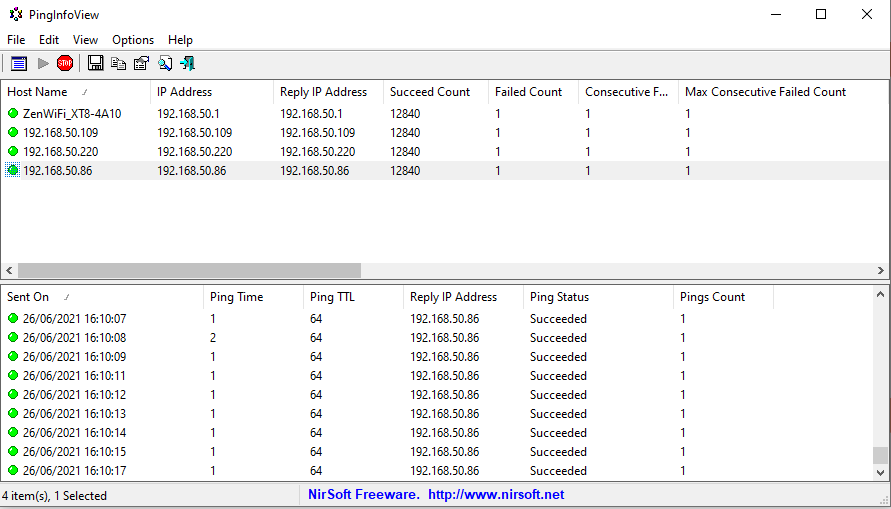
After 4 hours only one ping lost? Does that mean my new settings is not not experiencing the problems like others? Hopefully it resolves the Teams issue next week and this will do for me.
Attachments:
You need to login in order to vote
I am now on 43181. The only problem I have on this firmware is dropped Microsoft Teams calls.
I am checking with following settings on 43181 which Teams worked for me on 42095:
Wireless mode: AX Only
Channel bandwidth: 160MHz
Control channel: 124
Straight away backhaul changed to 160MHz
You need to login in order to vote
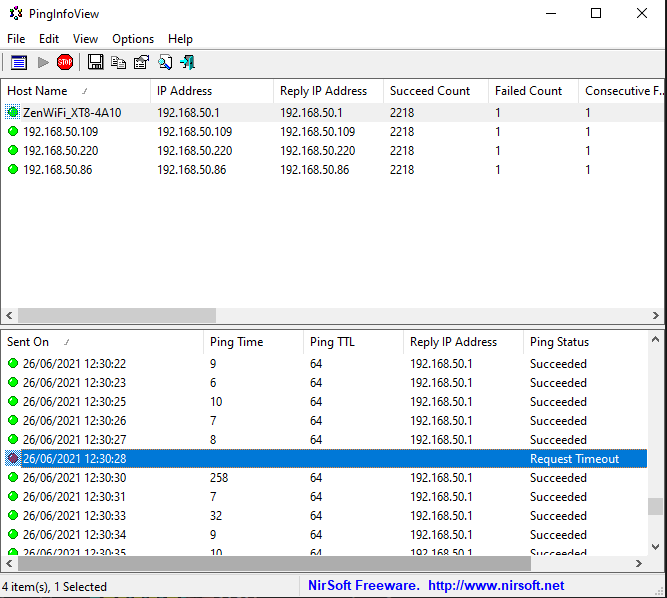
Started PingInfo test at 11:51 AM and got first failed count at 12.30PM. Is this what others were seeing and could this be what is causing my Microsoft Teams issues?
Attachments:
You need to login in order to vote
You simply have to add the IPs of your router and nodes and then press ok… ;) Look at my config
Thanks, I managed to work it out but what should I look out for? Failed count?
You need to login in order to vote
-
AuthorPosts