

› UKTH forums › 🛜 Wireless Routers & Modems › ASUS & Wireless › ASUS – DSL-AC88U / DSL-AC3100 Firmwares (beta's) etc. Looks like a new Beta Release for the DSL-AC88U is available, this version has Telnet enabled and improved 2.4GHz wifi (I believe). DSL-AC88U_v9.10.06_build581_debug.w.zip https://www.asuswebstorage.com/navigate/s/604D61534F2541D1B3CE1CC031A697E4Y UK Sentinel In a completely...
- This topic has 1,435 replies, 105 voices, and was last updated 1 year, 9 months ago by
 UK Sentinel.

- AuthorPosts
- February 2, 2019 at 6:54 pm #2121
I am amazed that you have reached 96%, can I ask two favours, can you screen dump the 96% and also via the ASUS DSL-AC88U feedback form (tick all check box), send a feedback form and mention at beginning of description, as requested by UK Sentinel in response to Router Memory/RAM usage reaching 96%.
I will send them a separate email so they can look for your feedback and hopefully this will assist ASUS with this particular ‘ feature’ ;-)
Then feel free to give router a reboot if you wish as this Cleary (my view also) indicates a Wifi issue.
Thanks
In a completely sane world, madness is the only freedom (J.G.Ballard).
You need to login in order to vote
February 2, 2019 at 10:05 pm #2122Hi, it didn’t last, just logged back into router and it had already done a reboot, that means lost all stats etc and now memory is back down to 43%. Sorry. 1 thing I have noticed is that the general logs start with jan 1st for a few logs and then jump to feb 2nd?
You need to login in order to vote
February 2, 2019 at 11:15 pm #2123Hi, it didn’t last, just logged back into router and it had already done a reboot, that means lost all stats etc and now memory is back down to 43%. Sorry. 1 thing I have noticed is that the general logs start with jan 1st for a few logs and then jump to feb 2nd?
No problem, at least you have a guaranteed 40 days before next reboot ;-)
In a completely sane world, madness is the only freedom (J.G.Ballard).
You need to login in order to vote
February 3, 2019 at 3:37 pm #2124February 3, 2019 at 5:50 pm #2125
@jetspeed – That is exactly what I have passed back to ASUS on ThursdayThanks so much. I thought you may have been ‘overwhelmed’ and lost track. It would be good to get report back from other users to provide further evidence for ASUS, as sample pool size is small.
I am sure the DSL-AC3100 are also impacted by this, any feedback via that channel would also be helpful. ?
In a completely sane world, madness is the only freedom (J.G.Ballard).
You need to login in order to vote
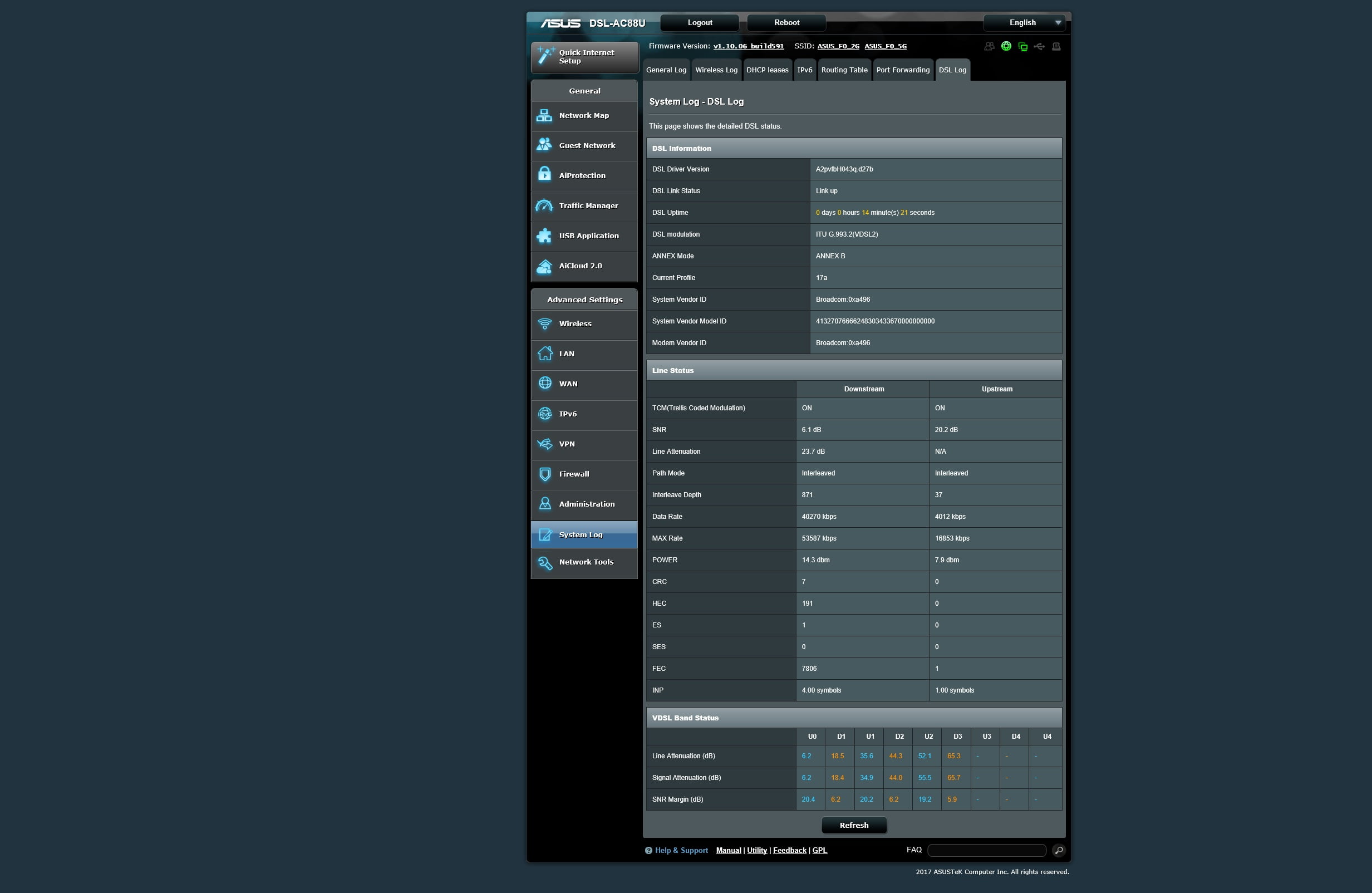
February 6, 2019 at 12:07 am #2147February 6, 2019 at 9:13 am #2150Next time you plug in yourDSL-AC88U, can you screen dump (again) the DSL Stats, It is looking like this is all you are going to get from the DSL-AC88U, which is unfortunate for you ;-(
I assume ISP in Egypt could not get line any better?
In a completely sane world, madness is the only freedom (J.G.Ballard).
You need to login in order to vote
February 6, 2019 at 8:33 pm #2157Next time you plug in yourDSL-AC88U, can you screen dump (again) the DSL Stats, It is looking like this is all you are going to get from the DSL-AC88U, which is unfortunate for you ;-( I assume ISP in Egypt could not get line any better?
Hi, I called my ISP they told me there is still physical problem on the line and its not affect me only
i attached new ASUS status
Attachments:
You need to login in order to vote
February 6, 2019 at 9:51 pm #2159The DLINK does still synch well compared to the DSL-AC88U, thanks for posting stats and hopefully you ISP gets your line sorted, if not you can always change your ISP ;-)
Hopefully issues with your line is why the DSL-AC88U does not synch as high as your DLINK ?
Let us know if/when line issues are fixed and if synch speed increases for DSL-AC88U?
In a completely sane world, madness is the only freedom (J.G.Ballard).
You need to login in order to vote
February 7, 2019 at 3:32 am #2160How is everyone’s uptime with build 591? Mine seems terrible.
After my initial 38 days up, it locked up and had to reboot. It then lasted 5 days. And now after 9 days I had to reboot again.
In all cases I can ping the router but cannot access the admin page so can’t figure out what’s going on.
I really need to go back to an older firmware but I have overseas guests 😟
You need to login in order to vote
February 7, 2019 at 8:42 am #2161How is everyone’s uptime with build 591? Mine seems terrible. After my initial 38 days up, it locked up and had to reboot. It then lasted 5 days. And now after 9 days I had to reboot again. In all cases I can ping the router but cannot access the admin page so can’t figure out what’s going on. I really need to go back to an older firmware but I have overseas guests
A few have also commented that the DSL-AC88U runs out of RAM/Memory and it appears to be related to number of wifi clients.
I cannot recall if the DSL-AC88U has the option to schedule a reboot, once a week, if so I would enable this until ASUS fix this latest issue?
In a completely sane world, madness is the only freedom (J.G.Ballard).
You need to login in order to vote
February 7, 2019 at 3:40 pm #2170A few have also commented that the DSL-AC88U runs out of RAM/Memory and it appears to be related to number of wifi clients. I cannot recall if the DSL-AC88U has the option to schedule a reboot, once a week, if so I would enable this until ASUS fix this latest issue?
The “Enable Reboot Scheduler” option is there under Administration > System
I’m currently on 68% after 21days and looks to be going the same way as others.
Perhaps the issue is with DHCP and the quantity of clients rather than WiFi specifically.
I have 7 wired devices and upto 20+ Wifi devicesI’ll try and send feedback to Asus before it crashes.
I suspect due to the issue I have with no wired clients getting IP ADD’s, scheduled rebooting is not something I want to do as I suspect i’ll have to default the router again, so I want the router to be up for as long as possible, so I don’t have to faff about again.You need to login in order to vote
February 7, 2019 at 4:31 pm #2172I’m at 38 days since last reboot with 591, but the last time was one of those massive RAM consumption events that led to the GUI becoming inaccessible. I’ve no idea what caused it. It came about quickly, not over a period of weeks. I’m not keen to say anything too positive about its present performance because each time I do so on here something bad happens shortly afterwards.
As I’ve mentioned, I don’t have much happening over wifi at the moment, thought that can change from time to time. I’ll have a few Macs, some iPhones and a few more androids here next week so I’ll brace myself. It will be interesting to see if connecting additional devices has any noticeable effects on mine.
You need to login in order to vote
February 7, 2019 at 5:29 pm #2174A few have also commented that the DSL-AC88U runs out of RAM/Memory and it appears to be related to number of wifi clients. I cannot recall if the DSL-AC88U has the option to schedule a reboot, once a week, if so I would enable this until ASUS fix this latest issue?
The “Enable Reboot Scheduler” option is there under Administration > System I’m currently on 68% after 21days and looks to be going the same way as others. Perhaps the issue is with DHCP and the quantity of clients rather than WiFi specifically. I have 7 wired devices and upto 20+ Wifi devices I’ll try and send feedback to Asus before it crashes. I suspect due to the issue I have with no wired clients getting IP ADD’s, scheduled rebooting is not something I want to do as I suspect i’ll have to default the router again, so I want the router to be up for as long as possible, so I don’t have to faff about again.
Maybe, I seem to remember one user had all his (I assume) wifi clients with static IP’s and they still had the RAM/Memory issues, hence my thoughts around wifi.
In a completely sane world, madness is the only freedom (J.G.Ballard).
You need to login in order to vote
February 7, 2019 at 7:49 pm #2175@UK Sentinel
Is there any way to lower line attenuation in ASUS DSLAC88U to be same as DLINK2888A because when I re plugged the DLINK I can see always getting lower line attenuation which I think why I’m getting better sync speed than ASUS DSL AC88U also I noticed when I re plugged ASUS DSL AC88U I see it didn’t use VDSL BAND STATUS D1 like DLINK2888A so if u can contact ASUS about that. Thanks
You need to login in order to vote
- AuthorPosts




- You must be logged in to reply to this topic.