Forum Replies Created
-
AuthorPosts
-
The last FW interface crashes very often and then I see this log.
Aug 25 11:59:55 rc_service: watchdog 1746:notify_rc start_httpd
Aug 25 11:59:55 DSL-AX82U: start https:8443
Aug 25 11:59:55 DSL-AX82U: start https:8443
Aug 25 11:59:55 DSL-AX82U: start httpd:80
Especially this pagehttp://www.asusrouter.com/TrafficAnalyzer_Statistic.asp
-
This reply was modified 2 years, 1 month ago by
 Black Bird.
You need to login in order to vote
The settings used for Asus Routers are common for Turk Telekom GPON and Turknet GPON.
You can set up the WAN connection via a DSL device set to bridge mode or an ONT device used for fiber, as shown in the video. The minimum required settings are explained in the video. If a step is shown in the video, it is absolutely necessary, so do not skip any steps.
IPTV setting is required for “Türk Telekom tivibu ev” because IPTV broadcast is transmitted from the local network (VLAN 55) and not over the internet. Other IPTV services (Apple TV, etc.) do not need IPTV settings because they receive the broadcast directly over the internet, they can receive the broadcast over VLAN 35.-
This reply was modified 2 years, 7 months ago by Black Bird.
-
This reply was modified 2 years, 7 months ago by Black Bird.
Liked by:
You need to login in order to vote
@black-bird, please start a new topic if you wish to continue this subject as this is not really general DSL-AX82UIn a completely sane world, madness is the only freedom (J.G.Ballard).
I don’t want to continue.
I’m just using these commands for now to stop the DSL connection. Although these commands do not turn off the driver, there is only this until Asus does something.
xdslctl connection –down
xdslctl connection –upYou need to login in order to vote
Your knowledge is probably from youtube.
For crosstalk lines must lay in parallel close together on relevant distance to occour.
Without line connected to the modem there is no antenna inside to emit radiation and characteristic wave impedance is not matched to transmit relevant amount of power.
Antennas are basic circuit components. A small piece of metal, based on the frequency it’s designed for, can inefficiently serve as an antenna. The metal piece within the RJ11 port functions as an antenna and broadcasts the DSL initialization signal to its surroundings (one of the two metals). Given the very low power involved, if you wish to capture the signal from the audio recording I provided, you could use a cable tracing device placed very close to the metal in the RJ11 port to listen in. This is simply a test suggestion for better comprehension; communication cannot be established in this manner.
You need to login in order to vote
Yes, but there no current is flowing as there is no line attached and resistance is infinite.
And zero current means zero energy (P = I x R).
So internal chip losses remain.I suggest you research electromagnetic waves. They do not need any circuit to consume energy. The interconnection of cables is for lower power consumption and to allow multiple users to use the same frequencies at the same time. If the cables used are close to each other, crosstalk occurs even if there is no physical contact.
You need to login in order to vote
I see that some manufacturers have this option. If it was trivial, they wouldn’t do it. The audio recording I attached in the previous message I took to verify that it sends the “I’m here DSLAM” signal continuously on an empty DSL port.
Attachments:
You need to login in order to vote
I have sent it as feedback.
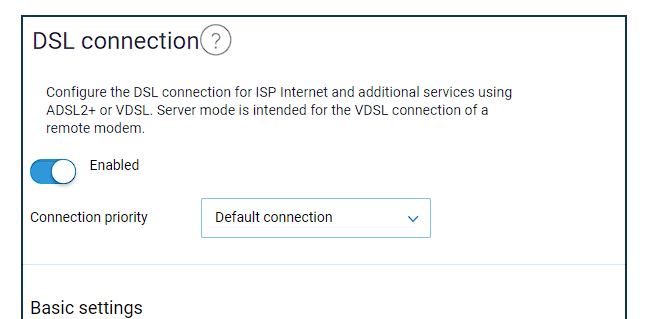
In the device configuration, there is a significant issue regarding excessive power consumption under certain conditions. When DSL is not being used in the WAN configuration, the DSL signal remains active and consumes energy. I am requesting your support to address this matter. Could you provide an update that includes a DSL disable button or an automatic deactivation based on the WAN configuration? In both dual WAN and single WAN setups, if DSL is not configured under a condition, the DSL signal should be turned off for energy conservation. You should consider that many users utilize this device not only with DSL infrastructure but also with fiber infrastructure or as a secondary network device.
Attachments:
You need to login in order to vote
There is a certain user group, like myself, that uses the DSL AX82U solely as a router. When the DSL port is not used, it remains active, consuming energy. Could Asus add an automatic or manual option, perhaps through a confirmation box, to disable the DSL functionality when the DSL WAN is not in use? Otherwise, energy is being consumed to constantly search for a signal on an unused DSL port.
You need to login in order to vote
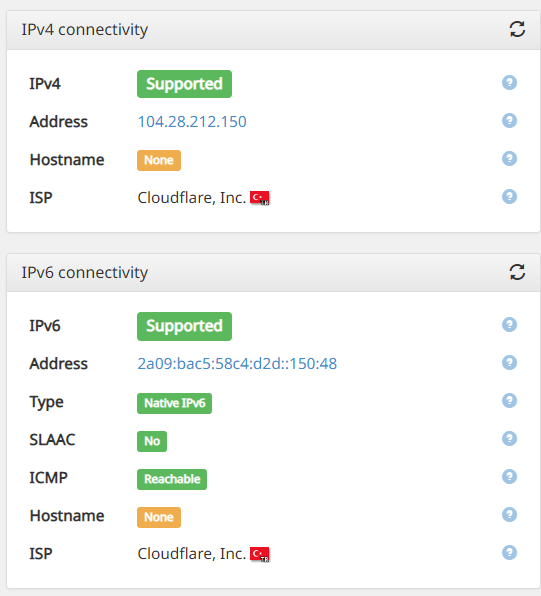
Unfortunately there is no such option, which is why it’s directing the IPv6 connection through the VPN. While conducting these tests, I individually verified whether the IP addresses belong to my internet service provider or to Cloudflare.
Device 1: Routed through VPN
IPv4: VPN IP
IPv6: VPN IPDevice 2: Routed through the default internet connection.
IPv4: ISP IP
IPv6: VPN IPI changed the default internet profile, but the result remained as mentioned above.
Liked by:
You need to login in order to vote
I tried some combinations, and v4 configures the way I want, but v6 always routes through VPN. Even if I change the default profile, when the VPN is active, it still provides IPv6 over VPN.
Liked by:
You need to login in order to vote
@uk-sentinel Thank you, I’ve checked now and I saw that it’s operating as v6.
Attachments:
You need to login in order to vote
Does anyone know if it’s possible to use the built in VPN Fusion function in conjunction with ipv6? Currently if I enable ipv6 (as Sky offers ipv6 support) then nothing will forward through the connection configured in vpn fusion. I know NordVPN do offer a handful of ipv6 servers now that can be configured.
Regarding the subject, Asus had last written this to me in April.
1. VPN Fusion not support IPv6 currently. So the IPv6 traffic of LAN devices will not be forwarded to VPN tunnel. No matter what kind of VPN.
2. WireGuard client may connect to the remote endpoint over IPv4 or IPv6 if the domain name of endpoint could be resolved to both IPv4 and IPv6 address. It just choose the first record in the DNS reponse. If you would like to connect to remote endpoint over IPv6 only, you have to set IPv6 address instead of domain name.Liked by:
You need to login in order to vote
what does this mean?
WRT 5 we should not have expectations.
Liked by:
You need to login in order to vote
Will it stick with AsusWRT version 4 or will it be upgraded to AsusWRT version 5?
Good question, I will check with ASUS
In a completely sane world, madness is the only freedom (J.G.Ballard).
I think the .pkgtb firmware is available on the devices.
Liked by:
You need to login in order to vote
Will it stick with AsusWRT version 4 or will it be upgraded to AsusWRT version 5?
Liked by:
You need to login in order to vote
-
This reply was modified 2 years, 1 month ago by
-
AuthorPosts