Forum Replies Created
-
AuthorPosts
-
Newer chips doesn’t support old lines as well as older ones build for those slower standards.
There is no backward compatibility issue with DSL, but there are compatibility issues with some devices on WIFI. For example, my old phone cannot connect at 80 MHz 2×2, so I am using 433 Mbps instead of 866 Mbps.
Liked by:
You need to login in order to vote
but the vdsl2 Annex B mode I took in the picture above appears
It appears that way, but that information is not accurate.
You need to login in order to vote
VPN Fusion not support IPv6 currently. So the IPv6 traffic of LAN devices will not be forwarded to VPN tunnel. No matter what kind of VPN.
It was said that it is currently not supported, so I will not use this feature for now.
Liked by:
You need to login in order to vote
Annex A and Annex B settings are applicable to hardware and ADSL. Annex modes are not valid for VDSL. Those who tell you to choose Annex A for VDSL seem to mislead you as they are not knowledgeable about the subject. For VDSL, upload and download channels are set as the operator wishes, and you cannot change this.
The operator (Turk Telekom) can allocate more download bandwidth to subscribers who are given less upload speed, or the download and upload channels of a 16 Mbps package user and a 100 Mbps package user are not the same. DSL-AX82U or other brand modems automatically comply with this.
Liked by:
You need to login in order to vote
No idea, sorry
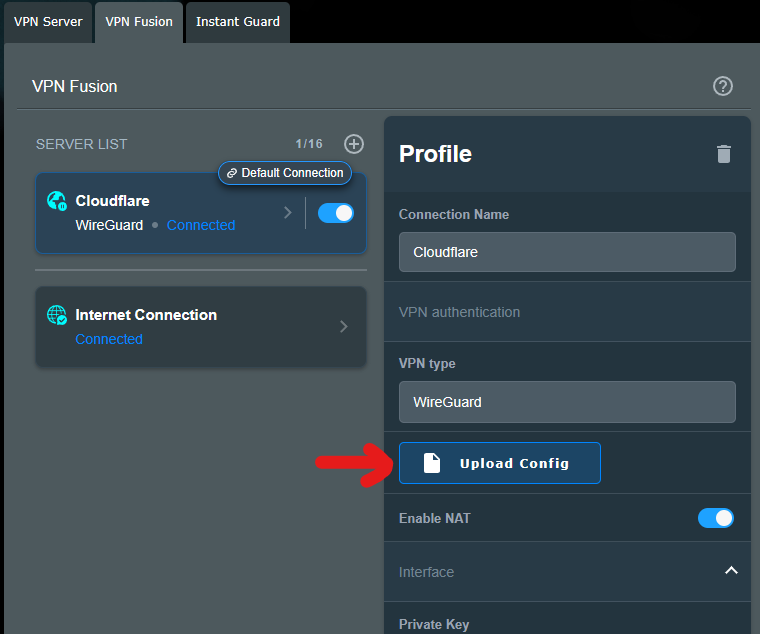
You don’t need to know that much detail. When we import the configuration file (such as wgcf-profile.conf), it doesn’t import correctly and doesn’t work properly, Asus just needs to be aware of this.
Attachments:
Liked by:
You need to login in order to vote
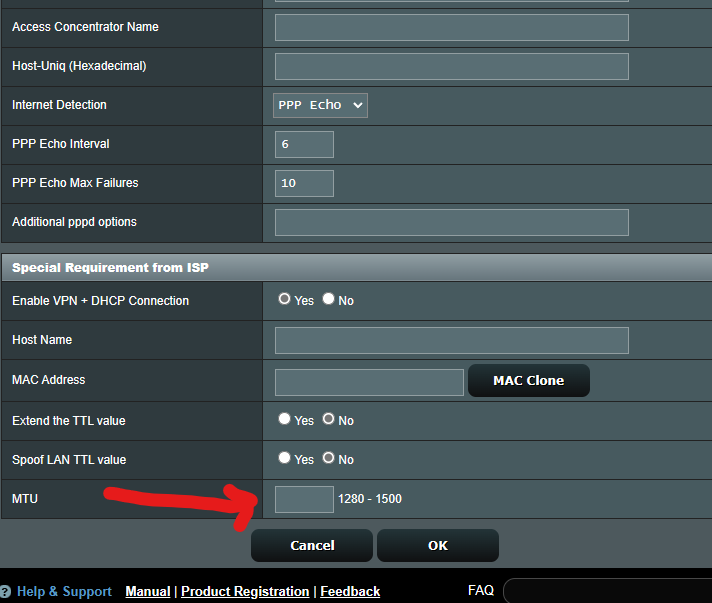
Should I enter it in this field?
should be under ‘Account Settings’ unless your WAN Connection Type is STATIC, then it will be under Special Requirement from ISP = MTU
When I tried this, IPv6 access was lost.
In addition, there is no IPv6 NAT option in VPN Fusion settings.Liked by:
You need to login in order to vote
I am not setting up a server, I am connecting to an already active Cloudflare account. IPv4 is working as expected. When I use the same account with a Wireguard client independently from the modem, IPv6 connectivity is also established.
You need to login in order to vote
Using a VPN is necessary to increase privacy and access some inaccessible websites. In this case, Cloudflare WARP works well. I want both my IPv4 and IPv6 addresses to be hidden. I am not very knowledgeable about these issues, but VPNs are really important where we live. Instead of installing a program on a PC or smartphone, when we enter the VPN address into the modem, the entire network works through the VPN.
…
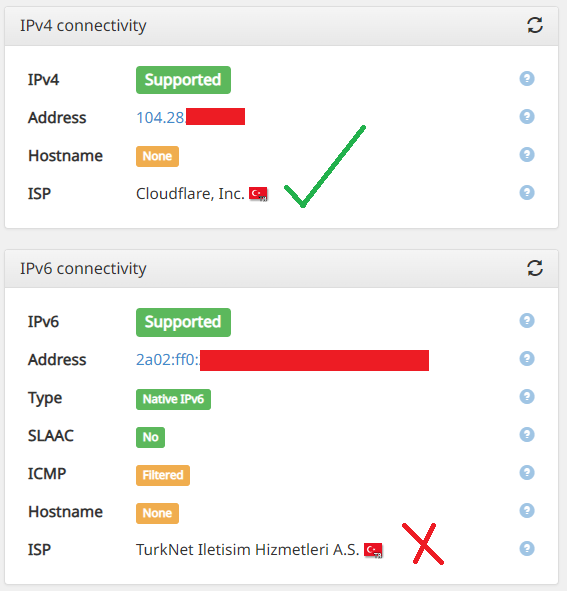
The website whatismyipaddress.com is also showing my IPv4 address as the Cloudflare VPN and my IPv6 address as my direct TurkNet address.
Attachments:
You need to login in order to vote
I have dropped ASUS the question around Wireguard and Co-usage of IPv4 and IPv6 for the DSL-AX82U – will let you know what they say. Alas, I do not have my DSL-AX82U plugged in currently, so cannot check if IPv4 and Ipv6 is supported. For reference: https://www.asus.com/support/FAQ/1048280/
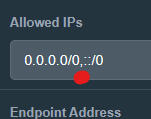
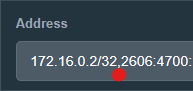
It is possible to enter an IPv6 address, but it is not possible to enter both an IPv4 and an IPv6 address at the same time, which is causing issues with the VPN not working properly. When I tried to enter them separated by a comma, it accepted the input, but still, the IPv6 VPN is not working.
And the MTU option is also not visible.[Interface]
Address = 172.16.0.2/32 (IPv4)
Address = 2606:aaaa:bbbb:cccc:dddd:eeee:bbbb:ffff/128 (IPv6)[Peer]
AllowedIPs = 0.0.0.0/0 (IPv4)
AllowedIPs = ::/0 (IPv6)Liked by:
You need to login in order to vote
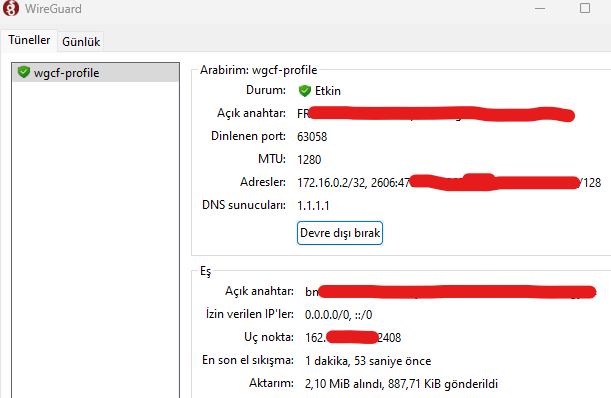
When I import a Wireguard profile, it becomes a problem when it is saved as both an IPv4 and an IPv6 address, but Wireguard only works when I save it with IPv4 entries. How can I configure IPv6 addresses?
Otherwise, the situation becomes complicated like this.
[Interface]
PrivateKey = sAj…
Address = 172.16.0.2/32
Address = 2606:4700:xxxx:xxxx:xxxx:xxxx:xxxx:xxxx/128
DNS = 1.1.1.1
MTU = 1280
[Peer]
PublicKey = bmX…
AllowedIPs = 0.0.0.0/0
AllowedIPs = ::/0
Endpoint = engage.cloudflareclient.com:2408Attachments:
You need to login in order to vote
You are right about this because I have been using Native mode for 2 days without any problems.
Good to know and thanks for the update “shooting a narration video” a budding voice actor
silent modem setup video :)
Liked by:
You need to login in order to vote
-
AuthorPosts