Forum Replies Created
-
AuthorPosts
-
Thank you, ASUS has returned by e-mail and I’m sending answers according to questions.
It’s a strange problem and I think the modem doesn’t seem to be insisting on connecting again after the pppoe timeout. ipv4 works after a while, but it does not allow internet output, although ip addresses are assigned ip to ipv6 wan and local devices.
You need to login in order to vote
Are you ipv6 /64 ? If you send feedback form and detail UK Sentinel in comments box – and explain issues, I can chat with ASUS next week
 <noscript></noscript>Let me know if you do this and when Feedback form was sent .
Yes, ipv6/64
I just submitted a feedback with some explanation and included your name as well.You need to login in order to vote
I install and try all the firmware that comes out, the problem persists.
———————————————
result on a different modem
https://i.ibb.co/fX3dG2W/zte1.jpg
https://i.ibb.co/dpt7XzR/zte2.jpg
———————————————–
these results belong to DSL AX82U
https://i.ibb.co/z8Krzk9/asus1.jpg
https://i.ibb.co/Yf4g2jn/asus2.jpg
———————————————–
You need to login in order to vote
There has been a new fw update but it includes a simple improvement. The IPv6 internet problem persists.
3.0.0.4.386_43600
2021/08/06 53.35 MBytes
ASUS DSL-AX82U Firmware version 3.0.0.4.386_43600
1. Fix GUI issue.
2. Fix bugs during setup wizard.Please unzip the firmware file first then check the MD5 code.
MD5: 4fe1bf2879516744926b33d60d799de2https://dlcdnets.asus.com/pub/ASUS/wireless/DSL-AX82U/FW_DSL_AX82U_300438643600.zip
Liked by:
You need to login in order to vote
When I restart the modem, it works and continues to run for several hours. After a while, the interface WAN (ipv6) and DHCP IP (ipv6) are normal but cannot provide internet access.
You need to login in order to vote
– Fixed sometimes ipv6 not work.
this problem persists
@UK Sentinel
I’ve also provided feedback on this, but can you tell asus about it?
It works at first, it doesn’t work after a while
You need to login in order to vote
the only difference i can see is the max rate has gone up a bit. Also the log shows 6db for a couple of seconds after restarting the router then it jumps to 11
Your internet service provider appears to have made a limit.
It looks that way because it focuses on the SNR set during the first connection, it does not interfere with its operation.
My internet package is 100 Mbps dw / 8 Mbps up so even if my line supports more, my operator limits my line to 100 Mbps (102400 Kbps). Your download speed may be limited to 27400 Kbps for any reason. it may be useful to contact your internet service provider.
Liked by:
You need to login in order to vote
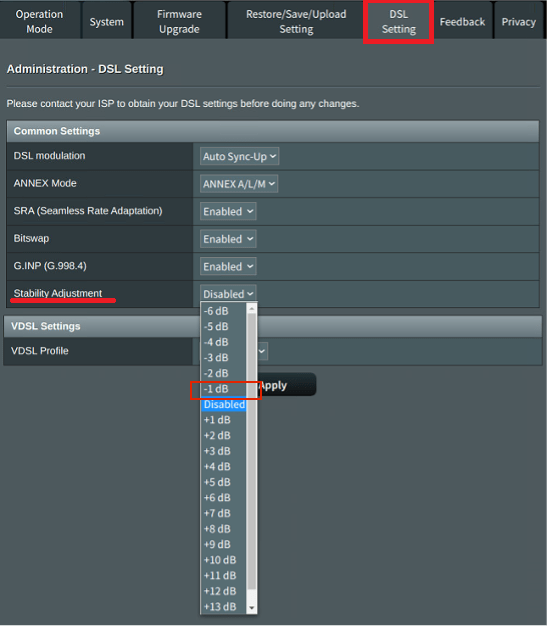
Ok, so spoke with ASUS and they have kindly shared DSL-AX82U beta Firmware (DSL-AX82U_9.0.0.4_386_43563-g9919a0d_cferom_puresqubi) which now the UI of Stability adjustment has changed to -1 dB, -2 dB, … and +1 dB, +2dB etc. and should work for both ADSL and VDSL connections. This is a beta firmware so normal UKTH ASUS beta firmware T&Cs apply (see top of forum) DSL-AX82U_9.0.0.4_386_43563-g9919a0d_cferom_puresqubi.w (5 downloads) Would be good if someone could verify if VDSL Stability adjustment actually works ?
Thanks, SNR tuning works in this firmware as well.
Liked by:
You need to login in order to vote
mine looks like this on 9.0.0.4.386_13831-g7ade778
Yes, this firmware version was introduced for VDSL SNR tuning and remained obsolete. Because you installed an old beta firmware, you are already writing down a known issue.
You need to login in order to vote
so i set the snr to 6db but i think my line has been banded so it showing 10db at the moment.
The way it works is different, so there’s inconsistency. The next firmware was also more understandably updated.
Attachments:
You need to login in order to vote
@black-bird – Did you have access this version (version 9.0.0.4_386_13892) already ?
Unfortunately I couldn’t access it but I know this firmware version was the latest
You need to login in order to vote
Had a chat with ASUS and they have kindly allowed me to share the beta that @black-bird was refereeing to that now supports VDSL Stability Adjustment
Note: usual UKTH ASUS Beta Firmware terms still apply (DSL-AX82U_9.0.0.4_386_13831-g7ade778_cferom_puresqubi.w) DSL-AX82U_9.0.0.4_386_13831-g7ade778_cferom_puresqubi.w (3 downloads) DSL-AX82U_9.0.0.4_386_13892-gf9b01b6_cferom_puresqubi.w Is it possible to access firmware version numbered ?
You need to login in order to vote
@black-bird – have you managed to make this option work for VDSL ?
Yes, it works on beta firmware that I mentioned in the previous message, I only experienced it in 9.0.0.4.386_13831 firmware.
At the first stage, the SNR was selected directly, but 2 dB was more connected. For example, 2 dB is selected and 4 dB is connected. Then they changed this part and you can choose a dB according to the default link – and + . When a new official firmware update arrives, it will work as shown in the statement on the ASUS page.
You need to login in order to vote
any idea what the Stability Adjustment setting does?
SNR Margin Tweak: Better quality lines can provide higher connection speed.
only works for adsl ?
Asus has released a narrative about this.
https://www.asus.com/support/FAQ/1046037
9.0.0.4.386_13831 was first tested in beta and VDSL SNR Tweaking is now active. The recently tested version 9.0.0.4_386_13892 (beta) or higher will be available in a very short time as a firmware, a Broadcom DSL device AX82U as I mentioned earlier VDSL SNR Tweaking is active.
You need to login in order to vote
any idea what the Stability Adjustment setting does?
SNR Margin Tweak: Better quality lines can provide higher connection speed.
only works for adsl ?
VDSL is also available
(with new firmware update)
You need to login in order to vote
-
AuthorPosts

 <noscript>