

› UKTH forums › 🛜 Wireless Routers & Modems › ASUS & Wireless › ASUS – DSL-AC88U / DSL-AC3100 Firmwares (beta's) etc. Looks like a new Beta Release for the DSL-AC88U is available, this version has Telnet enabled and improved 2.4GHz wifi (I believe). DSL-AC88U_v9.10.06_build581_debug.w.zip https://www.asuswebstorage.com/navigate/s/604D61534F2541D1B3CE1CC031A697E4Y UK Sentinel In a completely...
- This topic has 1,438 replies, 106 voices, and was last updated 6 months, 1 week ago by
 alt.james.

- AuthorPosts
- April 25, 2022 at 5:47 pm #18785
No problem and glad to help ;-)
OpenReach G.Fast uses bitswap, SRA and G.INP.
basically, as G.fast incorporates all the good stuff from the years of ADSL and VDSL, just enable everything and if its not needed, it wont be used.
In a completely sane world, madness is the only freedom (J.G.Ballard).
You need to login in order to vote
April 25, 2022 at 6:55 pm #18789The only reason I went for this Asus was because I was sick of the homehub being so locked down that I couldn’t use my Pi-hole without workarounds. This was the only available one that ticked the boxes I needed. I knew it had issues but not this bad, even though this looks like a 100% external problem still having buyers remorse lol.
I may change out to a draytek modem or something, The DSL-AC88U doesn’t even support BTs IPv6.
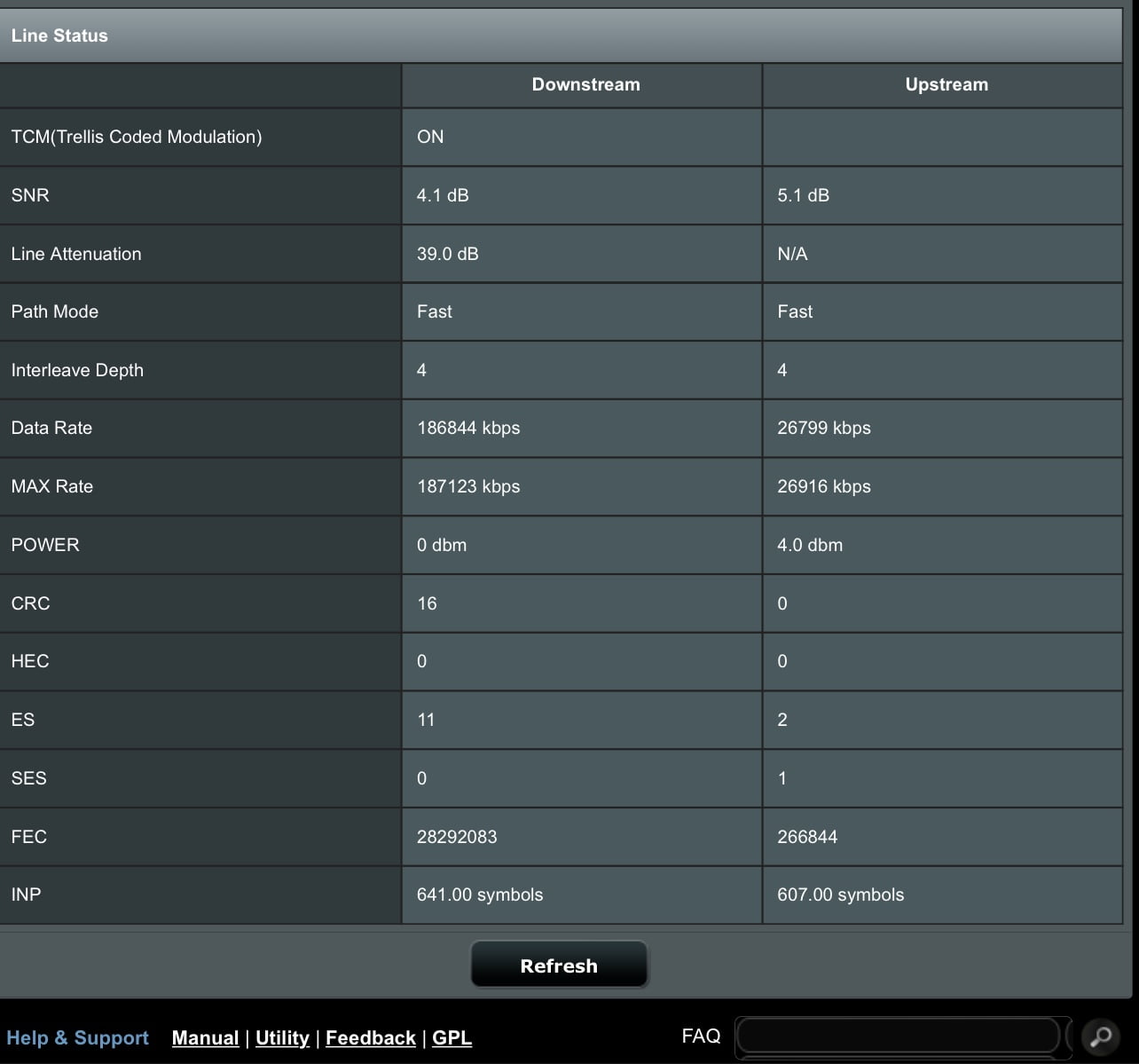
15 hours uptime on the line now and errors and data rates are starting to rear their ugly heads. SNR has never been higher than 2.9/3.1 usually also.
Attachments:
Bt G.Fast | Draytek Vigor 2766AC | RT-AX82u
i9 10900k @ 5.3GHz | 32GB DDR4 4000MHz CL16 | Aorus Xtreme 3080ti 2100MHz | LG 3840x1600 175Hz | X34a 3440x1440 100Hz |
http://www.3dmark.com/spy/23655081You need to login in order to vote
April 25, 2022 at 7:42 pm #18791I may change out to a draytek modem or something, The DSL-AC88U doesn’t even support BTs IPv6.
Trendy paperweight
In a completely sane world, madness is the only freedom (J.G.Ballard).
You need to login in order to vote
April 25, 2022 at 8:10 pm #18792hi chris i just started using the draytek 167 and its super stable
but i dont think it got gfast but i think 165 have it my new system is a dream to work with
running 167 in modem mode conected to a pfsence appliance
to a zyxel switch but if u only got 3 hardwires including ap then u can skip a switch for wifi im using a unifi wifi6ap best upgrade i ever made
Liked by:You need to login in order to vote
April 25, 2022 at 8:18 pm #18793Vigor 166 supports G.fast and I use the Vigor 130 for VDSL
https://draytek.co.uk/products/business/vigor-166
In a completely sane world, madness is the only freedom (J.G.Ballard).
You need to login in order to vote
April 25, 2022 at 8:39 pm #18794<p style=”padding-left: 40px;”>awsome just dont use the router mode</p>
that is like throwing 🎲 mine was crap in that mode but in modem mode its awsome could be difrent firmware in 166 then 167 mine was using bleeding edge 64bit firmwareYou need to login in order to vote
April 25, 2022 at 9:33 pm #18799@Chris – (new Topic created)
In a completely sane world, madness is the only freedom (J.G.Ballard).
You need to login in order to vote
June 4, 2022 at 3:25 pm #19163I recently purchased this device to replace my dead DSL-AC68U and was hoping someone would be kind enough to share the firmware that has telnet access. I use telnet to create a static arp entry so I can wake up my PC remotely. I’m currently on firmware v1.10.08 build593 Aug. 16, 2021
Thanks 😄
You need to login in order to vote
June 4, 2022 at 3:32 pm #19165Welcome, do you own the DSL-AC88U or the DSL-AC3100 ?
I ask as the DSL-AC3100 is released for your region. (wifi standards etc.) but I only have the telnet enabled firmware available for the DSL-AC88U ?
In a completely sane world, madness is the only freedom (J.G.Ballard).
Liked by:You need to login in order to vote
June 4, 2022 at 11:36 pm #19166Thanks for the quick reply and yep it has DSL-AC88U on the sticker and the WebUI
You need to login in order to vote
June 5, 2022 at 7:19 am #19168Thanks for the quick reply and yep it has DSL-AC88U on the sticker and the WebUI
Email sent about firmware and usual ASUS Beta T&C’s apply, see top of forum
In a completely sane world, madness is the only freedom (J.G.Ballard).
You need to login in order to vote
June 5, 2022 at 11:16 am #19169July 26, 2022 at 1:33 pm #20312Hello. A quick question if I may.
Do any of these custom firmware include upgraded Samba server versions?
Thanks in advance.
You need to login in order to vote
July 26, 2022 at 2:10 pm #20313Alas no, the DSL-AC88U is an abandoned project by ASUS and areas such as Samba was not improved upon after final official release. (I believe)
Version 1.10.08_Build593
In a completely sane world, madness is the only freedom (J.G.Ballard).
Liked by:You need to login in order to vote
August 17, 2022 at 6:27 pm #20563Hi all – firstly just wanted to say this is a lovely forum – far more help going on here than the official Asus forum! :)
I just wondered if you wouldn’t mind if I posted this really odd ‘issue’ if you can call it that (more of an annoyance).
I’ve had the DSL-AC88U for some time (about 2 years) and came to settle on firmware v1.10.05 build503 which has been very stable with my FTTC VDSL 80/20 service.
I found later firmwares to have a memory leak that caused the router to lock-up after about 2 weeks).
Today I’ve been lucky enough that FTTP (full-fibre) installed and I’ve upgraded to a 500/80 service but wanted to continue using the DSL-AC88U via it’s E-WAN port if possible.
To ensure everything was a ‘clean’ config, I reset the device back to factory default and used the QIS interface to setup the device using PPPoE, plugged in BT’s ONT box via the ethernet port into the E-WAN port on the on the DSL-AC88U.
Sure enough, everything has worked and I’m getting an excellent stable connection at the rated speed.
The only ‘issue’ I’m experiencing is that (exactly) every 1-minute the router mechanically ‘ticks’ because the DSL cable is no longer present (almost like it’s doing a diagnostic reset on the port to try and get it connected).
I’ve scoured every menu and there doesn’t seem to be any way to fully disable the DSL and stop this from happening.
If I plug in the DSL cable to the old VDSL 80/20 service which they’ve left behind (which is still going to be here until BT are doing a copper recovery next year apparently!), the DSL syncs and the ticking stops.
Obviously that isn’t a solution as the line will be removed at some point.
Just wondering if anyone has experienced this and has a solution for it?
I’m willing to upgrade the firmware but don’t want to suffer the router lock-ups + I couldn’t see it as a specific ‘fix’ in the release notes the releases since the one I’m running.
Many thanks in advance! :)
You need to login in order to vote
- AuthorPosts





- You must be logged in to reply to this topic.