Forum Replies Created
-
AuthorPosts
-
For me, the correct IPv6 setting is “Passthrough”, we previously determined this through testing with Sam Wen
Did SAM suggest IPV6 Pasthrough for DSL-AX82U when you was using DSL or FTTH ? BTW – What is your setting for WAN >Internet Connection> WAN Connection Type ?
Yes, we tested with SAM and he said that I need to use the “Passthrough” option because my ISP does not support DHCP-PD, maybe you remember it. I had been using the “Passthrough” option smoothly for a long time, but after the last update, it started not detecting the internet.
Attachments:
You need to login in order to vote
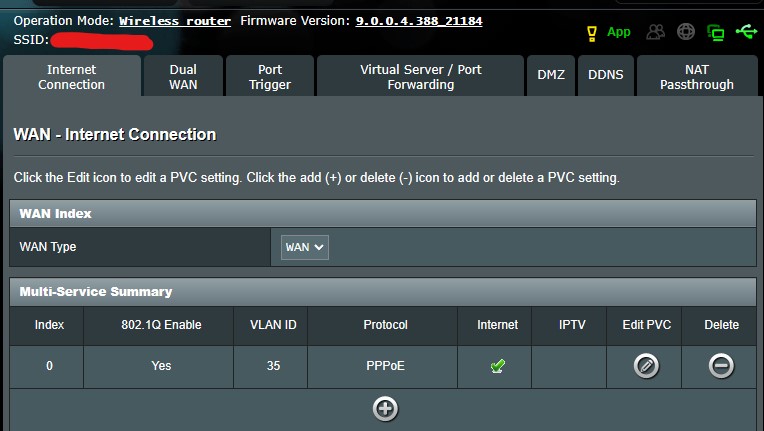
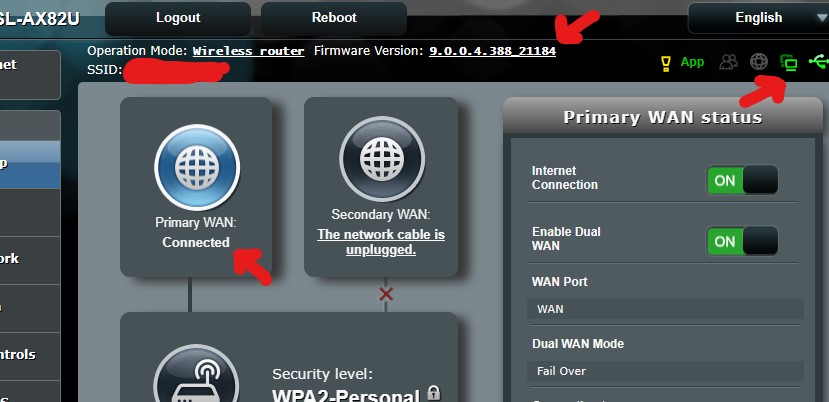
I will show you again that IPv6 is working in the beta version (9.0.0.4.388_21184), please take a look at the screenshots I have attached. I always take these screenshots in real time, not old ones.
You need to login in order to vote
I know the settings of the modem that are definitely working and have checked them again:
IPv6
Connection type: Passthrough
Interface: PPPDual WAN
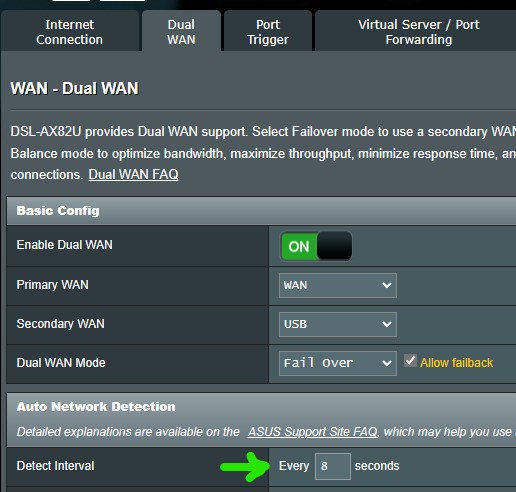
Auto Network Detection: Detect Interval Every 8 seconds (this is necessary)You need to login in order to vote
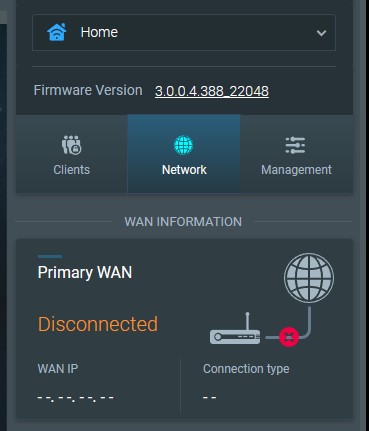
For me, the correct IPv6 setting is “Passthrough”, we previously determined this through testing with Sam Wen(温仁孝) and I was able to use IPv6 perfectly all year. The only change made was upgrading the modem to version 3.0.0.4.388_22048 fw. If I revert back to version 9.0.0.4_388_21184 beta fw, it does not work directly (I used IPv6 for almost two months with this version), but if I reset to factory settings and set it up, it works 9.0.0.4_388_21184 fw. The problem with IPv6 only occurs with version 3.0.0.4.388_22048. I also tried the “Native” option shown in your screenshots instead of “Passthrough”, but the situation did not change.”
You need to login in order to vote
Understood, can you send a Administration – Feedback and explain IPv6 issue and put in comments box ‘UK Sentinel’ and then I can speak with ASUS next week ? When sending feedback, can you use the same email address as you use for this forum registration

I will do what you said in a moment.
I did this.
Liked by:
You need to login in order to vote
ASUS DSL-AX82U Firmware version 3.0.0.4.388_22048 does IPv6 work ?
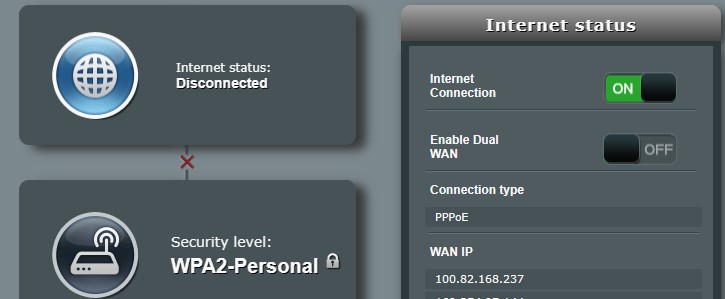
When I try to upgrade or when I set it up from the beginning, it doesn’t work. I have tried it a few times.
Attachments:
You need to login in order to vote
I upgrade to version 9.0.0.4_388_21184-g44bd437 with the same settings, it works IPv6.
I take the modem to the factory settings and re-install it, it works again.
Attachments:
Liked by:
You need to login in order to vote
Are you using the DSL-AX82U inbuilt modem ?
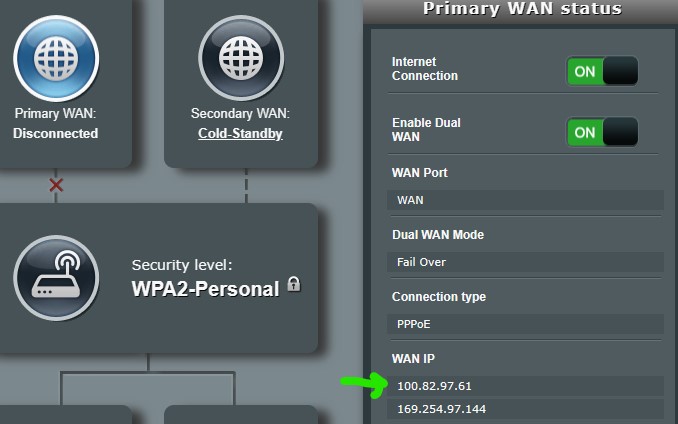
I using VDSL and was transferred to FTTH (same ISP). I connected DSL-AX82U directly to ONT. I’ve been using it this way for a long time. There were no problems until the FW update.
Note: All my account and configuration information on the same ISP is the same as VDSL (username, password and VLAN ID)
You need to login in order to vote
The status has not changed, more modem logs are as follows. I replaced the special parts with ff)
May 5 08:05:41 pppd[1861]: PAP authentication succeeded
May 5 08:05:41 pppd[1861]: peer from calling number ff:ff:ff:ff:ff:ff authorized
May 5 08:05:41 pppd[1861]: local LL address fe80::ffff:ffff:c006:83fc
May 5 08:05:41 pppd[1861]: remote LL address fe80::ffff:ffff:fe0d:bfc0
May 5 08:05:41 pppd[1861]: local IP address 100.82.178.86
May 5 08:05:41 pppd[1861]: remote IP address 172.17.1.250
May 5 08:05:41 pppd[1861]: primary DNS address 193.192.98.8
May 5 08:05:41 pppd[1861]: secondary DNS address 212.154.100.18
May 5 08:05:41 rc_service: ipv6-up 2006:notify_rc start_rdisc6
May 5 08:05:41 rc_service: ipv6-up 2006:notify_rc start_dhcp6c
May 5 08:05:41 rc_service: waitting “start_rdisc6” via ipv6-up …
May 5 08:05:41 miniupnpd[1749]: SendNATPMPPublicAddressChangeNotification: cannot get public IP address, stopping
May 5 08:05:41 wan: finish adding multi routes
May 5 08:05:42 miniupnpd[1749]: shutting down MiniUPnPd
May 5 08:05:42 miniupnpd: it is advised to use network interface name instead of 10.1.1.1/255.255.255.0
May 5 08:05:42 miniupnpd[2058]: HTTP listening on port 35093
May 5 08:05:42 roamast: ROAMING Start…
May 5 08:05:42 rc_service: ip-up 2009:notify_rc start_tr
May 5 08:05:42 miniupnpd[2058]: Listening for NAT-PMP/PCP traffic on port 5351
May 5 08:05:42 TR-069 agent: version match
May 5 08:05:43 usb: USB ntfs fs at /dev/sda mounted on /tmp/mnt/ffff.
May 5 08:05:43 asusware: umount partition /dev/sda…
May 5 08:05:43 disk monitor: unmount partition
May 5 08:05:43 hotplug: USB partition unmounted from /tmp/mnt/ffff
May 5 08:05:43 asusware: Automatically scan partition /dev/sda…
May 5 08:05:43 disk monitor: scan partition
May 5 08:05:44 asusware: re-mount partition /dev/sda…
May 5 08:05:44 disk monitor: re-mount partition
May 5 08:05:44 usb: USB ntfs fs at /dev/sda mounted on /tmp/mnt/ffff.
May 5 08:05:44 asusware: done.
May 5 08:05:44 disk monitor: done
May 5 08:05:49 kernel: [ 61.361936] SHN Release Version: 2.0.2 d2ff630
May 5 08:05:49 kernel: [ 61.366428] UDB Core Version: 0.2.20
May 5 08:05:49 kernel: [ 61.390387] sizeof forward pkt param = 192
May 5 08:05:49 BWDPI: fun bitmap = 43f
May 5 08:05:55 transmission-daemon[3520]: UDP Failed to set receive buffer: requested 4194304, got 1048576 (tr-udp.c:84)
May 5 08:05:55 transmission-daemon[3520]: UDP Failed to set receive buffer: requested 4194304, got 1048576 (tr-udp.c:84)
May 5 08:05:56 miniupnpd[2058]: shutting down MiniUPnPd
May 5 08:05:56 kernel: [ 68.823499] CPU: 1 PID: 3537 Comm: dm2_amuled Tainted: P O 4.1.52 #4
May 5 08:05:56 kernel: [ 68.831047] Hardware name: Generic DT based system
May 5 08:05:56 kernel: [ 68.835866] task: cccfc400 ti: cd8ca000 task.ti: cd8ca000
May 5 08:05:56 kernel: [ 68.841313] PC is at 0xb6baf5c8
May 5 08:05:56 kernel: [ 68.844466] LR is at 0x6
May 5 08:05:56 kernel: [ 68.847007] pc : [<b6baf5c8>] lr : [<00000006>] psr: 20000010
May 5 08:05:56 kernel: [ 68.847007] sp : b6a60840 ip : 00000dd1 fp : 00289464
May 5 08:05:56 kernel: [ 68.858506] r10: 00289464 r9 : b6a60c80 r8 : 00000000
May 5 08:05:56 kernel: [ 68.863741] r7 : 0000010c r6 : 00000001 r5 : 01d9f7c0 r4 : b6bf51dc
May 5 08:05:56 kernel: [ 68.870293] r3 : b6a69950 r2 : 00000006 r1 : 00000dd1 r0 : 00000000
May 5 08:05:56 kernel: [ 68.876873] Flags: nzCv IRQs on FIQs on Mode USER_32 ISA ARM Segment user
May 5 08:05:56 kernel: [ 68.884177] Control: 10c5387d Table: 0b43804a DAC: 00000015
May 5 08:05:56 kernel: [ 68.889970] CPU: 1 PID: 3537 Comm: dm2_amuled Tainted: P O 4.1.52 #4
May 5 08:05:56 kernel: [ 68.897463] Hardware name: Generic DT based system
May 5 08:05:56 kernel: [ 68.902298] [<c00270a0>] (unwind_backtrace) from [<c0022cf8>] (show_stack+0x10/0x14)
May 5 08:05:56 kernel: [ 68.910072] [<c0022cf8>] (show_stack) from [<c045551c>] (dump_stack+0x8c/0xa0)
May 5 08:05:56 kernel: [ 68.917325] [<c045551c>] (dump_stack) from [<c003acf0>] (get_signal+0x490/0x558)
May 5 08:05:56 kernel: [ 68.924750] [<c003acf0>] (get_signal) from [<c0022290>] (do_signal+0xc8/0x3ac)
May 5 08:05:56 kernel: [ 68.932004] [<c0022290>] (do_signal) from [<c0022718>] (do_work_pending+0x94/0xa4)
May 5 08:05:56 kernel: [ 68.939602] [<c0022718>] (do_work_pending) from [<c001f58c>] (work_pending+0xc/0x20)
May 5 08:05:57 miniupnpd: it is advised to use network interface name instead of 10.1.1.1/255.255.255.0
May 5 08:05:57 miniupnpd[3788]: HTTP listening on port 59836
May 5 08:05:57 kernel: [ 69.865613] Archer TCP Pure ACK Enabled
May 5 08:05:57 rc_service: ip-up 2009:notify_rc stop_samba
May 5 08:05:57 rc_service: ip-up 2009:notify_rc start_samba
May 5 08:05:57 rc_service: waitting “stop_samba” via ip-up …
May 5 08:05:57 miniupnpd[3788]: Listening for NAT-PMP/PCP traffic on port 5351
May 5 08:05:57 Samba Server: smb daemon is stopped
May 5 08:05:58 miniupnpd[3788]: shutting down MiniUPnPd
May 5 08:05:59 Samba Server: daemon is started
May 5 08:05:59 miniupnpd: it is advised to use network interface name instead of 10.1.1.1/255.255.255.0
May 5 08:05:59 miniupnpd[4079]: HTTP listening on port 43836
May 5 08:06:00 miniupnpd[4079]: Listening for NAT-PMP/PCP traffic on port 5351
May 5 08:06:01 zcip client: configured 169.254.97.144
May 5 08:06:03 rc_service: hotplug 2160:notify_rc restart_nasapps
May 5 08:06:03 iTunes: daemon is stoped
May 5 08:06:03 FTP Server: daemon is stopped
May 5 08:06:03 wsdd2[4046]: Terminated received.
May 5 08:06:03 Samba Server: smb daemon is stopped
May 5 08:06:04 Timemachine: daemon is stoped
May 5 08:06:04 miniupnpd[4079]: shutting down MiniUPnPd
May 5 08:06:04 avahi-daemon[4211]: WARNING: No NSS support for mDNS detected, consider installing nss-mdns!
May 5 08:06:04 Samba Server: daemon is started
May 5 08:06:04 miniupnpd: it is advised to use network interface name instead of 10.1.1.1/255.255.255.0
May 5 08:06:04 miniupnpd[4230]: HTTP listening on port 37259
May 5 08:06:04 miniupnpd[4230]: Listening for NAT-PMP/PCP traffic on port 5351
May 5 08:06:05 avahi-daemon[4211]: Alias name “DSL-AX82U” successfully established.
May 5 08:06:08 WAN Connection: WAN was restored.
May 5 08:06:08 rc_service: wanduck 1581:notify_rc start_apps_update
May 5 08:06:09 ntp: start NTP update
Dec 31 18:48:54 rc_service: ntp 2046:notify_rc restart_diskmon
Dec 31 18:48:54 disk_monitor: Finish
Dec 31 18:48:54 disk monitor: be idle
Dec 31 18:49:15 wlceventd: wlceventd_proc_event(530): eth5: Auth ff:ff:ff:ff:ff:ff, status: Successful (0), rssi:0
Dec 31 18:49:15 wlceventd: wlceventd_proc_event(559): eth5: Assoc ff:ff:ff:ff:ff:ff, status: Successful (0), rssi:-44
Dec 31 18:49:40 WAN Connection: Fail to connect with some issues.
Dec 31 18:49:45 crond[1683]: time disparity of 2450083 minutes detected
Dec 31 18:50:12 wlceventd: wlceventd_proc_event(530): eth6: Auth ff:ff:ff:ff:ff:ff, status: Successful (0), rssi:-57
Dec 31 18:50:12 wlceventd: wlceventd_proc_event(540): eth6: ReAssoc ff:ff:ff:ff:ff:ff, status: Successful (0), rssi:-57
Dec 31 18:50:47 WATCHDOG: [FAUPGRADE][auto_firmware_check:(7722)]periodic_check AM 5:46
Dec 31 18:50:47 WATCHDOG: [FAUPGRADE][auto_firmware_check:(7761)]do webs_update
Dec 31 18:51:08 WATCHDOG: [FAUPGRADE][auto_firmware_check:(7779)]retrieve firmware information
Dec 31 18:51:08 WATCHDOG: [FAUPGRADE][auto_firmware_check:(7782)]user in use
Dec 31 18:51:38 WATCHDOG: [FAUPGRADE][auto_firmware_check:(7761)]do webs_update
Dec 31 18:51:41 WAN Connection: WAN was restored.
Dec 31 18:51:41 rc_service: wanduck 1581:notify_rc start_apps_update
Dec 31 18:51:44 WATCHDOG: [FAUPGRADE][auto_firmware_check:(7779)]retrieve firmware information
Dec 31 18:51:44 WATCHDOG: [FAUPGRADE][auto_firmware_check:(7782)]user in use
Dec 31 18:52:07 WAN Connection: Fail to connect with some issues.
Dec 31 18:52:13 WATCHDOG: [FAUPGRADE][auto_firmware_check:(7761)]do webs_update
Dec 31 18:52:19 WATCHDOG: [FAUPGRADE][auto_firmware_check:(7779)]retrieve firmware information
Dec 31 18:52:19 WATCHDOG: [FAUPGRADE][auto_firmware_check:(7782)]user in useYou need to login in order to vote
All you IPv6 screen dumps look good, do you need DUAL WAN, if not as @Vitt13 said, disable it to see if the bug is the DUAL WAN setting ?
No, I don’t normally use it, the last time I reset it I turned on to set up WAN (because this is a modem, DSL is the default). This issue persists when Dual WAN is off. It’s constantly taking IP and releasing it.
last night modem log
Dec 31 00:39:49 pppd[9546]: Connect: ppp0 <–> wan0
Dec 31 00:39:50 pppd[9546]: PAP authentication succeededDec 31 00:40:31 WAN(0) Connection: WAN(0) link down.
Dec 31 00:40:38 pppd[11074]: Connect: ppp0 <–> wan0
Dec 31 00:40:39 pppd[11074]: PAP authentication succeededDec 31 00:41:19 WAN(0) Connection: WAN(0) link down.
Dec 31 00:41:28 pppd[12502]: Connect: ppp0 <–> wan0
Dec 31 00:41:29 pppd[12502]: PAP authentication succeededcurrent modem log
Dec 31 18:19:38 WAN Connection: WAN was restored.
Dec 31 18:20:05 WAN Connection: Fail to connect with some issues.
Dec 31 18:24:13 WAN Connection: WAN was restored.
Dec 31 18:24:41 WAN Connection: Fail to connect with some issues.
Dec 31 18:27:00 WAN Connection: WAN was restored.Dec 31 18:27:27 WAN Connection: Fail to connect with some issues.
Dec 31 18:28:06 WAN Connection: WAN was restored.Dec 31 18:28:34 WAN Connection: Fail to connect with some issues.
Dec 31 18:29:01 WAN Connection: WAN was restored.Attachments:
You need to login in order to vote
There are those who say that HDD hibernation does not work, can you check it?
You need to login in order to vote
I barely got this print out because of the constant presence and absence.
Attachments:
You need to login in order to vote
i created a topic
ASUS DSL-AX82U IPv6 Issue – UKTechHub.com
Liked by:
You need to login in order to vote
-
AuthorPosts