


Forum Replies Created
-
AuthorPosts
-
I mean the BT10 mesh nodes. Both my BT10 nodes are connected to the main BT10 via wireless backhaul. I have 3 BT10, one is connected to the ISP provided modem, the other 2 are connected to this BT10 via wireless backhaul. The furthest away node has to be connected to the main BT10 to get MLO. If I default it to connect to the node closest to it, MLO wireless backhaul to that node disappears. The one closest to the main BT10 still has MLO.
Hope that makes sense.
-
This reply was modified 1 year, 7 months ago by
 dodgydrains.
-
This reply was modified 1 year, 7 months ago by dodgydrains.
You need to login in order to vote
I have been tinkering with the setup. It looks like MLO backhaul only works on the unit/s that are connected to the main BT10. Any units that are not getting their wireless backhaul from the main BT10, get conventional wireless backhaul. Is this a limitation on MLO backhaul, or just how ASUS have implemented it?
Liked by:
You need to login in order to vote
I have had no issues with any of my devices dropping wireless connection. No complaints so far from the rest of the family, other than the initial setup down time.
Already started tinkering around and turned on ‘MLO Fronthaul for clients’.
My S25 ultra has connected as MLO rather than 5G or 6G.
I think I will leave the tinkering for a bit and see how stable it is. So far so good.
-
This reply was modified 1 year, 7 months ago by dodgydrains.
Liked by:
You need to login in order to vote
You need to login in order to vote
It seems like the web GUI has become snappier for me now, much better than when I first set it up in the afternoon.
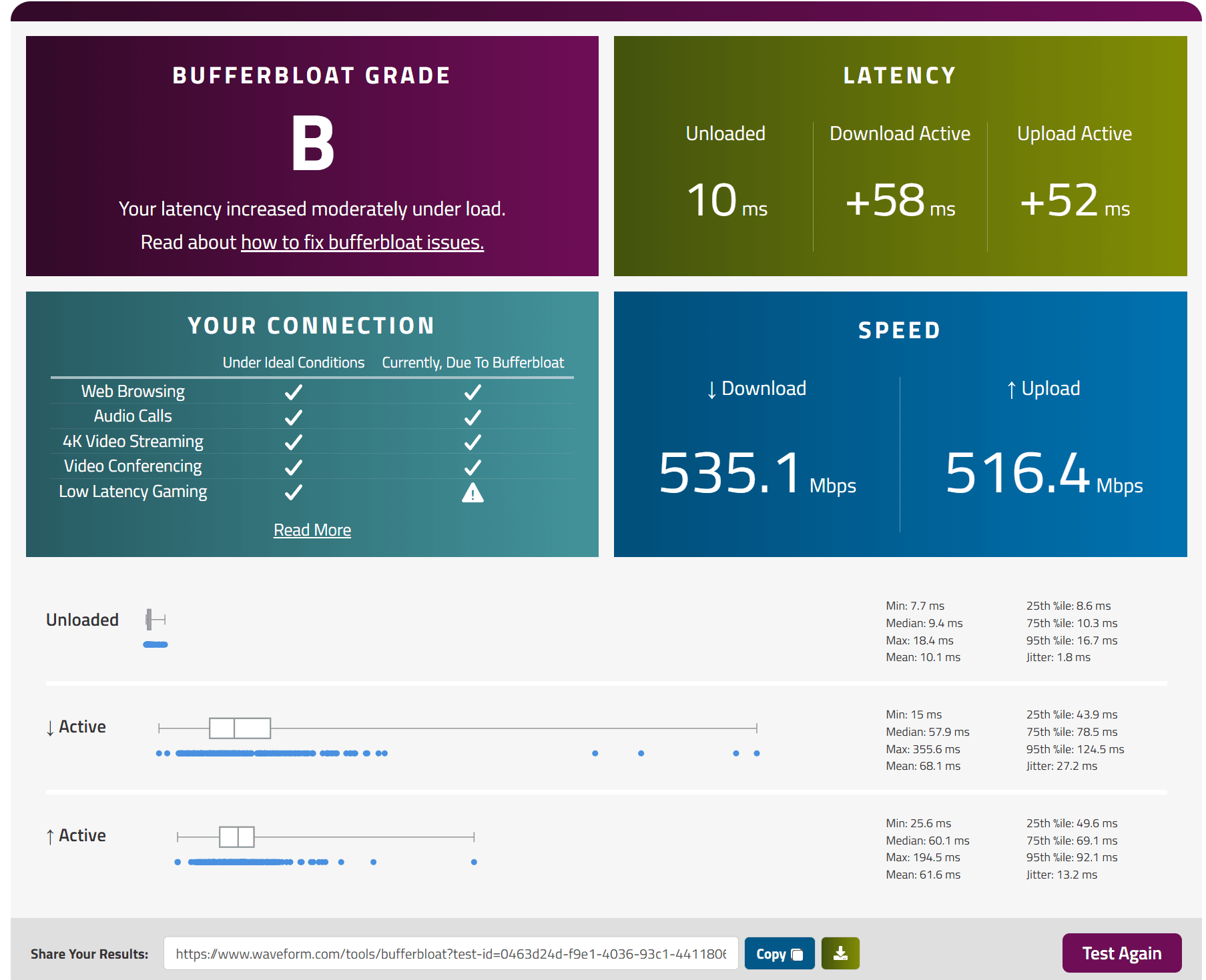
Also did a ‘bufferbloat’ test and got B. With the XT8’s it was mostly C. This is with me connected wirelessly to the furthest away node.
Any ideas what this means? Seems to have a lot more log entries than I am used to.
Mar 1 22:25:46 smarthaul: : cycle 4466: mbh 0 linkset red to 1, new tidmap fff0f0(L0L1L2)
Mar 1 22:25:52 smarthaul: : cycle 4468: mbh 0 linkset exp to 3, new tidmap fffff0(L0L1L2)
Mar 1 22:29:09 wlceventd: wlceventd_proc_event(696): wl1.1: Auth 64:B5:C6:18:33:E0, status: Successful (0), rssi:-37
Mar 1 22:29:09 wlceventd: wlceventd_proc_event(733): wl1.1: Assoc 64:B5:C6:18:33:E0, status: Successful (0), rssi:-37
Mar 1 22:29:43 wlceventd: wlceventd_proc_event(673): wl1.1: Disassoc 64:B5:C6:18:33:E0, status: 0, reason: Disassociated because sending station is leaving (or has left) BSS (8), rssi:0
Mar 1 22:29:43 wlceventd: wlceventd_proc_event(656): wl1.1: Deauth_ind 64:B5:C6:18:33:E0, status: 0, reason: Deauthenticated because sending station is leaving (or has left) IBSS or ESS (3), rssi:0I have hope that this will be a bigger success than the XT8. So much so, I have asked my brother to see if he can sell them….
Attachments:
Liked by:
You need to login in order to vote
I purchased from a local shop as ‘ex display’ – open boxed. I think they may be closing down soon, so a bit apprehensive when buying.
I have registered it with Asus and registration expiry shows as 11/09/2027. Not sure what that means.
You need to login in order to vote
Looks like a new FW has released:
ASUS ZenWiFi BT10 Firmware version 3.0.0.6.102_36921Version 3.0.0.6.102_3692159.73 MB2025/02/19SHA-256 :6473AEAEF5A27D43E925B96F4581384CC88B2AD0FD7182A933C5A28C3E99F63CSecurity:
1.Enhanced input parameter handling techniques to improve data processing stability and system security.
2.Enhance system access control mechanisms.Bug Fixes and Enhancements:
1. Enhanced Client Connection Stability.
2. WPA Encryption Settings Update. Added new configuration options for WPA encryption, including the option to select AES for improved client compatibility. This setting can be found under “Network > Main Network”.
3. Improved AiMesh Backhaul Compatibility.I manually updated to it and then went into the GUI and it updated to 3.0.0.6.102_36921-gab1ff70_1212-gaab6f_BB0B. I think the one from Asus had _1207_
The web GUI seems to me to be less responsive than I am used to on the XT8’s.
-
This reply was modified 1 year, 7 months ago by dodgydrains.
-
This reply was modified 1 year, 7 months ago by dodgydrains.
You need to login in order to vote
Took the plunge and bought the 3 pack. Got a decent offer of £508 for the pack of 3.
Setting up with the app was a breeze after me being an idiot and plugging the ethernet cable from the router to the wrong port on the main BT10
. I have done this so many times, not sure why I made that silly mistake – nearly 45 minutes of scratching my head.Initial thoughts are underwhelming, not much improvement (if any) from my XT8 setup from the furthest room.
I will keep testing and then sell my 4x XT8’s (2 packs of 2) if the BT10 are not any worse. At least the BT10’s will be ‘future proof’ for a few years
@UK Sentinel, should we make this the official thread for the BT10? I am happy to provide feedback and if anyone else wants to as well that would be amazing?
Now waiting for Merlin to adopt the BT10, so that I can start my tinkering again….
Liked by:
You need to login in order to vote
I am on 12 months Fixed November 24 V2.
Dreading what the tariffs will be when that expires.
Liked by:
You need to login in order to vote
I have been trying to read up on the BT10. It looks like the wireless backhaul has MLO. If you have a 3 units, do both nodes connect with MLO?
There seems to be not much information on MLO and how that technology works. Probably the initial users of this new tech will be guinea pigs.
You need to login in order to vote
I do not use the guest wifi, it is always disabled.
Not had any issues for 43 days uptime. I’ll just let it continue until something goes wrong and then do a reboot at some point
No issues in 43 days is amazing.
You need to login in order to vote
Any ideas what this ‘error’ means?
It is repeated many times in the log:
Feb 24 09:45:05 kernel: ^[[0;33;41m[ERROR archer] archer_mcast_activate,577: ADD_PORT: WLAN SSID has already been added: egress_port 7, current 0x0006, new 0x0004^[[0m
You need to login in order to vote
-
This reply was modified 1 year, 7 months ago by
-
AuthorPosts



 . I have done this so many times, not sure why I made that silly mistake – nearly 45 minutes of scratching my head.