


Forum Replies Created
-
AuthorPosts
-
They just released an official firmware with Aimesh-child support.
Direct firmware download (visible choosing OS others): https://dlcdnets.asus.com/pub/ASUS/wireless/DSL-AC68U/FW_DSL_AC68U_v300438481140.zip
Liked by:
You need to login in order to vote
Just wondering there is no acer it this listing.
We have them twice and quite happy about for a good price.
Latest is an Acer Swift 3 SF314 and no problems so far.
You need to login in order to vote
I think its probably fine and they have an Ireland/AU version with decent plugs.
As long as its not German version (with single language) the first step is done.
Rest is only related to plugs and adapters, but you could do them yourself in worst case.
Austria is AT or AUT
Australia AU or AUS.
And with Ireland I think they got same plugs as UK.
OPEN it and tell us how it its going on
Firmware will be same as mine thats “other” (all outside Germany).
ftp://ftp.avm.de/fritzbox/fritzbox-7582/
Try to load it to be sure, no worry, it will refuse if not the correct one.
Liked by:
You need to login in order to vote
September 15, 2019 at 8:01 pm in reply to: ASUS – DSL-AC88U / DSL-AC3100 Firmwares (beta's) etc. Looks like a new Beta Release for the DSL-AC88U is available, this version has Telnet enabled and improved 2.4GHz wifi (I believe). DSL-AC88U_v9.10.06_build581_debug.w.zip https://www.asuswebstorage.com/navigate/s/604D61534F2541D1B3CE1CC031A697E4Y UK Sentinel In a completely... #4442Is it a one chip solution for G.fast and vdsl? I have seen other modems where they use 2 seperate chips with a small relay to switch from one to the other. They can use best driver for each chip and so less dependant on manufacturers driver.
You need to login in order to vote
Its only an estimation but good enough. Over 250m vplus(Vectoring) is almost as good as G.fast. And 7590 syncs about 10% faster than 7582 on my line tested with different modems.
Think this is a good choice, especially if you like to use your old POTS with box-features like audio-recorder. I have their M2, C4 and C5 DECT phones too, got them cheap used.
And I use 2 other 7590 for mesh and a 3rd to mesh over WiFi to neighbour house with DECT phones there too. Each DECT phone should be fixed to one router, otherwise internal calls to it will have problems.
If you have any questions how to do feel free to ask and dont be unpatient, I know its hard after getting a new toy.
Maybe we could clear up some things in front, that you are faster and wont have to change often to get what you like to have.
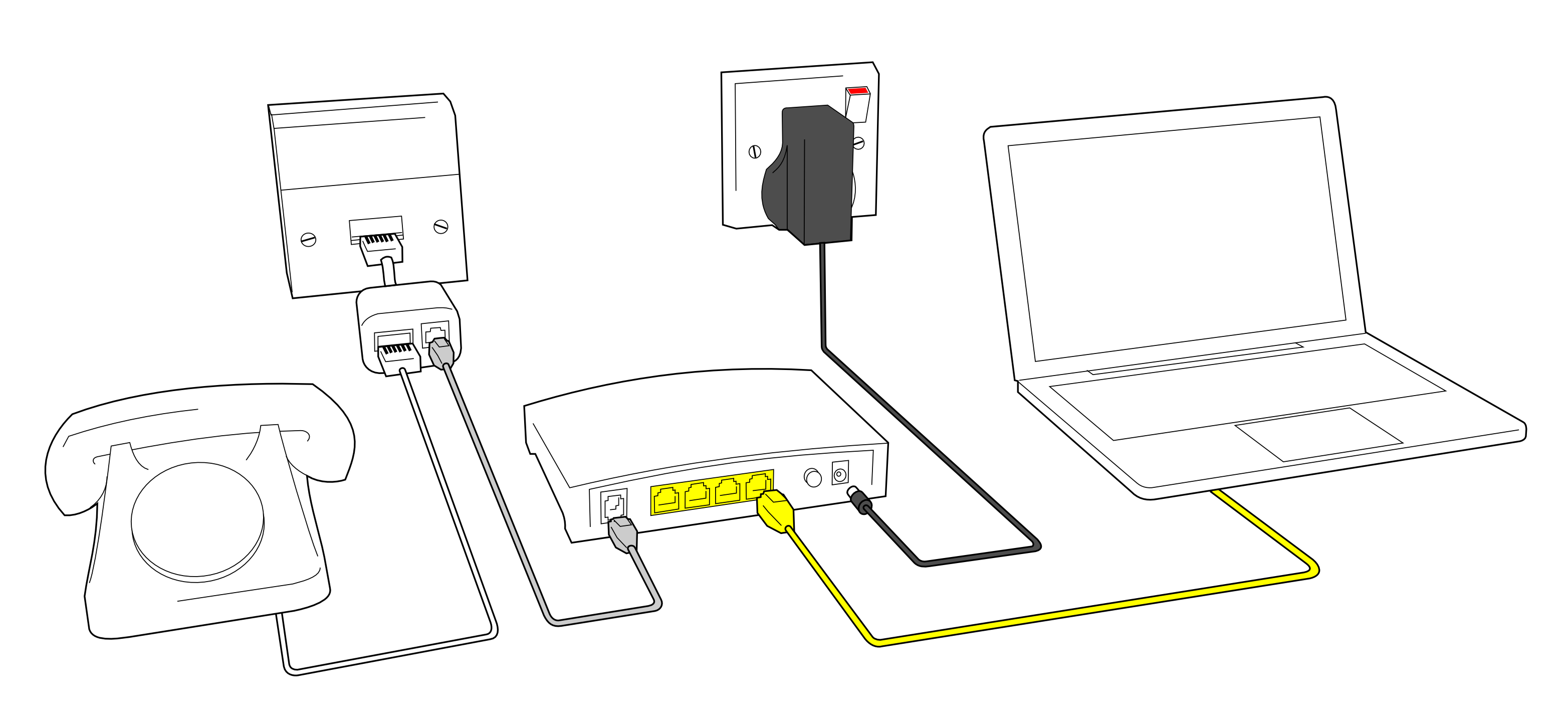
First: You have POTS and needed to use a splitter, no VoIP possible what could make things easier, is this correct?
How does the phone wall-outlet look like in UK? Pin, switching and connector schematics would be fine to predefine best and easiest connections.
I still dont understand the 4 or 6 pins of UK wall box and what’s inside this huge box, is this all really needed at all? All I know line comes on this funny plug on pin 2 and 5. What are the other 1-4 wires??? Worldwide only 2 (a and b) are used. And is there really only one jack or are there more to use more than one phone. How do you connect a splitter to it? They usually have 2 pins in from line, 2 pins phone out and 2 pins to modem. We have 3 sockets in Austria for 3 phones or audio recorder or whatever. On the first we plug in a cable to splitter, on this same plug the phone pins go back to this first plug and supplies the other 2 plugs for phones. If not enough you may get a second/third .. wall box to connect phones in other rooms, they all in daisy chain, so first phone will take over calls from other phones behind if picked up.
Sorry if I mixed up words, dont know how to name them correctly.
What I could find is your phones are connected in parallel and for each one an own wall mount box.
DSL splitter uses first one and have a phone jack and one for modem. Then things are easy. Use Y-cable and either the correct adapters for phone and DSL with RJ11 jack or make your own adapters to directly fits to your funny UK-system. Your phones should be connected to the Fritzbox Fon1 and/or Fon2.
This pinout in the FIRST picture shows on left side top Y-cable phone from splitter (outer 2 pins), down Y-cable DSL from splitter and on the right side DSL-port of 7590.
Here the english manual: https://assets.avm.de/files/docs/fritzbox/fritzbox-7590/fritzbox-7590_man_en_GB.pdf
On page 48 the connection scheme you will probably need.
Liked by:
You need to login in order to vote
Sorry dont understand what you want to say with this?
But first I have to correct myself!
I mixed up a little bit with 7590 which I use and forgot that 7582 and 7583 have an RJ11 connector for xDSL and no ISDN support!
7583 even have line bonding support, so you can double speed with 2 lines.
First there is no issue to use an RJ11 plug in RJ45 socket (only for 7590).
Usually the inner (middle) pins are line on almost all devices.
And ISDN like POTS use this 2 pins for their signal, the only difference is that POTS uses analog 300-3,4kHz and ISDN is modulated with 120KHz. ISDN-So bus with 4 pins will only be behind the ISDN-NT (network termination) used to connect upto 8 ISDN phones directly to it in parallel.
After the splitter its the same DSL-signal with Annex A and B, only B wont use cut off lower spectrum while A can do so. And there is a Annex_M too, but dont know the difference.
An RJ11 to RJ45 adapter (for 7590) is included with the router to connect Y-cable to the splitter and back to the phones or you can use RJ11-ports Fon1 and Fon2 for your analog phones.
The back-phone signal goes to the next inner pins while if you use ISDN the outer 4 pins will be used, there are 2 different adapters included to do so.
But that all not relevant for 7582 or 7593!
They have only DSL input signal pins used on their DSL-port. Y-cable only with 7583 for bonding 2 lines.
Both dont support POTS over the box nor ISDN, you have to use a splitter for POTS as usually.
Thats different to 7590 where you may run POTS into the box, use the recorder, fax-box and DECT together with POTS or even ISDN over the box.
7582 and 7583 cant do so, only if you have VoIP it will go through the box with all its phone features. In Austria all new lines run VoIP or can be changed to VoIP, POTS is dying. So thats not an issue so far here.
All you would need is RJ11 adapter to your local phone plug if they use something different!
Liked by:
You need to login in order to vote
Problem with 7583 and 7582 they are still only brought by provider, so no real market to get them. Only if somebody gets one from carrier and then uses a different modem or can keep it after ending the contract. German or “real” provider versions like 1&1 should be avoided. Our Austrian provider doesn’t come with brandings or restrictions so they are fine.
This would be what you need: https://skinflint.co.uk/avm-fritz-box-7583-20002847-a1776713.html
One Austrian 7582 is sold on ebay: https://www.ebay.co.uk/itm/FRITZ-Box-7582-ahnlich-Fritzbox-7590/274000005456?hash=item3fcbac4950:g:MJcAAOSwyX9ddTyv
Liked by:
You need to login in order to vote
All I can tell, you should take 7583-20002847 international version to avoid trouble with German only or Annex B.
Your 20002859 is an 1&1 (German) provider limited version, I dont think you’ll get happy with it!
I have both German and internat. 7590 and both are fine with Annex A and B as you can change it. Even using the wrong works here with no difference (maybe my provider supports both same time). Problem only comes with TV and VoIP if there is no support for your carrier with distinct VLAN-ID if thats the case in UK and you want to use this. VoIP with SIP-trunking or streaming over xDSL is fine.
Right now I only found this one very expensive and wont sell to UK: https://www.ebay.de/itm/Fritz-AVM-Box-7583-High-End-WLAN-AC-N-Router-inkl-2-ISDN-S-Anschlusse/254351847545?hash=item3b388d3079:g:8wUAAOSwbkNdck92
Cables wont be any problem, you can change them to whatever you use in UK. It comes with an Y-cabel usable with and w/o splitter and phone can be put back to your existing phones with it. There is an RJ-45 plug on the end, you only have to connect this to your wall-plug, shouldn’t be the huge problem. Middle pins are from line, next ones are phone back to your POTS phones if you use them and outer 4 pins forget they are for ISDN (I think you wont have).
Much cheaper would be a 7582 internat. version with G.fast I could get new for €150.
You need to login in order to vote
September 11, 2019 at 6:15 pm in reply to: ASUS – DSL-AC88U / DSL-AC3100 Firmwares (beta's) etc. Looks like a new Beta Release for the DSL-AC88U is available, this version has Telnet enabled and improved 2.4GHz wifi (I believe). DSL-AC88U_v9.10.06_build581_debug.w.zip https://www.asuswebstorage.com/navigate/s/604D61534F2541D1B3CE1CC031A697E4Y UK Sentinel In a completely... #4325If I have a look at their RT-AC86U firmwares they worked hard
for 5 months and then:released a firmware 81039 that buggy that they had to pull it 3 days later
released a v2 next week, pulled it again
released 81049 a week later and pulled even that because of serious bugs
I have no hope with them and their firmwares anymore
Liked by:
You need to login in order to vote
September 3, 2019 at 6:40 pm in reply to: ASUS – DSL-AC88U / DSL-AC3100 Firmwares (beta's) etc. Looks like a new Beta Release for the DSL-AC88U is available, this version has Telnet enabled and improved 2.4GHz wifi (I believe). DSL-AC88U_v9.10.06_build581_debug.w.zip https://www.asuswebstorage.com/navigate/s/604D61534F2541D1B3CE1CC031A697E4Y UK Sentinel In a completely... #4195BG = Belgium / Bulgaria ?
BE=Belgium
BG=Bulgaria
https://www.google.com/search?client=firefox-b-d&q=BG+%3D+Belgium+%2F+Bulgaria
You need to login in order to vote
August 30, 2019 at 7:26 pm in reply to: ASUS – DSL-AC88U / DSL-AC3100 Firmwares (beta's) etc. Looks like a new Beta Release for the DSL-AC88U is available, this version has Telnet enabled and improved 2.4GHz wifi (I believe). DSL-AC88U_v9.10.06_build581_debug.w.zip https://www.asuswebstorage.com/navigate/s/604D61534F2541D1B3CE1CC031A697E4Y UK Sentinel In a completely... #4093That are standard VPN speeds for 68U, dont think DSL-AC88U is much faster.
That can’t be right though?
Why not?
Look here: https://www.snbforums.com/threads/18mbps-nordvpn-on-ac68u-so-easy-whats-your-speed.44857/
And DSL-AC88U is not that much faster CPU AFAIK and its got no HW-encryption to get RT-AC86U speeds.
You need to login in order to vote
August 30, 2019 at 4:38 pm in reply to: ASUS – DSL-AC88U / DSL-AC3100 Firmwares (beta's) etc. Looks like a new Beta Release for the DSL-AC88U is available, this version has Telnet enabled and improved 2.4GHz wifi (I believe). DSL-AC88U_v9.10.06_build581_debug.w.zip https://www.asuswebstorage.com/navigate/s/604D61534F2541D1B3CE1CC031A697E4Y UK Sentinel In a completely... #4085That are standard VPN speeds for 68U, dont think DSL-AC88U is much faster.
You need to login in order to vote
August 29, 2019 at 8:38 pm in reply to: GT-AX11000 Firmware Status Has there been any news from Asus since the WPA3 Beta Firmware was unceremoniously withdrawn? #4068And this one is a student changing every month.
Oh, just first time saw the new smilies
You need to login in order to vote
Dont know but maybe due to necessarily routing for VLAN and bridge mode wont do any routing.
You need to login in order to vote
August 29, 2019 at 8:32 am in reply to: GT-AX11000 Firmware Status Has there been any news from Asus since the WPA3 Beta Firmware was unceremoniously withdrawn? #4048 -
AuthorPosts




 for 5 months and then:
