


Forum Replies Created
-
AuthorPosts
-
Hi
I have rolled back to the previous FW version and it’s reporting the time correctly.
You need to login in order to vote
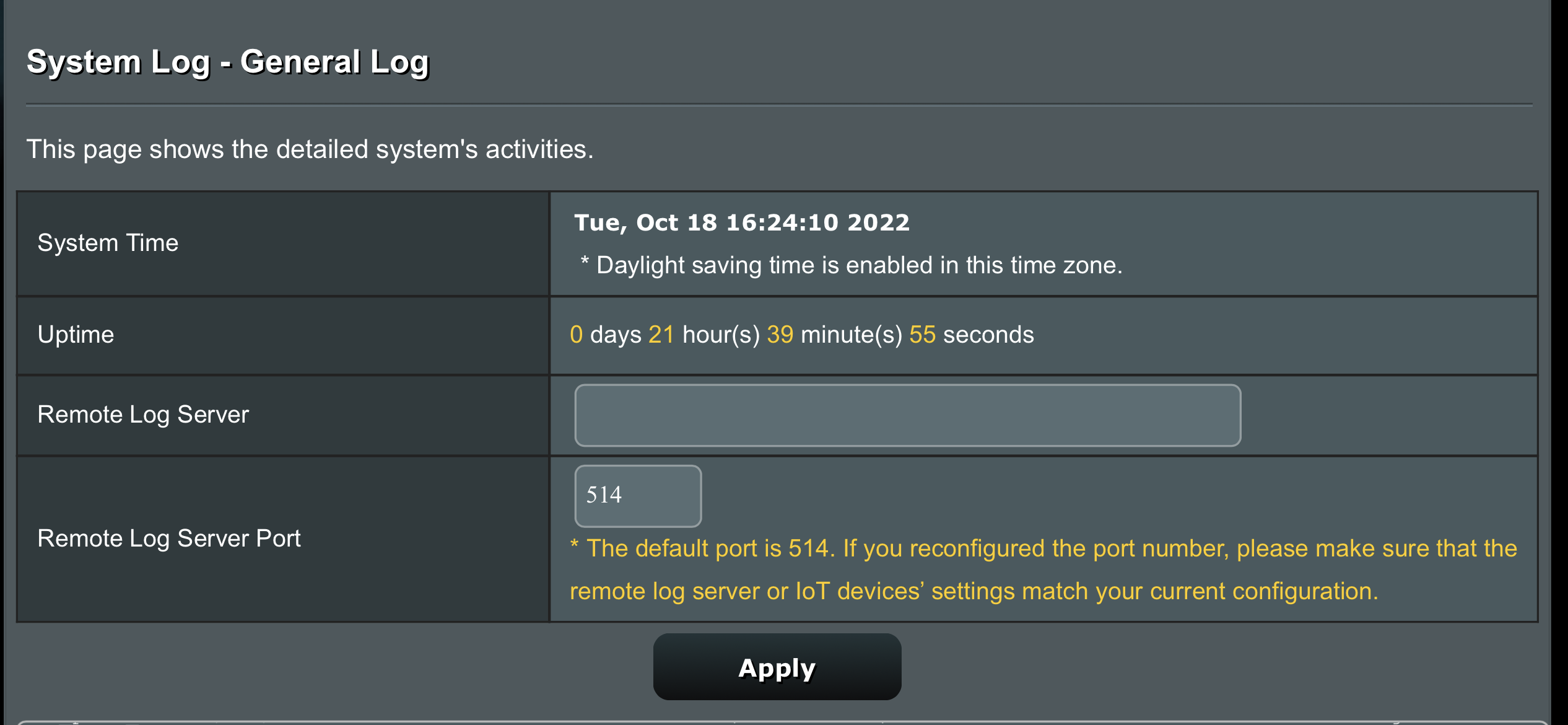
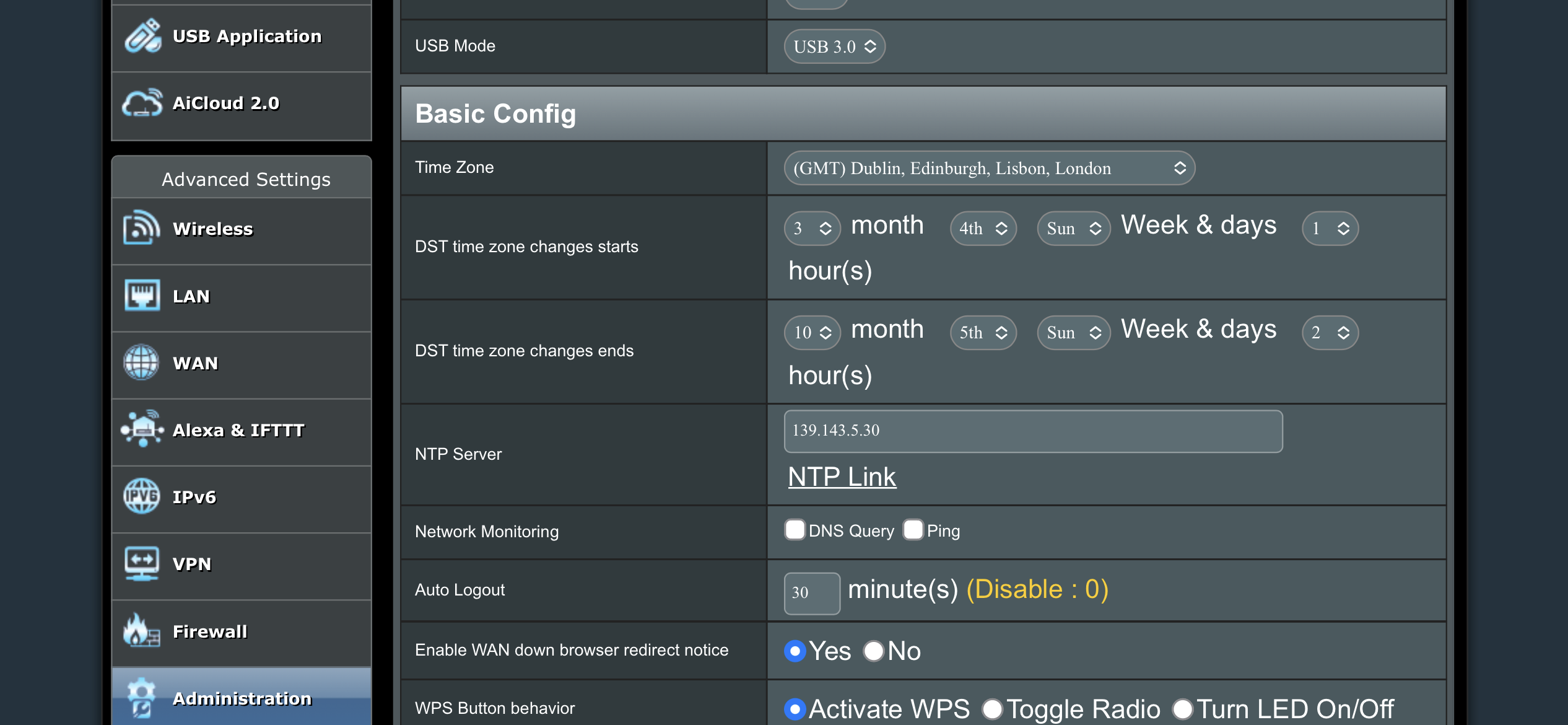
Hi I wondered if it is just me but I have noticed the router is now 1 hour behind since the update. it is sating that ‘Daylight saving time is enabled in this time zone.’ and it is set as GMT London so with BST it should be correct.
It was right with the previous firmware but am running 3.0.0.4.388_21099
Thanks
You need to login in order to vote
I have noticed on another forum that people are reporting that the wireless backhaul is falling back to the 2.4GHz band. I can’t test it as I only have the one router but worth a mention.
Liked by:
You need to login in order to vote
I downloaded the latest update yesterday and so far everything has been working fine from teams video and calls VPN no issues let’s hope it stays that way.
Liked by:
You need to login in order to vote
Any WAN IP address change or shall I close support call with ASUS ?
Hi there’s no change in IP address so happy if you wanted to close and hopefully things have settled down
You need to login in order to vote
Hi, No the IP address is still the same but I have changed the DDNS name and it shows as registered which is good.
You need to login in order to vote
TrendMicro
Thanks I have AiProtection switched off so I wonder if that’s why its is erroring. I will switch it on and keen an eye on the logs.
You need to login in order to vote
Hi
I have noticed a few times this error in the logs and wondered if anyone knew what it was? Im on the latest firmware and it happens once a day at different times
May 29 13:05:43 kernel: *** ERROR: [tdts_shell_ioctl_sig_op_load:95] tdts_core_rule_parsing_trf_load() fail!
May 29 13:05:48 kernel: SHN Release Version: 2.0.2 c03f6c5
May 29 13:05:48 kernel: UDB Core Version: 0.2.20
May 29 13:05:48 kernel: sizeof forward pkt param = 192
May 29 13:05:48 BWDPI: fun bitmap = 3
May 29 13:05:59 BWDPI: force to flush flowcache entries
May 29 13:06:00 BWDPI: rollback fcYou need to login in order to vote
I have chased ASUS and the Main Engineer at ASUS whom deals with DDNS will be in contact (if not already) and he will be using his ASUS email address, so you can correspond accordingly. I have been added to the email chain, so I can track communication etc. and help if required
<noscript></noscript>Thanks so much. I have just sent a reply to all on email and resent the logs via the router page
You need to login in order to vote
Had a look at attachment and agree with yourself , I assume they are just working thru the basics with yourself, maybe worth sending an email back to them and say all done and still problem ? If any further ‘odd’ emails, let me know and I will Have a chat with them
<noscript><noscript>
</noscript>Hi I have replied to their email and got this as didn’t realise it was from a no reply account
Sorry, we were unable to deliver your message to the following address.
<no-reply_nw@asus.com>:
550: #5.1.0 Address rejected.You need to login in order to vote
Most odd the last email from ASUS support, what where the other emails content ?
Sure this is the other email :)
You need to login in order to vote
@uk-sentinel I have been getting a few odd emails from ASUS support since I submitted the DDNS feedback and logs. The latest one that I’ve attached is about the username and password even though I have no issues with my username and password and the previous one was about having an incorrect time zone. The time is correct and I use the U.K. NPL time server 139.143.5.30 I double checked and any entry log created is logged with the correct time so no ideas what they are thinking is wrong.
Attachments:
You need to login in order to vote
@uk-sentinel Thanks again!
I have just submitted the feedback and mentioned you at the top of the form :) I have had to submit 1 of 2 and 2 of 2 feedback forms so they should have two feedback forms titled as configuration issue and DDNS as the secondary I have provided the same email address for here.
You need to login in order to vote
Thanks very much for your support. I am back home Friday so will be able to send the logs and will add comments and reference you on the feedbackit is ASUS one for the DDNS
You need to login in order to vote
Thanks for the reply :)
I had only the Remote Access Config enabled from Administration > System that did allow the app to work remotely with DDNS but I think this is more passive so only updates when the app is connected to the AX8 and updates the latest WAN settings so if the IP address changes in the meantime it doesn’t update the app when it try’s to connect remotely.
I have now turned on the DDNS Client in WAN > DDNS and switched off the FFTP ONT to generate a new IP address and the app did reconfigure over 4G to connect. The guidance on this page though is somewhat confusing or I am reading it wrong;
‘The host name is successfully registered. You can use “[hostname].asuscomm.com” to access the service in home network from WAN. Use “[hostname].asuscomm.com” to remotely access your network.Go to Advanced Settings > WAN to configure the port forwarding or DMZ settings to allow other WAN clients to remotely access your network. If you want to remotely configure the wireless router, go to here.’
As I only want to configure remotely the router I’m not sure if I need the DDNS setting on or off as the remotely configure the wireless link mentioned above takes you back to Administration > System > Remote Access Config which is what I only had originally on.
You need to login in order to vote
-
AuthorPosts



 <noscript>
 <noscript>

